

MVSEK_TransferLines
BMM_Archive · July 15, 2026

BMM_Archive
Preserved forum archive. This topic stores the original first post and locally mirrored RPG Maker Web attachments when available. It is posted by the BMMPlay archive account, not by the original creator.
Original Source
- Original title: SEK_TransferLines
- Original author: SEK
- Original date: November 28, 2016
- Source thread: https://forums.rpgmakerweb.com/threads/sek_transferlines.71620/
- Source forum path: Game Development Engines > RPG Maker Javascript Plugins > JS Plugin Releases (RMMV)
Summary
SEK_TransferLines - v 1.0 By SEK Introduction Create a TransferLine to teleport your actor to a relative location on another map or in the same map!
Archived First Post
SEK_TransferLines - v 1.0
By SEK
Introduction
Create a TransferLine to teleport your actor to a relative location on another map or in the same map!
Features
-Create vertical or horizontal transfer lines to move between places
just by creating a simple event (works with regions)
-the plugin erases the event after the plugin call!
Plugin Commands:
• sektl mapid, x, y, arriving-direction, fade-effect, needed-direction, step-forward
- mapid = map where your actor will be transferred (in position x,y)
- arriving-direction = 8-up, 6-right, 2-down, 4-left (watch you numpad to remember this)
if direction is different from 2,4,6,8, the direction of the player
as he enters the t.l. will be kept.
- needed-direction = player must be facing this way to be transferred,
else it won't activate(if missing, every direction will be ok to be
transferred)
- fade-effect = 0-Black, 1-White, 2-None (If missing, it will be set to 0)
- step-forward: Number of steps your player will make after being
transferred.
[How to use]
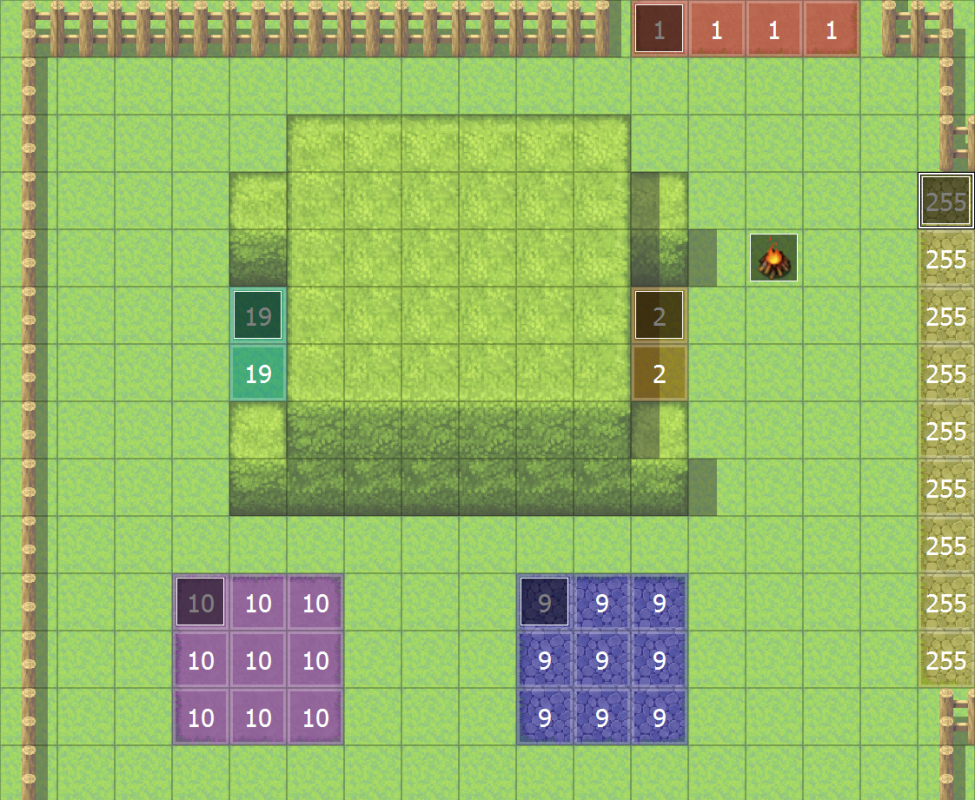
Creates a transfer line and deletes the calling event: all you need to do is create a line of squares with the same region and put an event with this plugin command on its top left corner.
if values (except mapid, x and y) are missing, they will be set by default:
arriving-direction will be kept, fade-effect will be 0, there will be no
needed-direction and no steps forward.
• sektloff turns off the plugin (transfer lines aren't deleted but they are inactive)
• sektlon turns on the plugin
Screenshots/Video
skip to 1:44 to see how it works
How to use
Plugin
Right Click Here to Save
Credit and Thanks
- SEK
Author's Notes
Even if I try my best, I might not be able to help with issues.
This may have issues with other plugins using regions.
You are free to use this plugin. If you do use it, I'd like to have my name and my plugin's name included in credits.
By SEK
Introduction
Create a TransferLine to teleport your actor to a relative location on another map or in the same map!
Features
-Create vertical or horizontal transfer lines to move between places
just by creating a simple event (works with regions)
-the plugin erases the event after the plugin call!
Plugin Commands:
• sektl mapid, x, y, arriving-direction, fade-effect, needed-direction, step-forward
- mapid = map where your actor will be transferred (in position x,y)
- arriving-direction = 8-up, 6-right, 2-down, 4-left (watch you numpad to remember this)
if direction is different from 2,4,6,8, the direction of the player
as he enters the t.l. will be kept.
- needed-direction = player must be facing this way to be transferred,
else it won't activate(if missing, every direction will be ok to be
transferred)
- fade-effect = 0-Black, 1-White, 2-None (If missing, it will be set to 0)
- step-forward: Number of steps your player will make after being
transferred.
[How to use]
Creates a transfer line and deletes the calling event: all you need to do is create a line of squares with the same region and put an event with this plugin command on its top left corner.
if values (except mapid, x and y) are missing, they will be set by default:
arriving-direction will be kept, fade-effect will be 0, there will be no
needed-direction and no steps forward.
• sektloff turns off the plugin (transfer lines aren't deleted but they are inactive)
• sektlon turns on the plugin
Screenshots/Video
skip to 1:44 to see how it works
How to use
make a line with regions and put an event on its top-left corner
the event should be set up like this: you can also make it run by switch and add some commands before the plugin call, just remember that
the plugin erases the event after the plugin call -> if it doesn't delete it, you wrote the plugin command in a wrong way and if on autorun, you'll notice it
because you won't be able to move!
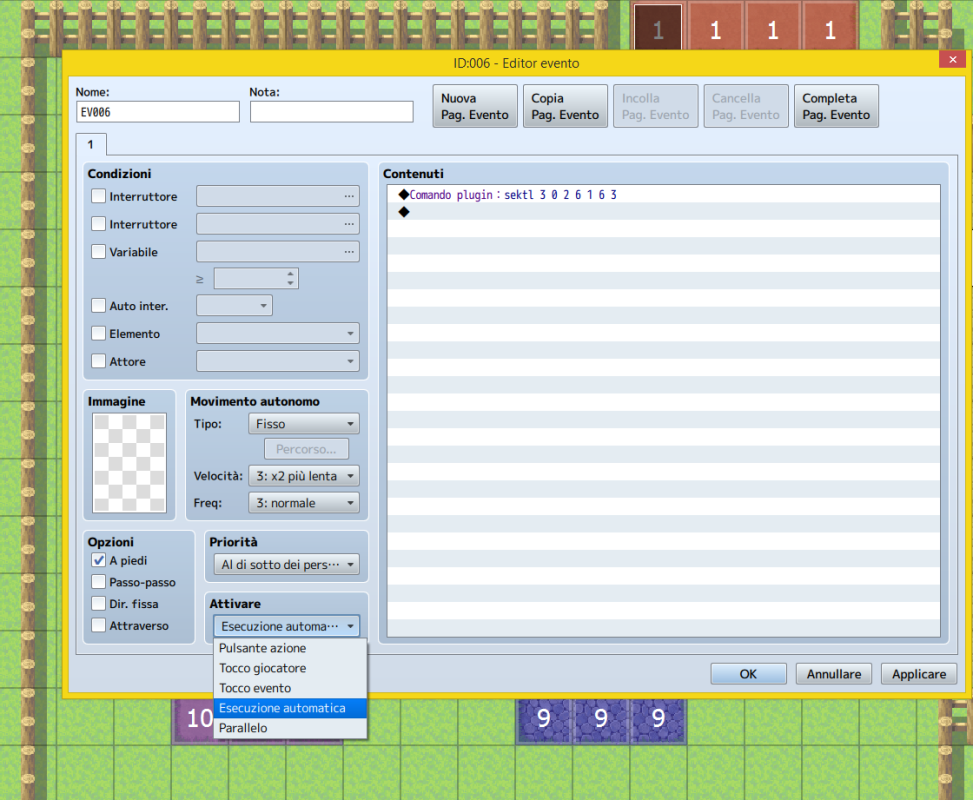
the event should be set up like this: you can also make it run by switch and add some commands before the plugin call, just remember that
the plugin erases the event after the plugin call -> if it doesn't delete it, you wrote the plugin command in a wrong way and if on autorun, you'll notice it
because you won't be able to move!
Plugin
Right Click Here to Save
Credit and Thanks
- SEK
Author's Notes
Even if I try my best, I might not be able to help with issues.
This may have issues with other plugins using regions.
You are free to use this plugin. If you do use it, I'd like to have my name and my plugin's name included in credits.
Features Mentioned
- Create vertical or horizontal transfer lines to move between places
- just by creating a simple event (works with regions)
- the plugin erases the event after the plugin call!
- Plugin Commands:
- sektl mapid, x, y, arriving-direction, fade-effect, needed-direction, step-forward
- mapid = map where your actor will be transferred (in position x,y)
- arriving-direction = 8-up, 6-right, 2-down, 4-left (watch you numpad to remember this)
- if direction is different from 2,4,6,8, the direction of the player
- as he enters the t.l. will be kept.
- needed-direction = player must be facing this way to be transferred,
- else it won't activate(if missing, every direction will be ok to be
- transferred)
- fade-effect = 0-Black, 1-White, 2-None (If missing, it will be set to 0)
- step-forward: Number of steps your player will make after being
- transferred.
- [How to use]
- Creates a transfer line and deletes the calling event: all you need to do is create a line of squares with the same region and put an event with this plugin command on its top left corner.
- if values (except mapid, x and y) are missing, they will be set by default:
Downloads / Referenced Files
RPG Maker Web attachments are mirrored locally when available. Other external links remain hosted by their original creator or third-party service.
- Local mirror: 32920-0f0a06e0f3990747d592fcb49f174f32.png
SHA-256:64a415316e9471c6277d6adda35f1e19634f956bbcfd69cc0e8ba15a679f6cd0
Original attachment URL: https://forums.rpgmakerweb.com/attachments/regions-png.53275/ - Local mirror: 32919-c9b48382f0117f71c0f80d6aeb7b141c.png
SHA-256:cc18d348ea48d16da47240edf6208c1cc6271932c0a1bae0e33c16e13a59a62c
Original attachment URL: https://forums.rpgmakerweb.com/attachments/event-png.53274/ - Source: Right Click Here to Save
License / Terms Note
Credit and Thanks - SEK Author's Notes Even if I try my best, I might not be able to help with issues.
Referenced Images / Attachments
Creator Claims / Removal
If you are the original creator and want this listing reassigned, edited, or removed, join BMMPlay and contact the moderators with proof that matches the original RPG Maker Web profile, linked GitHub, itch.io page, or another public creator identity.
Replies (0)
No replies yet.
0
replies
19
views
Topic Summary
Loading summary...