

MVOrange Overlay v1.1.4 + Animated Parallax Add-On (Updated 7Jul17)
BMM_Archive · July 3, 2026

BMM_Archive
Preserved forum archive. This topic stores the original first post and locally mirrored RPG Maker Web attachments when available. It is posted by the BMMPlay archive account, not by the original creator.
Original Source
- Original title: Orange Overlay v1.1.4 + Animated Parallax Add-On (Updated 7Jul17)
- Original author: Tsukitsune
- Original date: July 7, 2017
- Source thread: https://forums.rpgmakerweb.com/threads/orange-overlay-v1-1-4-animated-parallax-add-on-updated-7jul17.80917/
- Source forum path: Game Development Engines > RPG Maker Javascript Plugins > JS Plugin Releases (RMMV)
Summary
Orange Overlay + Animated Parallax Add-on { "lightbox_close": "Close", "lightbox_next": "Next",
Archived First Post
<span style="color: #ff8000">Orange Overlay + <span style="color: #0080ff">Animated Parallax Add-on
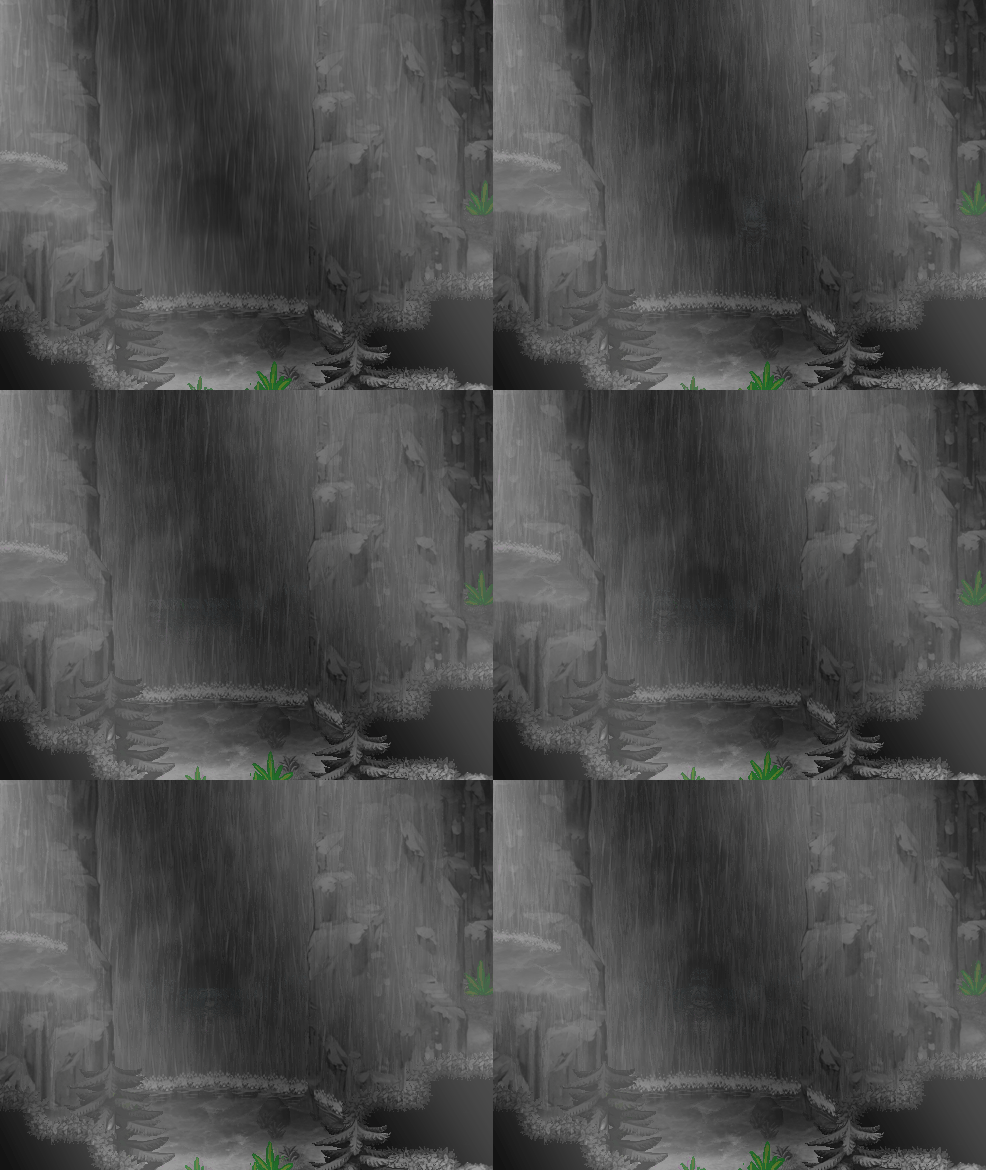 <span style="color: #ff8000">Orange Overlay 1.1.4 - Plugin DL - (Updated 7July17)
With permission from Hudell and thanks to Chaucer for the plugin fix, here's an updated version of Orange Overlay. This version fixes the broken plugin commands people were experiencing when trying to change parallaxes via events.
Instructions from the original thread.
<span style="color: #0080ff">Animated Parallax Add-on - Plugin DL - (Updated 12Aug17) - Thanks @Krimer for the latest update!
Rejoice parallax mappers! You can now have animated water!
This plugin adds to the Orange Overlay plugin, and allows you to animate overlay images.
==============================================================================
INSTRUCTIONS :
==============================================================================
Naming Images :
When naming the animated images, please include _ followed by the index of the image, please take note that the index will always start on 0 and NOT 1, so please name images accordingly
( example : example_1, example_2, example_3, etc.. ).
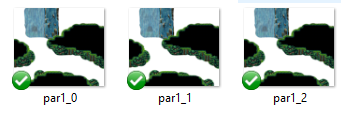
Example of how the 3 frame images would be set up in your parallax folder.
par(layertype), 1(map#), _0(frame#).
Changing animated layers:
When changing a layer that is animated via plugin command(example: Overlay ground ground1-v1 ), do NOT include _0, as this plugin will do so on it's own.
Map Note Tags:
(ex. <animate_parallax: 3, 10 > -- This will animate the par layer with 3 image frames at a speed of 10fps.)
keys:
f = the amount of frames( or images ), that will be used.
s = the amount of frames that must pass before changing frames.
Plugin Commands:
Description : tell a layer to start animating.
(ex.) animate_layer ground 3 10
Description : change the speed of a given layers animation.
Description : tell a layer to stop animating.
keys:
f = the amount of images used in the animation.
l = the name of the layer( ground, parallax, shadow, light ).
s = the amount of frames that must pass before changing frames.
----------------------------------------------------------------------------------------------------------------------------
Bugfixes: Please post all bugs you encounter in the thread. I'll try to keep this plugin updated and bug free.
----------------------------------------------------------------------------------------------------------------------------
With permission from Hudell and thanks to Chaucer for the plugin fix, here's an updated version of Orange Overlay. This version fixes the broken plugin commands people were experiencing when trying to change parallaxes via events.
Instructions from the original thread.
Introduction
You can use this plugin to add overlay images to your maps
You can keep the images either on the img/parallaxes folder
Or (if you set the Organized Folders param to true) on separate folders like this:
All image filenames must end with the number of the map that they are used on.Code:img/overlays/grounds img/overlays/pars img/overlays/shadows img/overlays/lights img/overlays/fogs
Map notetags:
<all> : Display all overlays
<ground> : Display ground overlay
<par> : Display parallax overlay
<light> : Display light overlay
<shadow> : Display shadow overlay
<fogName:filename> : Display the specified fog image
<fogOpacity:number> : Change the opacity level of the fog image (0 to 255)
<fogBlend:number> : Changes the blend type of the fog image
<fogDuration:number> : Changes the duration of the opacity transition
<xMove:number> : Changes the horizontal speed of the fog
<yMove:number> : Changes the vertical speed of the fog
You can use variables numbers on the notetags by adding a $ symbol before the value
Plugin Commands
Overlay layertype filename
Possible layer types: ground, light, shadow, par.
Overlay fog filename opacity xMove yMove blendmode duration
Changes the fog params to the ones specified in this command.
Blendmode and duration are optional
Examples:
Overlay fog fog1 100 10 0 0 20
This will display the file fo1 with opacity 100 and move horizontally 10px at a time, with a transition of 20 frames
Overlay fadeout duration
Do a fadeout effect on the current fog. This command will disable the fog switch at the end of the fadeout effect.
Overlay addfog filename ID Opacity xMove yMove BlendType Z
Adds an extra fog layer. BlendType and Z values are optional
Overlay removefog ID
Removes an extra fog that was added with the addfog command
License
Free to use on any game.
<span style="color: #0080ff">Animated Parallax Add-on - Plugin DL - (Updated 12Aug17) - Thanks @Krimer for the latest update!
Rejoice parallax mappers! You can now have animated water!
This plugin adds to the Orange Overlay plugin, and allows you to animate overlay images.
==============================================================================
INSTRUCTIONS :
==============================================================================
Naming Images :
When naming the animated images, please include _ followed by the index of the image, please take note that the index will always start on 0 and NOT 1, so please name images accordingly
( example : example_1, example_2, example_3, etc.. ).
Example of how the 3 frame images would be set up in your parallax folder.
par(layertype), 1(map#), _0(frame#).
Changing animated layers:
When changing a layer that is animated via plugin command(example: Overlay ground ground1-v1 ), do NOT include _0, as this plugin will do so on it's own.
Map Note Tags:
Code:
<animate_parallax: f, s > : *parallax layer will animate upon map entry.
<animate_shadow: f, s > : *shadow layer will animate upon map entry.
<animate_ground: f, s > : *ground layer will animate upon map entry.
<animate_light: f, s > : *light layer will animate upon map entry.keys:
f = the amount of frames( or images ), that will be used.
s = the amount of frames that must pass before changing frames.
Plugin Commands:
Code:
animate_layer l f s(ex.) animate_layer ground 3 10
Code:
change_layer_speed l s
Code:
stop_layer_animation lkeys:
f = the amount of images used in the animation.
l = the name of the layer( ground, parallax, shadow, light ).
s = the amount of frames that must pass before changing frames.
----------------------------------------------------------------------------------------------------------------------------
Bugfixes: Please post all bugs you encounter in the thread. I'll try to keep this plugin updated and bug free.
----------------------------------------------------------------------------------------------------------------------------
Terms of Use
<span style="color: #ff8000">Orange Overlay
Credit: Hudell and Chaucer
Same rights as original-Free to use on any game
<span style="color: #0080ff">Tsukitsune Animated Overlay Add-on
Do not share on any other site without permission
Free for use on any game
Edits are allowed
and please support my project <3

<span style="color: #ff8000">Orange Overlay
Credit: Hudell and Chaucer
Same rights as original-Free to use on any game
<span style="color: #0080ff">Tsukitsune Animated Overlay Add-on
Do not share on any other site without permission
Free for use on any game
Edits are allowed
and please support my project <3
Downloads / Referenced Files
RPG Maker Web attachments are mirrored locally when available. Other external links remain hosted by their original creator or third-party service.
License / Terms Note
License Free to use on any game. Click to expand... Animated Parallax Add-on - Plugin DL - (Updated 12Aug17) - Thanks @Krimer for the latest update!
Referenced Images / Attachments
Creator Claims / Removal
If you are the original creator and want this listing reassigned, edited, or removed, join BMMPlay and contact the moderators with proof that matches the original RPG Maker Web profile, linked GitHub, itch.io page, or another public creator identity.
Replies (0)
No replies yet.
0
replies
18
views
Topic Summary
Loading summary...