

MVDynamic Faces in Messages
BMM_Archive · July 15, 2026

BMM_Archive
Preserved forum archive. This topic stores the original first post and locally mirrored RPG Maker Web attachments when available. It is posted by the BMMPlay archive account, not by the original creator.
Original Source
- Original title: Dynamic Faces in Messages
- Original author: Gilles
- Original date: January 2, 2016
- Source thread: https://forums.rpgmakerweb.com/threads/dynamic-faces-in-messages.54155/
- Source forum path: Game Development Engines > RPG Maker Javascript Plugins > JS Plugin Releases (RMMV)
Summary
Dynamic Faces Introduction
Archived First Post
Dynamic Faces
Introduction
Usually you write your Messages like this (the Show Text Option):
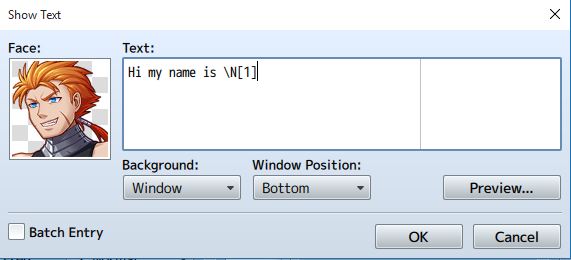
We see that we can write the characters name dynamically by writing \N[1]. What is still static? The picture!
This is where this plugin comes into play.
If you use this plugin and you choose on of the actor pictures like these:
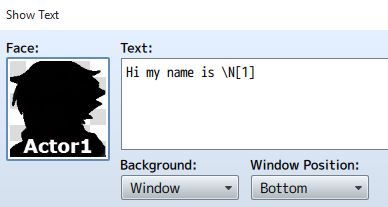
the picture in the messagebox will transform the picture of the first actor.
In my case it would be the picture of Rob.
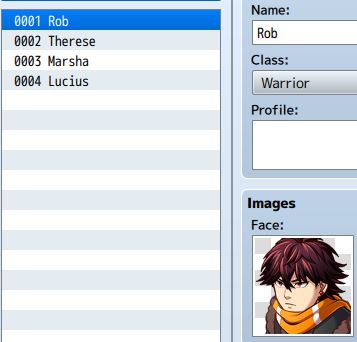
It is like the message functions \N[1] (To Show Actors1 Name) but with Message-Faces.
Video
Installation-Guide
http://gamedev-tutorials.de/dynamic-faces-dynamische-gesichter/
Download
Credit and Thanks
- Gamedev-Tutorials
You can use and edit this plugin as you want. This plugin is open for non commercial and commercial use. Just give me a little credit =)
Introduction
Usually you write your Messages like this (the Show Text Option):
We see that we can write the characters name dynamically by writing \N[1]. What is still static? The picture!
This is where this plugin comes into play.
If you use this plugin and you choose on of the actor pictures like these:
the picture in the messagebox will transform the picture of the first actor.
In my case it would be the picture of Rob.
It is like the message functions \N[1] (To Show Actors1 Name) but with Message-Faces.
Video
Installation-Guide
http://gamedev-tutorials.de/dynamic-faces-dynamische-gesichter/
Download
- Plugin: http://gamedev-tutorials.de/downloads/mv/df/DynamicFaces.js
- Actors Pic: http://gamedev-tutorials.de/downloads/mv/df/Actors.png
Credit and Thanks
- Gamedev-Tutorials
You can use and edit this plugin as you want. This plugin is open for non commercial and commercial use. Just give me a little credit =)
Downloads / Referenced Files
RPG Maker Web attachments are mirrored locally when available. Other external links remain hosted by their original creator or third-party service.
- Download: http://gamedev-tutorials.de/downloads/mv/df/DynamicFaces.js
- Download: http://gamedev-tutorials.de/downloads/mv/df/Actors.png

License / Terms Note
Credit and Thanks - Gamedev-Tutorials You can use and edit this plugin as you want. This plugin is open for non commercial and commercial use. Just give me a little credit =)
Referenced Images / Attachments
Creator Claims / Removal
If you are the original creator and want this listing reassigned, edited, or removed, join BMMPlay and contact the moderators with proof that matches the original RPG Maker Web profile, linked GitHub, itch.io page, or another public creator identity.
Replies (0)
No replies yet.
0
replies
40
views
Topic Summary
Loading summary...