

MVSimple Event Fade
BMM_Archive · July 15, 2026

Original Source
- Original title: Simple Event Fade
- Original author: kuoushi
- Original date: November 5, 2015
- Source thread: https://forums.rpgmakerweb.com/threads/simple-event-fade.49435/
- Source forum path: Game Development Engines > RPG Maker Javascript Plugins > JS Plugin Releases (RMMV)
Summary
SimpleEventFade.js SimpleEventFade.js (v1.1) Introduction This plugin adds the ability to make events fade in or out over a set duration of frames much more easily than having to repeatedly set the opacity over and over again. It should also be much smoother than doing that manually.
Archived First Post
Download
SimpleEventFade.js (v1.1)
Introduction
This plugin adds the ability to make events fade in or out over a set duration of frames much more easily than having to repeatedly set the opacity over and over again. It should also be much smoother than doing that manually.
How to Use
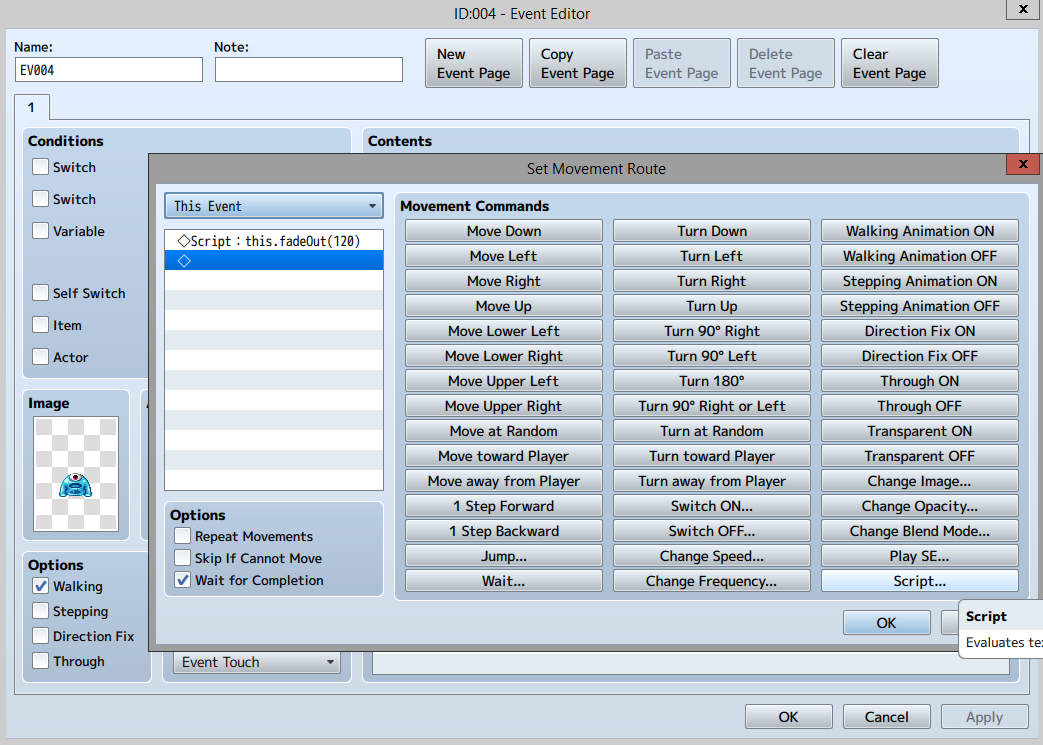
Go to the Event you want to make fade in or out and find the location where you want to make the event take this action. Create a move route, click script in the bottom right of that window and add one of the following lines depending on what you want to do:
this.fadeIn(x)
this.fadeOut(x)
this.fadeTo(newOpac,x)
x should be the duration in frames that you want the fade to last. There is also a default value in the plugin's parameters so you could even enter something like this.fadeOut() and that'd work just as well. In the case of using this.fadeTo, you MUST set an opacity to fade to. For instance, saying this.fadeTo(150,60) would fade the event or player to 150 opacity from their current opacity over 60 frames. You could also just call this.fadeTo(150) and it'd use your default duration set in the plugin parameters.
Screenshot
Notes
This plugin should not require any other plugins, nor should it have any compatibility issues. It is free for use commercially and non-commercially so long as I am credited.
Also, I finished this plugin before I saw that Galv had already created a plugin with this functionality and more. If you need more functionality for your Move Routes I recommend checking it out: Galv's Move Route Extras
Known Issues
None at the moment.
Downloads / Referenced Files
RPG Maker Web attachments are mirrored locally when available. Other external links remain hosted by their original creator or third-party service.
- Download: SimpleEventFade.js
- Local mirror: 14313-908459fde12e0221af2a2ca18a83c41c.png
SHA-256:1136a32175d68a3a5ac53a7deb599ee1aec77e851523df7374aa8dc30945d2b4
Original attachment URL: https://forums.rpgmakerweb.com/attachments/usage-png.25581/
License / Terms Note
This plugin should not require any other plugins, nor should it have any compatibility issues. It is free for use commercially and non-commercially so long as I am credited. Also, I finished this plugin before I saw that Galv had already created a plugin with this functionality and more. If you need more functionality for your Move Routes I recommend checking it out: Galv's Move Route Extras Known Issues None at the moment.
Referenced Images / Attachments
Creator Claims / Removal
If you are the original creator and want this listing reassigned, edited, or removed, join BMMPlay and contact the moderators with proof that matches the original RPG Maker Web profile, linked GitHub, itch.io page, or another public creator identity.
Replies (0)
No replies yet.
Topic Summary
Loading summary...