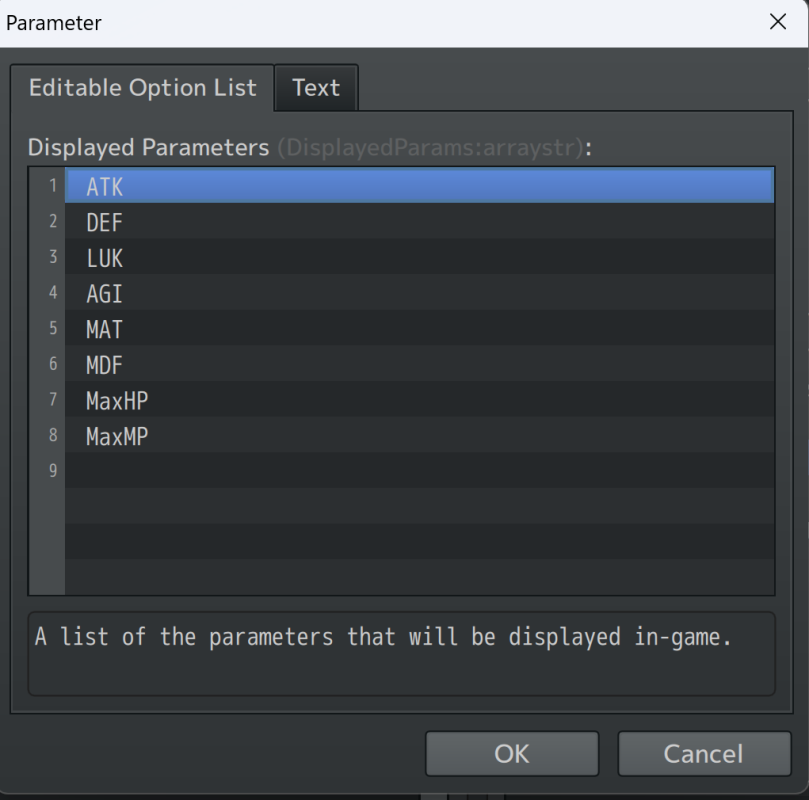
SOLVED: Don't neglect your Extended Parameters list in the Core plugin like this goober did, kids. Apparently that's what the other VisuStella plugins need to refer to.
EDIT: Thanks, mods
Hello!
This is kind of a frustrating one because I have both parts of my solution in two separate VisuStella plugins but I cannot get both to agree at once!
The armour in my game provides a suite of bonuses depending on their type. Some Provide lots of HP, DEF, and STR, some provide MP, SPR, and MAG, others provide a balance with a DEX bonus. So naturally, the default shop layout which only shows the DEF increase before purchase is no good to the player - they need to see all of the bonuses they're getting before they invest in a purchase.
Fortunately, the ItemsEquipsCore plugin shows
exactly that.
The only issue is the stats are in the wrong order here. I mean, it's arbitrary, but I just don't like this order at all (I've replaced Luck with Strength since Luck makes a very small difference to state changes).
I would like Attack, Defense, Strength, Dexterity, Magic, Spirit, Max HP, Max MP.
Now there IS an option in the VisuStella Core under Parameter Settings which I can adjust the order.
Protected download
If I disable ItemsEquipsCore this new order displays correctly in my status and equip menus. Unfortunately this new order is not reflected in the changes made in ItemsEquipsCore when that's enabled. I cannot find how to change the stat order in the latter!
I'm reasonably sure that what I'm looking for is in this // Draw Parameter Values section of this... section of the ItemsEquipsCore plugin, but I don't know java and can't make head nor tails of it. I was hoping to just be able to reorder some IDs as above, but alas.
Code:
// Set Variables
const lineHeight = this.lineHeight();
let x = 0;
let y = 0;
let width = this.innerWidth;
let height = this.innerHeight;
let hw = Math.floor(width / 2);
let hx = x + width - hw;

// Draw Item Name, Type, and Quantity
this.drawItemName(this._item, x + this.itemPadding(), y, width - this.itemPadding() * 2);
this.drawItemDarkRect(x, y, width);
y += lineHeight;
if (this.drawItemEquipType(x, y, hw)) y += 0;
if (this.drawItemQuantity(hx, y, hw)) y += lineHeight;

// Draw Item Weapon Type or Armor Type
if (this.drawItemEquipSubType(x, y, width)) y += lineHeight;

// Draw Parameter Values
const params = this.actorParams();
for (const paramId of params) {
    if (this.isCustomParameter(paramId)) continue;
    this.drawActorParamClassic(paramId, x, y, hw);
    if (x === hw) {
        y += lineHeight;
        x = 0;
    } else {
        x = hw;
    }
}
// Realign
if (x === hw) {
    this.drawItemDarkRect(hw, y, hw, lineHeight);
    y += lineHeight;
    x = 0;
}

// Draw Custom Entries
y = this.drawItemCustomEntries(x, y, width);

// Fill Rest of the Window
this.drawItemDarkRect(x, y, width, height - y);
SO, can anyone pretty please help with a solution to this? I would take
either approach; if anyone can help me get the full list of stats to display in shops without using ItemsEquipsCore, that's great! If you know how to simply order the parameters displayed within ItemsEquipsCore, also amazing! I don't necessarily need any other feature of the latter plugin.




 FIFINE Gaming USB Microphone Kit with Boom Arm
USB microphone setup for streams, party chat, podcasts, and creator clips.
View on Amazon
FIFINE Gaming USB Microphone Kit with Boom Arm
USB microphone setup for streams, party chat, podcasts, and creator clips.
View on Amazon