



public

Rpg Maker Developers Group

Simple enough for a child, powerful enough for a developer

2 Followers

MZ Pixel Fonts Are Blurred in Centered Text in Menus, Can I Fix This?

BMM Archive · July 15, 2026

Preserved forum archive. This topic stores the original first post and locally mirrored RPG Maker Web attachments when available. It is posted by the BMMPlay archive account, not by the original creator.

Original Source

  • Original title: MZ Pixel Fonts Are Blurred in Centered Text in Menus, Can I Fix This?
  • Original author: JimFrom2003
  • Original date: November 2, 2024
  • Source thread: https://forums.rpgmakerweb.com/threads/pixel-fonts-are-blurred-in-centered-text-in-menus-can-i-fix-this.172982/
  • Source forum path: Game Development Engines > RPG Maker Javascript Plugins > Javascript/Plugin Support

Summary

I found a pixelated font for my low-resolution game, but the problem is, on certain menus (title screen, options, etc.) the text is blurred on certain lines. I think it's because they way RMMZ centers text causes it to land on half-pixels. I've tried getting the pixels to align properly by writing a plugin and using math.Round(), but nothing seems to work. Does anyone have any idea which variables I should try tweaking or if there's a different method I should try, or is it just another hard-coded "quirk" of...

Archived First Post

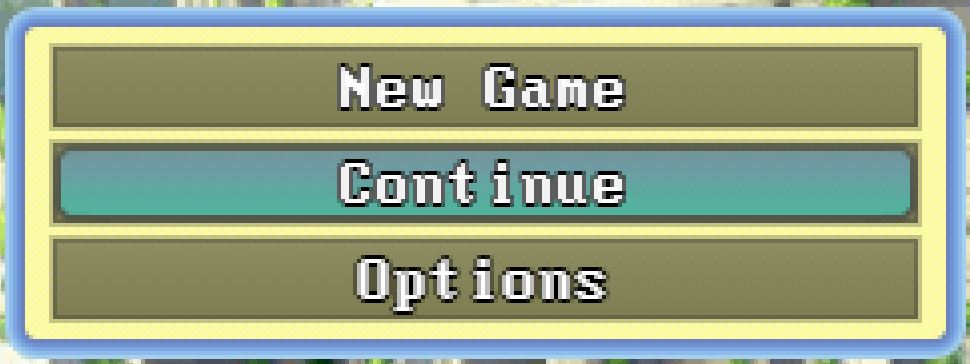
I found a pixelated font for my low-resolution game, but the problem is, on certain menus (title screen, options, etc.) the text is blurred on certain lines. I think it's because they way RMMZ centers text causes it to land on half-pixels. I've tried getting the pixels to align properly by writing a plugin and using math.Round(), but nothing seems to work. Does anyone have any idea which variables I should try tweaking or if there's a different method I should try, or is it just another hard-coded "quirk" of RPG Maker that I'm just going to have to work around?

Protected download
Here's an image of what's going on in case visual aid is necessary. Note how "New Game" and "Continue" are nice and crisp while "Options" is blurred a little.

Downloads / Referenced Files

Log in to download

Log in, then follow the RPG Maker Developers Group to see these download links.

Log in to download

Referenced Images / Attachments

Screenshot 2024-11-02 032536.png
Creator Claims / Removal

If you are the original creator and want this listing reassigned, edited, or removed, join BMMPlay and contact the moderators with proof that matches the original RPG Maker Web profile, linked GitHub, itch.io page, or another public creator identity.

#039#rpg-maker-archive#js-support

Replies (0)

No replies yet.

0 replies 1 view

Log in to reply.

User Avatar
