


MZ Script for use with ButtonPicture default plugin (MZ)
BMM_Archive · July 15, 2026

Original Source
- Original title: MZ Script for use with ButtonPicture default plugin (MZ)
- Original author: ZombieKidzRule
- Original date: May 31, 2024
- Source thread: https://forums.rpgmakerweb.com/threads/script-for-use-with-buttonpicture-default-plugin-mz.169143/
- Source forum path: Game Development Engines > RPG Maker Javascript Plugins > Javascript/Plugin Support
Summary
Does anyone know if you can use a script in a Loop that will provide the necessary input for the default MZ plugin ButtonPicture? When you use the ButtonPicture plugin, you designate a Picture Id and a Common Event Id each time you use the Plugin Event Command Option. I have to set 99 ButtonPicture commands in an Event. And I wanted to make a Loop that uses Variables for the Picture Id and the Common Event Id. Then I just need to increment each Variable by 1 in the...
Archived First Post
When you use the ButtonPicture plugin, you designate a Picture Id and a Common Event Id each time you use the Plugin Event Command Option.
I have to set 99 ButtonPicture commands in an Event. And I wanted to make a Loop that uses Variables for the Picture Id and the Common Event Id. Then I just need to increment each Variable by 1 in the Loop to use the next Picture Id and Common Event Id.
Currently, my Picture Ids are 301 - 399 and the Event Ids are 401 - 499.
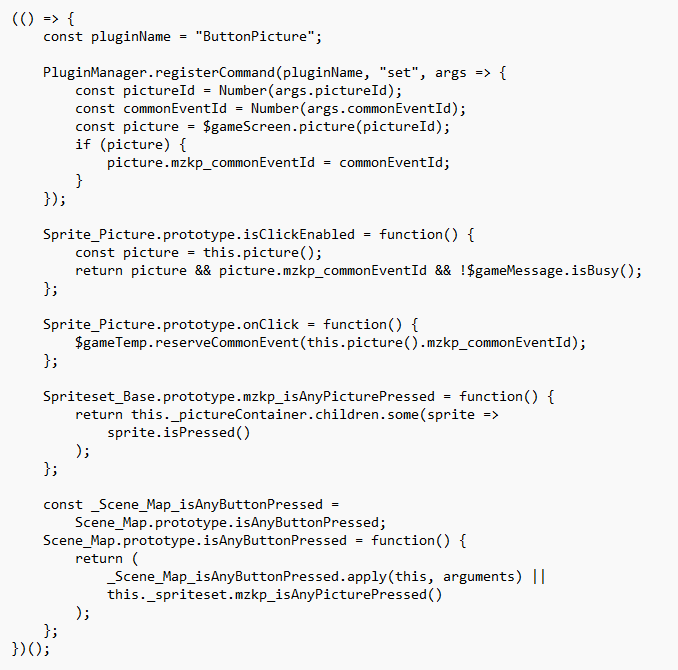
I looked inside the ButtonPicture .js file and I kind of sort of see what it is doing. But I don't know how I would construct a Script Event Command to use in this sort of Loop.
I would think it would be possible, but I don't know enough to figure it out.
So instead of 99 separate Plugin Event Commands that each set a Picture Id and Common Event Id, you would just set 1 Variable at 301 and 1 Variable at 401, have a Loop, a script that uses something like $game.Variables.value(#) for both the Picture Id and the Common Event Id, increment each of those Variables by 1, and then if the Loop goes through 99 times you break the Loop.
I hope this makes sense and I have explained it clearly. And thanks for any help you can provide or for letting me know that this isn't possible with the ButtonPicture plugin.
Here is an excerpt of the ButtonPicture plugin .js file.
Downloads / Referenced Files
Log in, then follow the RPG Maker Developers Group to see these download links.
Log in to downloadReferenced Images / Attachments
Creator Claims / Removal
If you are the original creator and want this listing reassigned, edited, or removed, join BMMPlay and contact the moderators with proof that matches the original RPG Maker Web profile, linked GitHub, itch.io page, or another public creator identity.


Replies (0)
No replies yet.
Topic Summary
Loading summary...
