


MV Issue with QPlus plugin
BMM_Archive · July 15, 2026

Preserved forum archive. This topic stores the original first post and locally mirrored RPG Maker Web attachments when available. It is posted by the BMMPlay archive account, not by the original creator.
Original Source
- Original title: MV Issue with QPlus plugin
- Original author: ZankokuNoYami
- Original date: April 3, 2022
- Source thread: https://forums.rpgmakerweb.com/threads/issue-with-qplus-plugin.146386/
- Source forum path: Game Development Engines > RPG Maker Javascript Plugins > Javascript/Plugin Support
Summary
Cannot seem for the life of me figure out why I keep getting this error with QPlus' plugin. Here is the plugin: Here is the error: {
Archived First Post
Cannot seem for the life of me figure out why I keep getting this error with QPlus' plugin.
Here is the plugin:
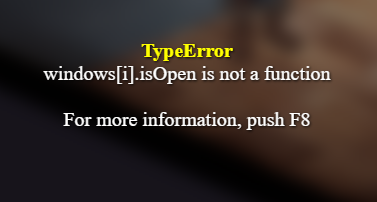
Here is the error:
Protected download
It seems to happen completely randomly. I havent figured out if its timer based or what.
TypeError: windows.isOpen is not a function
at Scene_Map.updateMouseInsideWindow (QPlus.js:892)
at Scene_Map.update (QPlus.js:884)
at Function.SceneManager.updateScene (rpg_managers.js:2024)
at Function.SceneManager.updateMain (rpg_managers.js:1983)
at Function.SceneManager.update (rpg_managers.js:1907)
QPlus script:
Tried doing a search and only found the same issue related to RMMZ. Tried that fix and same error.
EDIT: So it seems to happen once I move the mouse. Still not sure WHY.
Here is the plugin:
Here is the error:
Protected download
It seems to happen completely randomly. I havent figured out if its timer based or what.
TypeError: windows.isOpen is not a function
at Scene_Map.updateMouseInsideWindow (QPlus.js:892)
at Scene_Map.update (QPlus.js:884)
at Function.SceneManager.updateScene (rpg_managers.js:2024)
at Function.SceneManager.updateMain (rpg_managers.js:1983)
at Function.SceneManager.update (rpg_managers.js:1907)
QPlus script:
//-----------------------------------------------------------------------------
// Scene_Map
var Alias_Scene_Map_update = Scene_Map.prototype.update;
Scene_Map.prototype.update = function() {
if (TouchInput.isMoved()) this.updateMouseInsideWindow();
Alias_Scene_Map_update.call(this);
};
Scene_Map.prototype.updateMouseInsideWindow = function() {
var inside = false;
var windows = this._windowLayer.children;
for (var i = 0; i < windows.length; i++) {
if (windows.visible && windows.isOpen() && windows.isMouseInside()) {
inside = true;
break;
}
}
TouchInput.insideWindow = inside;
};
Tried doing a search and only found the same issue related to RMMZ. Tried that fix and same error.
EDIT: So it seems to happen once I move the mouse. Still not sure WHY.
Downloads / Referenced Files
Log in to download
Log in, then follow the RPG Maker Developers Group to see these download links.
Log in to downloadReferenced Images / Attachments
Creator Claims / Removal
If you are the original creator and want this listing reassigned, edited, or removed, join BMMPlay and contact the moderators with proof that matches the original RPG Maker Web profile, linked GitHub, itch.io page, or another public creator identity.
Replies (0)
No replies yet.
0
replies
10
views
Topic Summary
Loading summary...

