


MZ I need help with a (possible) JavaScript glitch
BMM_Archive · July 15, 2026

Original Source
- Original title: MZ I need help with a (possible) JavaScript glitch
- Original author: Magenta-Fantasies
- Original date: March 19, 2022
- Source thread: https://forums.rpgmakerweb.com/threads/i-need-help-with-a-possible-javascript-glitch.145911/
- Source forum path: Game Development Engines > RPG Maker Javascript Plugins > Javascript/Plugin Support
Summary
I just found nz-prism's Actor Pictures plugin, and aside from my complaint here, I am delighted with it. Not only is it free, but it has most of the functionality for displaying character portraits that I miss from Visual Novel Maker. Supposedly it can even do animations, but I am at my wit's end as to how to make this work. I read through the read-me file and the directions are fairly straightforward: “as a material standard, this loop animation is supported by arranging any number of patterns horizontally. Animation...


Archived First Post
Supposedly it can even do animations, but I am at my wit's end as to how to make this work. I read through the read-me file and the directions are fairly straightforward:
“as a material standard, this loop animation is supported by arranging any number of patterns horizontally. Animation can be set in the plug-in parameters of the ActorPictures .js. You can fine-tune the number and timing of patterns.”
I set up an image this way and put it under the “pictures” folder under “img” in my RPG Maker game folder. This is where the plugin requires character portraits to go, and I didn’t read anything that said images for animated portraits were an exception.
Then the read-me file shows this image. I know a little Japanese, enough to tell that this is the Parameter window and has the settings needed for animation.
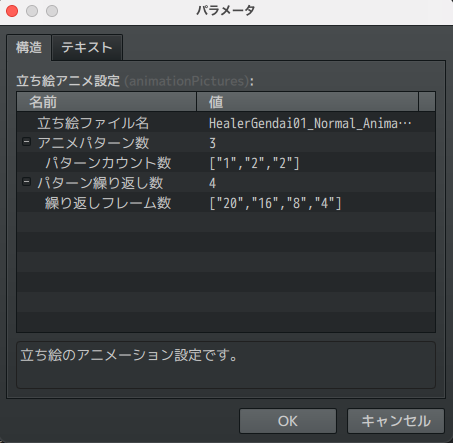
Except this is what I see on my screen in RPG Maker.
(Here are the plugin windows in the order I clicked them from top to bottom. The bottom one is the one I can't click on properly.)
It’s blank! Several settings are missing (pattern, timing, frame rate, etc.) from the developers' screenshot.
If I click on the lines underneath Name/Value, nothing happens. It won’t let me select an image (which is set under “pictures” as I mentioned above. I read through the read-me page for this plugin quite thoroughly and I don’t think I’m missing something, like an additional plugin for the animation feature or having the Actor Pictures plugin in the wrong order. I’d reach out to the developers directly, except I don’t have a Twitter account and there’s a language barrier.
Is this caused by an error with the JavaScript itself? If so, can someone point out where and offer any ideas for how to correct it? I would definitely appreciate it!
Edit: Here's the JavaScript: https://github.com/nz-prism/RPG-Maker-MZ/blob/master/ActorPictures/js/plugins/ActorPictures.js
Downloads / Referenced Files
Log in, then follow the RPG Maker Developers Group to see these download links.
Log in to downloadReferenced Images / Attachments
Creator Claims / Removal
If you are the original creator and want this listing reassigned, edited, or removed, join BMMPlay and contact the moderators with proof that matches the original RPG Maker Web profile, linked GitHub, itch.io page, or another public creator identity.
Replies (0)
No replies yet.
Topic Summary
Loading summary...
