


MV Image issue in Galv_VariableBar
BMM_Archive · July 15, 2026

Preserved forum archive. This topic stores the original first post and locally mirrored RPG Maker Web attachments when available. It is posted by the BMMPlay archive account, not by the original creator.
Original Source
- Original title: MV Image issue in Galv_VariableBar
- Original author: ShadowDragon
- Original date: March 8, 2022
- Source thread: https://forums.rpgmakerweb.com/threads/image-issue-in-galv_variablebar.145541/
- Source forum path: Game Development Engines > RPG Maker Javascript Plugins > Javascript/Plugin Support
Summary
Hi community =) I got a small issue with Galv_VariableBar as it works correctly without any issue, there is one things I cannot figure out to make it work perfect. my picture I want to draw is 600x60 (I use another plugin to draw a picture as well)
Archived First Post
Hi community =)
I got a small issue with Galv_VariableBar as it works correctly without any issue,
there is one things I cannot figure out to make it work perfect.
my picture I want to draw is 600x60 (I use another plugin to draw a picture as well)
this picture is draw as it's ratio as I screenshot and its width and height are 600x60.
but when using galv's plugin (which I really like and need it as a visual timer),
the image become bigger (612x62), this is scaled UP so the width and height are incorrect.
as this project use minimal plugin and works together, I dont see a way to correct this part.
you can replicate it very easy in a clean project or demo project, but I cannot find what function
the picture is scaled too or why.
any help is appreciated or the part in the code to change to make it work so the image
width and height retain the same (without upscale or downscale).
EDIT:
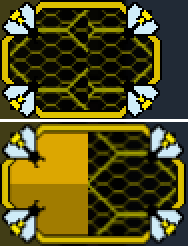
(to illustrate the image issue)
the top 1 is from a plugin 111_InputForm (require css to work)
the image drawed is 600x60 (which is correct)
the bottom one is Galv_VariableBar which scaled and become blurry.
the image drawed is 612x62 (incorrect) so avoid scaling = 600x60 as it should be).
Protected download
switching the plugin doesn't work and effect remain the same.
I got a small issue with Galv_VariableBar as it works correctly without any issue,
there is one things I cannot figure out to make it work perfect.
my picture I want to draw is 600x60 (I use another plugin to draw a picture as well)
this picture is draw as it's ratio as I screenshot and its width and height are 600x60.
but when using galv's plugin (which I really like and need it as a visual timer),
the image become bigger (612x62), this is scaled UP so the width and height are incorrect.
as this project use minimal plugin and works together, I dont see a way to correct this part.
you can replicate it very easy in a clean project or demo project, but I cannot find what function
the picture is scaled too or why.
any help is appreciated or the part in the code to change to make it work so the image
width and height retain the same (without upscale or downscale).
EDIT:
(to illustrate the image issue)
the top 1 is from a plugin 111_InputForm (require css to work)
the image drawed is 600x60 (which is correct)
the bottom one is Galv_VariableBar which scaled and become blurry.
the image drawed is 612x62 (incorrect) so avoid scaling = 600x60 as it should be).
Protected download
switching the plugin doesn't work and effect remain the same.
Downloads / Referenced Files
Log in to download
Log in, then follow the RPG Maker Developers Group to see these download links.
Log in to downloadReferenced Images / Attachments
Creator Claims / Removal
If you are the original creator and want this listing reassigned, edited, or removed, join BMMPlay and contact the moderators with proof that matches the original RPG Maker Web profile, linked GitHub, itch.io page, or another public creator identity.
Replies (0)
No replies yet.
0
replies
10
views
Topic Summary
Loading summary...

