Hey! I have a few customizations i'd to do on the SRD Timed Attack - Clock, i'm not sure if they are solvable by only troubleshooting, but i'll give it a shot.
1) I want 2 different damage zones, but only 1 input per clock.
By default, when you create a second, third or more targets on the clock you are supposed to hit it at the right time each one of them, but what i want is just to have 1 input, if you hit the white zone you get *1.5 dmg, if you get the red zone it's *2 damage.
Alternatively, i wonder if that could be solved with the damage formula... I accept solutions of that type, i dont need targets to look like that, i just need the effect.
And that brings us to my second question..
2) Get rid of the clock graphics, use only background picture, also offset it to the left a bit.
This one is actually pretty straight foward. I dont need the clock there, i want the effects but have no intention to show it rolling to the player, only a small icon that tells they 'you sould press the button now'. For that effect i'm setting in the plugins parameter Start and Finish of the action = to the Star and Finish of the target, but on a high Speed level.
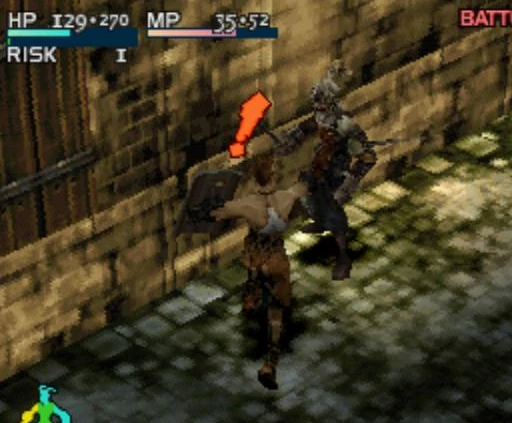
I'm sorta referencing Super Marios RPG timed hits (it doesnt show anything, you have to get a feel of it) with Vagrant Story's exclamation mark informing the right timing.
Protected download
3)
I dont get the Thickness and Cooldown parameter
I've actually tried to set them in a very high and a very low value but couldn't notice any change. I've also searched the net, the forums, and the plugin itself for more info on them but got no result.
Thats it! Thanks in advance!



 Kingston IronKey Locker+ 50 G2 256GB Encrypted USB Drive
Encrypted USB storage for secure files, travel documents, and work backups.
View on Amazon
Kingston IronKey Locker+ 50 G2 256GB Encrypted USB Drive
Encrypted USB storage for secure files, travel documents, and work backups.
View on Amazon