


MZ VisuMZ plugin - Selectable items opacity issue
BMM_Archive · July 15, 2026

Preserved forum archive. This topic stores the original first post and locally mirrored RPG Maker Web attachments when available. It is posted by the BMMPlay archive account, not by the original creator.
Original Source
- Original title: MZ VisuMZ plugin - Selectable items opacity issue
- Original author: Zyia
- Original date: December 10, 2020
- Source thread: https://forums.rpgmakerweb.com/threads/visumz-plugin-selectable-items-opacity-issue.130820/
- Source forum path: Game Development Engines > RPG Maker Javascript Plugins > Javascript/Plugin Support
Summary
Hello there, i'm encountering an issue with the opacity of the text of selectable items. I've changed this setting under "VisuMZ_0_CoreEngine" plugin (namely "Window Settings" > "Translucent opacity") in order to have under the "Options" screen, the option we do not select more transparent like the below: {
Archived First Post
Hello there,
i'm encountering an issue with the opacity of the text of selectable items.
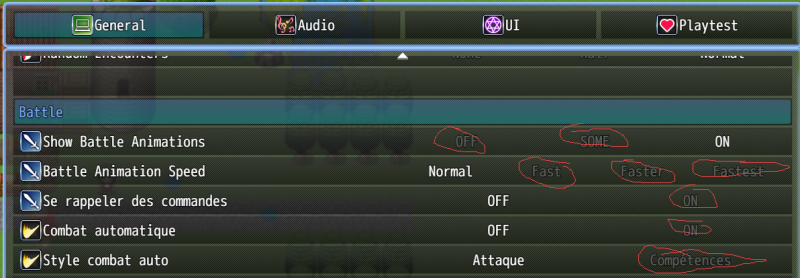
I've changed this setting under "VisuMZ_0_CoreEngine" plugin (namely "Window Settings" > "Translucent opacity") in order to have under the "Options" screen, the option we do not select more transparent like the below:
Protected download
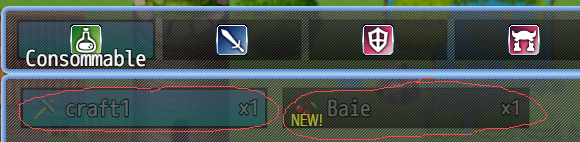
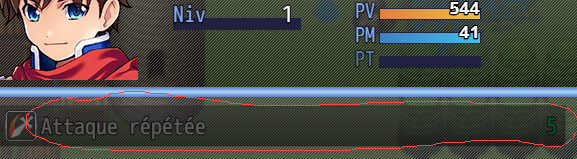
But the thing is it's being also applied to the other screens where we can select items, like the "Items" and "Skills" screens:
Protected downloadProtected download
I actually would like this transparency effect only applied to the "Options" screen.
Does anyone has any thoughts about how to deal with this?
I have looked on the other plugins i've installed (like "VisuMZ_1_MainMenuCore", "VisuMZ_1_ItemsEquipsCore", "VisuMZ_1_OptionsCore" but also "VisuMZ_1_MessageCore" and i could not find any clue.... This is driving me crazy, i'm on it for now two days....
In advance, thanks very much for the attention brought to my request
i'm encountering an issue with the opacity of the text of selectable items.
I've changed this setting under "VisuMZ_0_CoreEngine" plugin (namely "Window Settings" > "Translucent opacity") in order to have under the "Options" screen, the option we do not select more transparent like the below:
Protected download
But the thing is it's being also applied to the other screens where we can select items, like the "Items" and "Skills" screens:
Protected downloadProtected download
I actually would like this transparency effect only applied to the "Options" screen.
Does anyone has any thoughts about how to deal with this?
I have looked on the other plugins i've installed (like "VisuMZ_1_MainMenuCore", "VisuMZ_1_ItemsEquipsCore", "VisuMZ_1_OptionsCore" but also "VisuMZ_1_MessageCore" and i could not find any clue.... This is driving me crazy, i'm on it for now two days....
In advance, thanks very much for the attention brought to my request
Downloads / Referenced Files
Log in to download
Log in, then follow the RPG Maker Developers Group to see these download links.
Log in to downloadReferenced Images / Attachments
Creator Claims / Removal
If you are the original creator and want this listing reassigned, edited, or removed, join BMMPlay and contact the moderators with proof that matches the original RPG Maker Web profile, linked GitHub, itch.io page, or another public creator identity.
Replies (0)
No replies yet.
0
replies
9
views
Topic Summary
Loading summary...

