Hi everyone, So my class/skill/battle balance system is currently set up for a party consisting of five characters. Unfortunately, the Visustella menu windows are aligned for rows of four characters each. This is fine for multiples of four, maybe it would work for six, but having an additional row for a single character seems quite clunky. I've tried to find a setting in any of the various core plugin menus, but to no avail. So is there a way to have all five characters appear in a single row that...
Hi everyone,
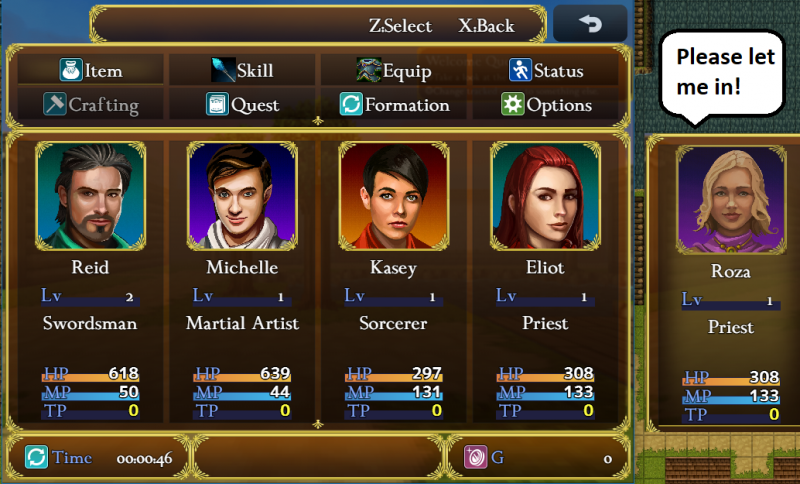
So my class/skill/battle balance system is currently set up for a party consisting of five characters. Unfortunately, the Visustella menu windows are aligned for rows of four characters each. This is fine for multiples of four, maybe it would work for six, but having an additional row for a single character seems quite clunky. I've tried to find a setting in any of the various core plugin menus, but to no avail. So is there a way to have all five characters appear in a single row that I've been missing or is this hardcoded in such a way that it would take unreasonable effort to implement?
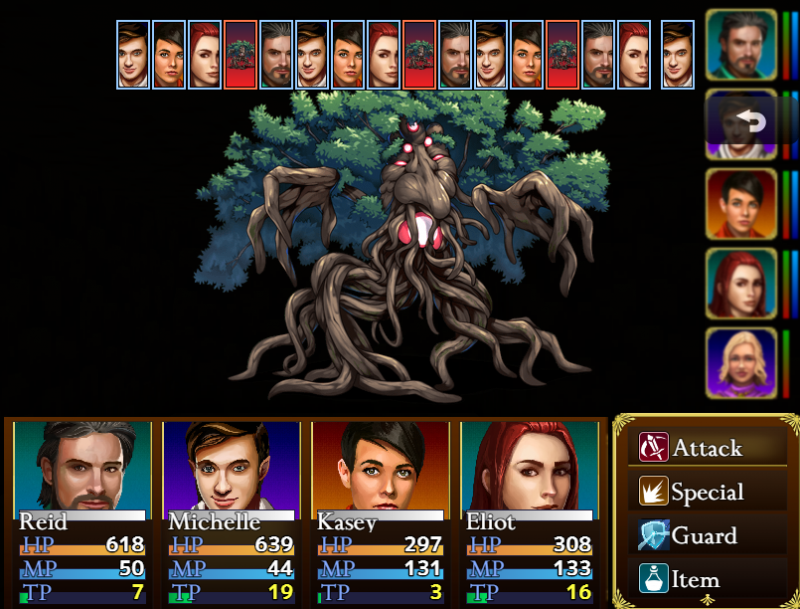
Edit: I just noticed it gets even worse in combat. Apparently, the engine doesn't even recognize the fifth character, at least it doesn't get to act (see screenshot)! And again, there doesn't seem to be a setting in the plugin manager that might accomplish this. What's going on, and is there any help?




 SteelSeries Rival 3 Wireless Gen 2 Gaming Mouse
Dual wireless gaming mouse with fast response and long battery life for PC players.
View on Amazon
SteelSeries Rival 3 Wireless Gen 2 Gaming Mouse
Dual wireless gaming mouse with fast response and long battery life for PC players.
View on Amazon
