I have been using this plugin to successfully zoom the way I want. I havent had any luck with any other plugin doing what I need. Right now Yanfly's core is allowing me to get 1920x1080 resolution, which is what I need for the sharp images I use. But this makes the game get pushed too far out. MBS - Map Zoom MBS - Map Zoom by Masked Introduction This plugin allows you to change the map zoom with some simple Plugin Commands, I made this based on this post....
I have been using this plugin to successfully zoom the way I want. I havent had any luck with any other plugin doing what I need. Right now Yanfly's core is allowing me to get 1920x1080 resolution, which is what I need for the sharp images I use. But this makes the game get pushed too far out.
MBS - Map Zoom by Masked Introduction This plugin allows you to change the map zoom with some simple Plugin Commands, I made this based on this post. Features - The map scroll and mouse/touch movement are adapted to work with zoom; - You can choose if the zoom is reseted when the...

forums.rpgmakerweb.com
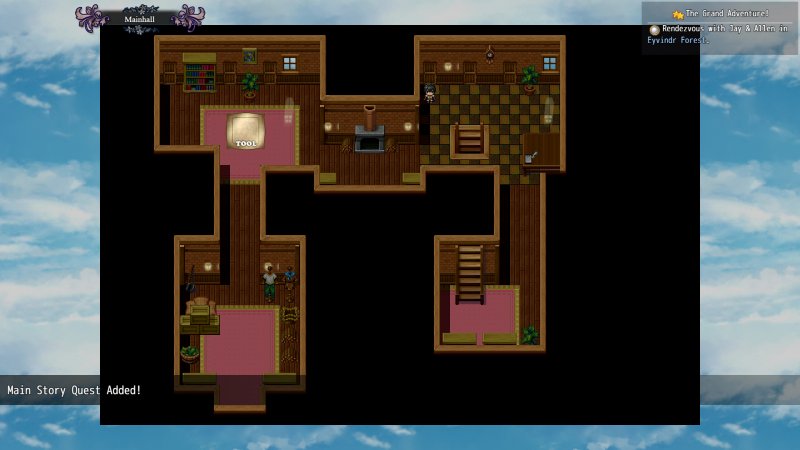
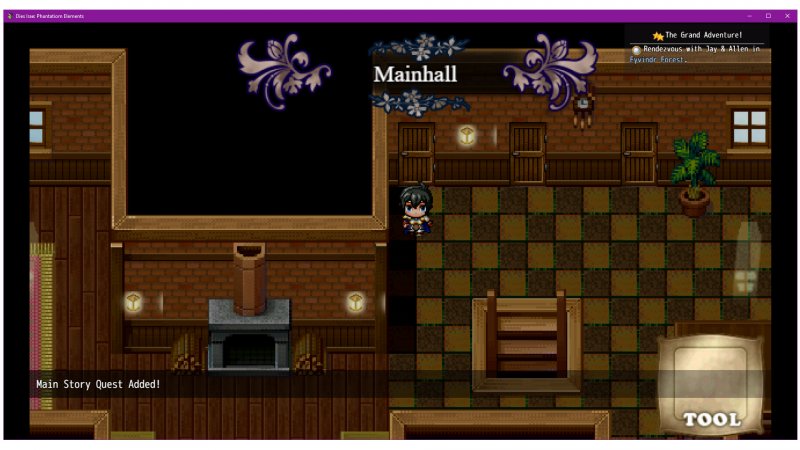
The issue is, of course, is that the images for certain HUD's also seem to get affected. Any images I use myself (through command) or Galv's animated faces seem to be fine. But Galv's tool and Moghunter plugins that are for a HUD (like map name or quest plugin) get exaggerated too.
Is there anyway to edit this script so it does not impact other scripts? Or do we need to edit OTHER scripts?
Example (this is without zoom, and the sizes I actually want for the images):
Protected download
Example (this is zoomed in.. I want it this close, but don't want the images growing and pixelating in response):
Protected download
Ver 1.3 – Last Updated 2017 / 10 / 31 File Name – MOG_MapNameHud.js DOWNLOAD CARACTERÍSTICAS Apresenta uma Hud com o nome do mapa. UTILIZAÇÃO Serão necessários os arquivos. (img/system/) MapN…

atelierrgss.wordpress.com
Simple Crops - Version 1.3 + Tools - Version 1.1 RPG Maker MV Plugins Galv Introduction Two plugins in one because they were designed to work with each other but not required. Eventing and database knowledge required. Screenshots Features This Simple crops plugin was designed to make a...
forums.rpgmakerweb.com





 UGREEN Nexode 200W GaN USB-C Wall Charger
High-output four-port USB-C charger for laptops, tablets, phones, and travel kits.
View on Amazon
UGREEN Nexode 200W GaN USB-C Wall Charger
High-output four-port USB-C charger for laptops, tablets, phones, and travel kits.
View on Amazon