This post is to answer @Tamina from another thread ( to keep from necro-posting in the wrong thread ) The question: "Hello, I am looking for a way to show icons above characters head when they get close to interactable event, but "show balloon" command doesn't work well because the game will continue to show balloon even after player leave the region until the animation is over. Is it possible to show balloon only when player stay close to the event, once they leave the ballo disappeared immediately? " The...
This post is to answer
@Tamina from another thread ( to keep from necro-posting in the wrong thread )
The question: "Hello, I am looking for a way to show icons above characters head when they get close to interactable event, but "show balloon" command doesn't work well because the game will continue to show balloon even after player leave the region until the animation is over.
Is it possible to show balloon only when player stay close to the event, once they leave the ballo disappeared immediately? "
The answer is close to a tutorial, but just geared towards the question. This is how it's done through eventing, without the use of a plugin. First, the base concept is, show a picture instead of a balloon. Balloons are animated, and if the indication needs to go away immediately - it's the best way. (FYI: I used MZ for this, but the answer also applies to MV, and I did not see an equitable board for MZ.)
First, we need an appropriate image, I chose to make a question mark using PDN for this:
Protected download
A simple image that's 48 * 48. (Reuse allowed, and no credit needed. It's a question mark with an outline. Woohoo...)
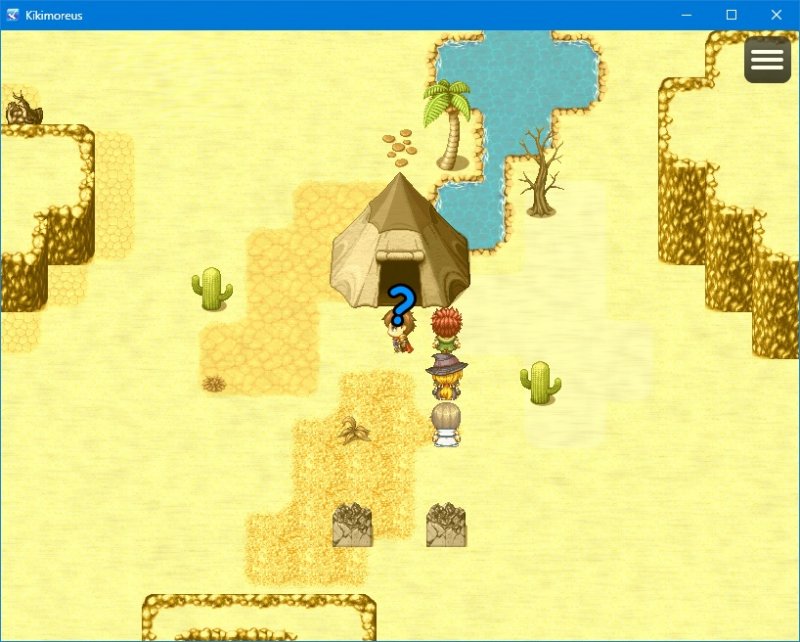
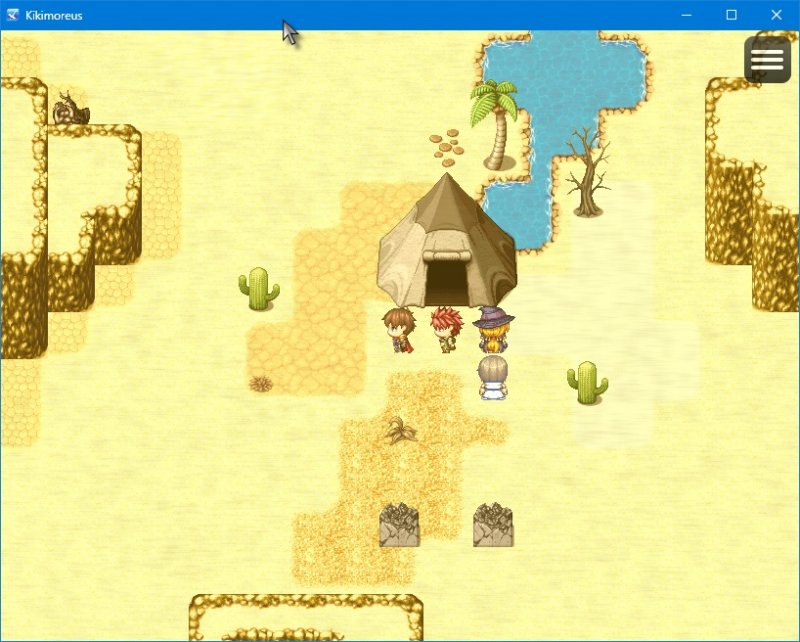
The result we're looking for is the following:
Protected download ->
Protected download
The idea is that the tent is a point of interest, and the question mark only shows when the player is right in front of the door. (This map, is one I made following Avy's Tutorial that can be found
HERE. I had a lot of fun with that tutorial
@Avery thanks for posting it!)
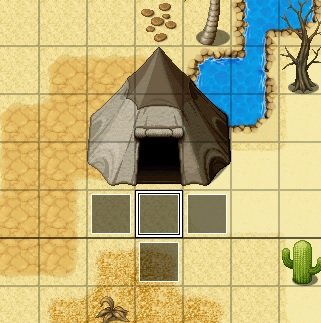
To have this work as this map is set up, without any plugins or common events, we'll need four events. Depending on where you have your event on your map in relation to passable tiles, the number of needed events will vary.
Protected download (the center event shows the picture, and the events surrounding the middle event erases the picture.)
Since we're using a picture, we'll want to decide in advance the picture's
number. I chose 5, since I prefer these types of images to be beneath anything like busts, screen effects, or other, more important, pictures.
The events needs to be
Below characters, so that the player can walk on the tile, and triggered by
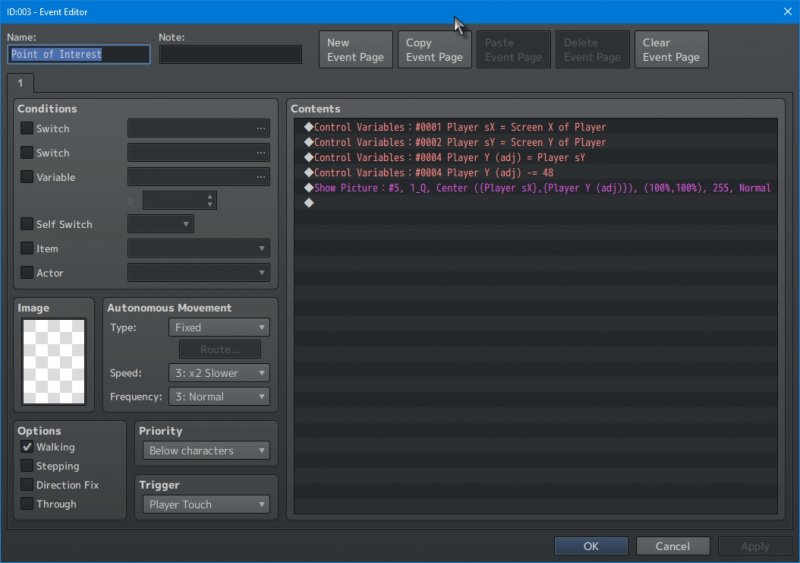
Player Touch. This applies to all three. Our first event is the middle event, that I aptly named "Point of Interest."
Protected download
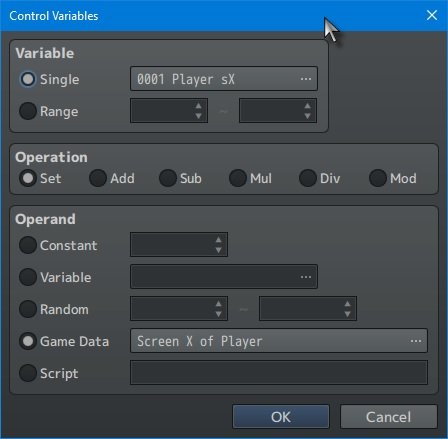
This event contains a few things of note, setting control variables, performing a math adjustment, and finally using show picture. So the first variable set, is using
Game Data to get
Screen X of Player. This returns where on the screen the player's sprite is, not the map. Pictured below is the Control Variable window, showing that Variable 1 being set:
Protected download
The same applies to
Screen Y of Player, with the exception of subtracting 48 from the number for an adjusted number (this is to move the question mark above the player). I utilized two extra variables, #4 and #5 for possible adjustments. I did this because there may be an occation to have the image adjusted on the X axis as opposed to the Y axis. For the
Show Picture command, I did not apply a screenshot, since it's just using the variables as named.
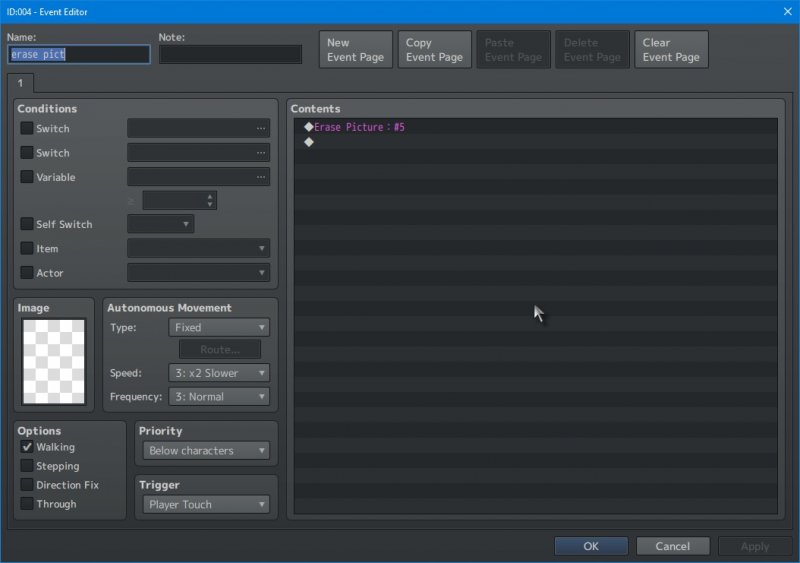
The final three events, are the erase picture events. They use the same triggers, and simply erase the picture (#5).
Protected download
In summary, make sure there is enough room to have events clumped together, trigger them by having them work by walking on them, show a picture, and erase that picture. There are tons of plugins that can be used instead (for example, I'm fond of Yanfly's Region Common Events). However, as I illustrated here, it can be done with just events. I'll go so far as to say, there are probably as many ways of pulling it off as there are makers that use RPG Maker!







 Amazon Fire TV 50-Inch 4-Series 4K UHD Smart TV
4K smart TV with Fire TV built in for streaming, games, and living room viewing.
View on Amazon
Amazon Fire TV 50-Inch 4-Series 4K UHD Smart TV
4K smart TV with Fire TV built in for streaming, games, and living room viewing.
View on Amazon