


Battle HUD - How to make the default HUD disappear?
BMM_Archive · July 15, 2026

Original Source
- Original title: Battle HUD - How to make the default HUD disappear?
- Original author: Scribblestick
- Original date: November 14, 2020
- Source thread: https://forums.rpgmakerweb.com/threads/battle-hud-how-to-make-the-default-hud-disappear.129884/
- Source forum path: Game Development Engines > Legacy Engine Support > RPG Maker MV Support
Summary
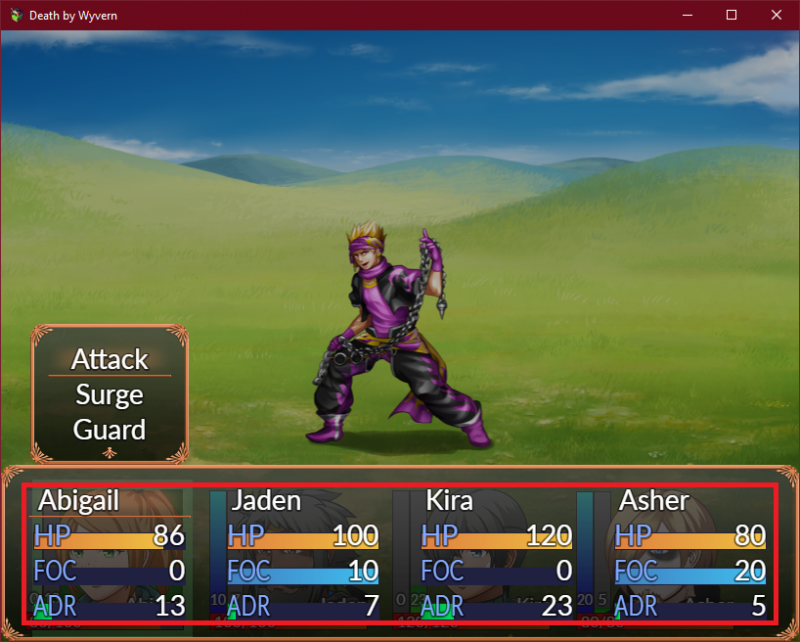
I am building a custom HUD for my game using SRD's HUD maker, but there are a couple features I can't figure out how to implement, such as a glowing box that highlights the "active" character and icons that display for characters' current statuses (KO, poisoned, etc.). I came across Mr. Trivel's Actor Portraits, and I like the layout, but I don't want most of the default HUD elements. { "lightbox_close": "Close", "lightbox_next": "Next",


Archived First Post
Protected download
I want to get rid of everything in the red box (names, HP/FOC/ADR bars), since I already have those on my custom HUD. I want to keep the orange border, status icon that display when relevant, and the action selection box that appears above each character. I have very little experience with coding, and none with javascript. I am willing to learn, but I thought I'd check if anyone else has done something like this before.
Downloads / Referenced Files
Log in, then follow the RPG Maker Developers Group to see these download links.
Log in to downloadReferenced Images / Attachments
Creator Claims / Removal
If you are the original creator and want this listing reassigned, edited, or removed, join BMMPlay and contact the moderators with proof that matches the original RPG Maker Web profile, linked GitHub, itch.io page, or another public creator identity.
Replies (0)
No replies yet.
Topic Summary
Loading summary...
