


(SOLVED) BGM Not Appearing
BMM_Archive · July 15, 2026

Preserved forum archive. This topic stores the original first post and locally mirrored RPG Maker Web attachments when available. It is posted by the BMMPlay archive account, not by the original creator.
Original Source
- Original title: (SOLVED) BGM Not Appearing
- Original author: Pal
- Original date: August 12, 2020
- Source thread: https://forums.rpgmakerweb.com/threads/solved-bgm-not-appearing.125178/
- Source forum path: Game Development Engines > Legacy Engine Support > RPG Maker MV Support
Summary
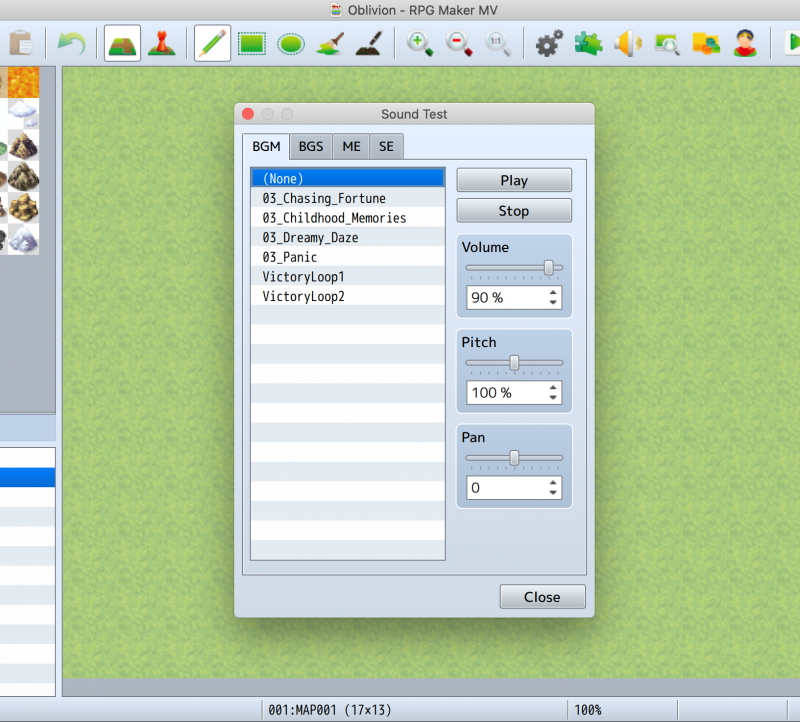
I just imported all the free dlc stuff on RPG Maker MV on Steam and i have kind of a problem. When i go to the sound test only a few songs appear. { "lightbox_close": "Close", "lightbox_next": "Next",
Archived First Post
I just imported all the free dlc stuff on RPG Maker MV on Steam and i have kind of a problem. When i go to the sound test only a few songs appear.
Protected download
Then, when i start playtesting, this pops up:

I didn't even put Theme 6 as the title theme!
The game folder still has all the songs in it, both with ogg and m4a.
I really need help with this. The error also popups every like fifth second.
If anyone has any idea what's happening and how i can fix this, please tell me!
(Also, sorry if anyone has already asked this. I couldn't find any solution for it so i decided to just ask.)
EDIT: I also get a popup every time i try to playtest saying '"RPG Maker MV" would like to access files in your documents folder.' This might be related to the previous problem, since it doesnt seem to be able to access the documents folder.
EDIT 2: Okay, it turns out the files were on icloud and not on the mac itself, so i've solved it.
Then, when i start playtesting, this pops up:
I didn't even put Theme 6 as the title theme!
The game folder still has all the songs in it, both with ogg and m4a.
I really need help with this. The error also popups every like fifth second.
If anyone has any idea what's happening and how i can fix this, please tell me!
(Also, sorry if anyone has already asked this. I couldn't find any solution for it so i decided to just ask.)
EDIT: I also get a popup every time i try to playtest saying '"RPG Maker MV" would like to access files in your documents folder.' This might be related to the previous problem, since it doesnt seem to be able to access the documents folder.
EDIT 2: Okay, it turns out the files were on icloud and not on the mac itself, so i've solved it.
Downloads / Referenced Files
Log in to download
Log in, then follow the RPG Maker Developers Group to see these download links.
Log in to downloadReferenced Images / Attachments
Creator Claims / Removal
If you are the original creator and want this listing reassigned, edited, or removed, join BMMPlay and contact the moderators with proof that matches the original RPG Maker Web profile, linked GitHub, itch.io page, or another public creator identity.


Replies (0)
No replies yet.
0
replies
7
views
Topic Summary
Loading summary...
