






public

Rpg Maker Developers Group

Simple enough for a child, powerful enough for a developer

2 Followers

Double parallaxes with Foreground.js

BMM Archive · July 15, 2026

Preserved forum archive. This topic stores the original first post and locally mirrored RPG Maker Web attachments when available. It is posted by the BMMPlay archive account, not by the original creator.

Original Source

  • Original title: Double parallaxes with Foreground.js
  • Original author: Skylez
  • Original date: April 26, 2020
  • Source thread: https://forums.rpgmakerweb.com/threads/double-parallaxes-with-foreground-js.120669/
  • Source forum path: Game Development Engines > RPG Maker Javascript Plugins > Javascript/Plugin Support

Summary

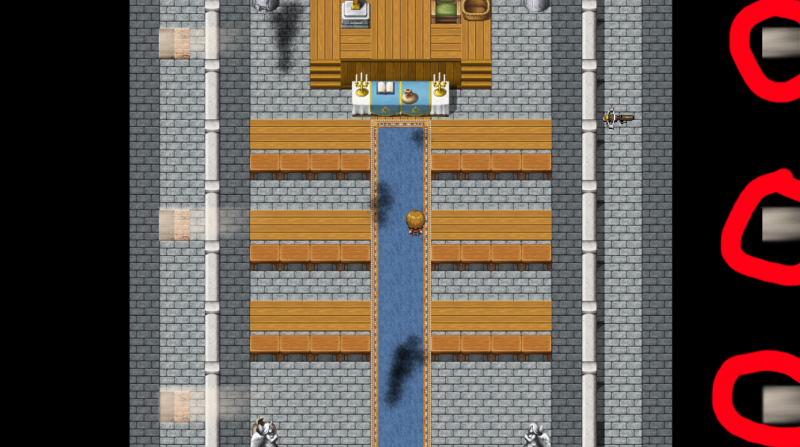
Hello! First post on this forum so I hope my formatting is up to par. So basically I made a sunbeam effect in photoshop after following a tutorial. When I went to apply it was Foreground.js it creates double, one where I intend for the sunbeams to be, and another on the opposite side of the map, as pictured: { "lightbox_close": "Close",

Archived First Post

Hello! First post on this forum so I hope my formatting is up to par.

So basically I made a sunbeam effect in photoshop after following a tutorial. When I went to apply it was Foreground.js it creates double, one where I intend for the sunbeams to be, and another on the opposite side of the map, as pictured:
Protected download
The map size is 20x25 so I multiplied those numbers in photoshop to get 960x1200.
Here is the code I put in the map's note section: <fgName:!JbergCathedral-Beams>
I have tried to remake the effect twice, but I still keep getting the duplicate beams on the right side of the map.

Attached is the parallax in question.
What am I doing wrong here? What do I need to do to get rid of those double beams?
Any help would be appreciated if you need more info, I would be happy to get it for you.

Downloads / Referenced Files

Log in to download

Log in, then follow the RPG Maker Developers Group to see these download links.

Log in to download

Referenced Images / Attachments

24c45239a66a9021587165828ddd929d.png
Creator Claims / Removal

If you are the original creator and want this listing reassigned, edited, or removed, join BMMPlay and contact the moderators with proof that matches the original RPG Maker Web profile, linked GitHub, itch.io page, or another public creator identity.

#rpg-maker-archive#js-support

Replies (0)

No replies yet.

0 replies 1 view

Log in to reply.

User Avatar