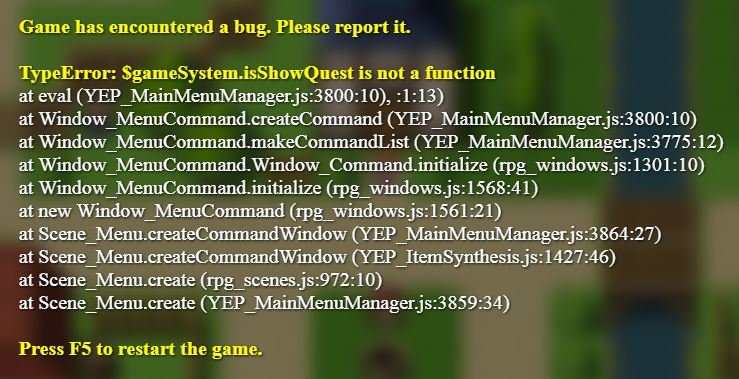
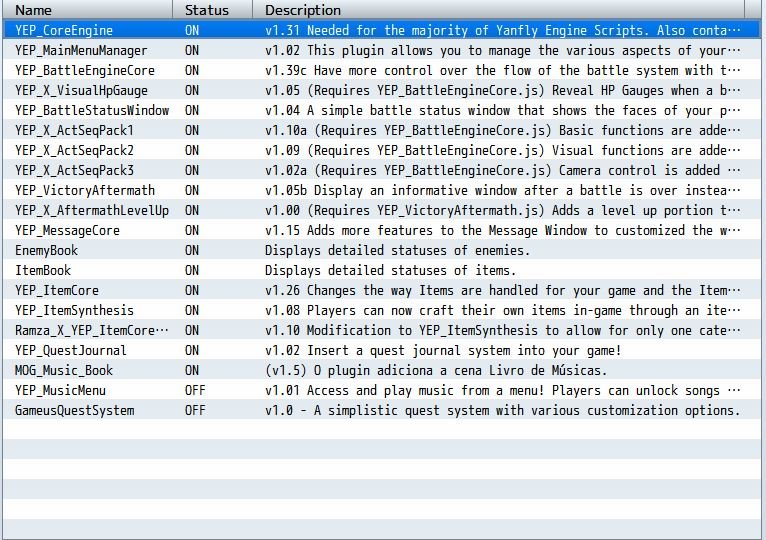
First of all, I apologize if having three threads in one evening is considered poor form. I hope it's not considered spam. I'm just not very bright when it comes to the more technical, less visual side of RPG Maker MV. (To be fair, though, I did figure out my one related problem, so that was better than expected!) Anyway, I'm encountering an error when bringing up the menu in my game, AKA the menu where the Side Quests portion of my game would be. I've since updated the YEP_CoreEngine,...
First of all, I apologize if having three threads in one evening is considered poor form. I hope it's not considered spam. I'm just not very bright when it comes to the more technical, less visual side of RPG Maker MV. (To be fair, though, I did figure out my one related problem, so that was better than expected!)
Anyway, I'm encountering an error when bringing up the menu in my game, AKA the menu where the Side Quests portion of my game would be. I've since updated the YEP_CoreEngine, by the way. Perhaps I have my plugins in a silly order, or I'm overlooking something obvious to someone else. It's a problem I've seen posted here elsewhere by using the search function, but I'm unable to replicate the success stories and solutions provided in the past on this forum.
Unfortunately, I don't know much about Javascript or coding for that matter, so any "breaking it down in layman's terms" explanations would be awesome. I think I understand that there's no "$gameSystem.isShowQuest" available, but I have no idea how I would make one so it would be properly identified as a function, thus solving part of the problem.
I hope I have all of the necessary information to receive help, but if not, please let me know and I'll do my best to provide it!
Protected downloadProtected download




 SANUS Advanced Full-Motion TV Wall Mount
Full-motion TV mount for flexible viewing angles and a cleaner entertainment wall.
View on Amazon
SANUS Advanced Full-Motion TV Wall Mount
Full-motion TV mount for flexible viewing angles and a cleaner entertainment wall.
View on Amazon