


Play Bgm in script call
BMM_Archive · July 15, 2026

Original Source
- Original title: Play Bgm in script call
- Original author: Overclocked
- Original date: November 13, 2015
- Source thread: https://forums.rpgmakerweb.com/threads/play-bgm-in-script-call.50434/
- Source forum path: Game Development Engines > Legacy Engine Support > RPG Maker MV Support
Summary
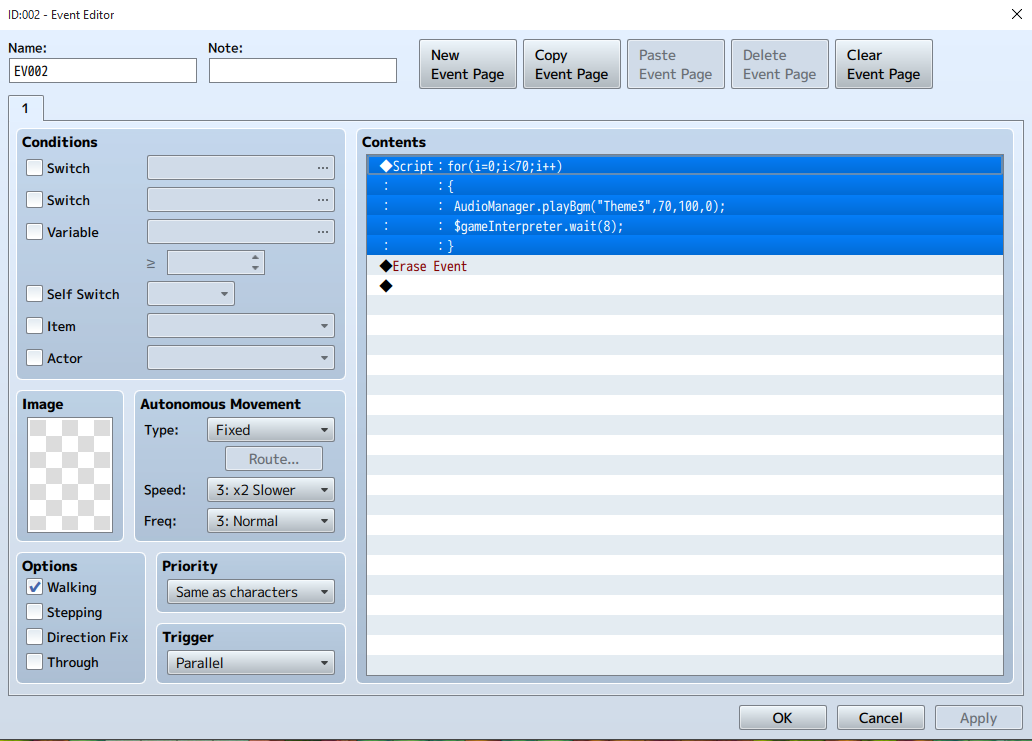
Could someone please take a look at this and maybe point me in the right direction? Objective: I'm trying to create a Background Music Fade-In effect using the event described in the attached graphic. Problem: The event does not play music at any point. I should also note running this event does not crash the game. It seems to stop any music that is currently playing but will not play the specified music within the for loop. I've also tried solely running AudioManager.playBgm("Theme3",70,100,0); by itself in a script call and it...
Archived First Post
Objective: I'm trying to create a Background Music Fade-In effect using the event described in the attached graphic.
Problem: The event does not play music at any point.
I should also note running this event does not crash the game. It seems to stop any music that is currently playing but will not play the specified music within the for loop. I've also tried solely running AudioManager.playBgm("Theme3",70,100,0); by itself in a script call and it still does not play any music.The file Theme3.ogg does exist in my project's BGM directory so I know it's not a "file does not exist" issue. Lastly, I have tried running AudioManager.playBgm("Theme3.ogg",70,100,0); in the script call but the problem still persists. I am not running any plugins that affect audio.
Edit: $gameInterpreter.wait(frames); doesn't seem to work here either. What would be the proper wait command?
Thank you
Protected download
Downloads / Referenced Files
Log in, then follow the RPG Maker Developers Group to see these download links.
Log in to downloadReferenced Images / Attachments
Creator Claims / Removal
If you are the original creator and want this listing reassigned, edited, or removed, join BMMPlay and contact the moderators with proof that matches the original RPG Maker Web profile, linked GitHub, itch.io page, or another public creator identity.


Replies (0)
No replies yet.
Topic Summary
Loading summary...
