


Stuck on creating a custom Barrier Gauge
BMM_Archive · July 15, 2026

Original Source
- Original title: Stuck on creating a custom Barrier Gauge
- Original author: Darkstrife
- Original date: September 30, 2018
- Source thread: https://forums.rpgmakerweb.com/threads/stuck-on-creating-a-custom-barrier-gauge.100588/
- Source forum path: Game Development Engines > Legacy Engine Support > RPG Maker MV Support
Summary
Hello, everyone. I'm not sure if this is the best spot for this question so please let me know if this is a mispost The project I'm working on utilizes the Absorption Barrier plugin by Yanfly. I've done a great deal of working in balancing my combat system to utilize LOW numbers and my weapons, abilities etc.. are all balanced around the concept of piercing through, or breaking down barriers while maintaining the players barrier in order to survive Because barriers are so important to to the games combat balance...


Archived First Post
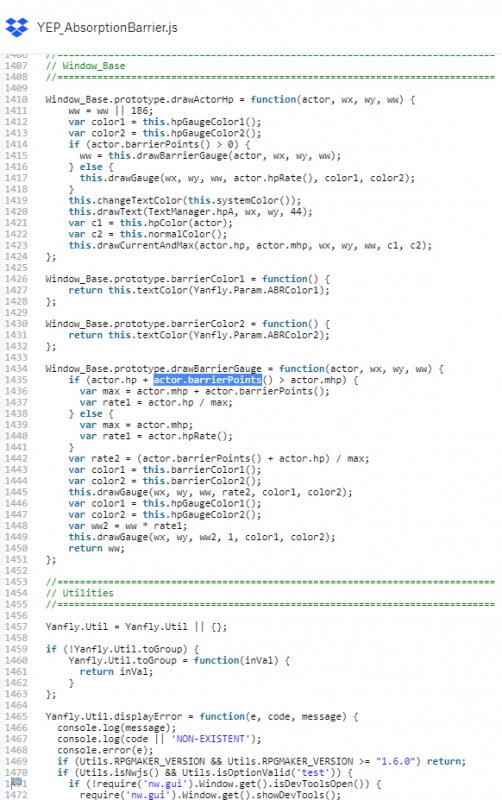
The project I'm working on utilizes the Absorption Barrier plugin by Yanfly.
https://www.dropbox.com/s/5cpwyqp3yryczac/YEP_AbsorptionBarrier.js?dl=0
- I've done a great deal of working in balancing my combat system to utilize LOW numbers and my weapons, abilities etc.. are all balanced around the concept of piercing through, or breaking down barriers while maintaining the players barrier in order to survive
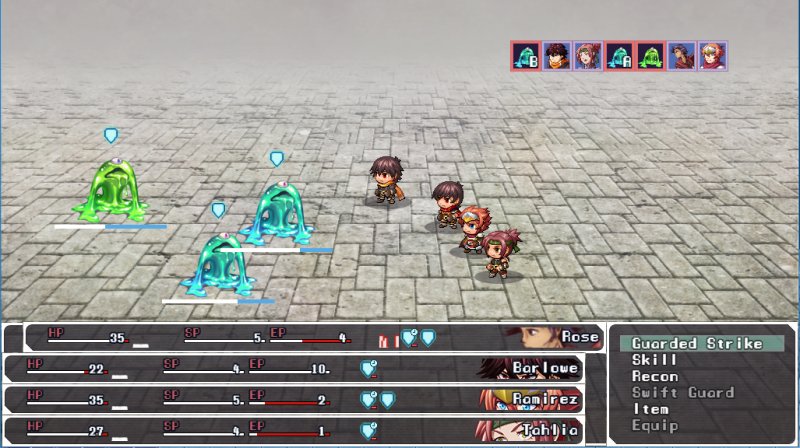
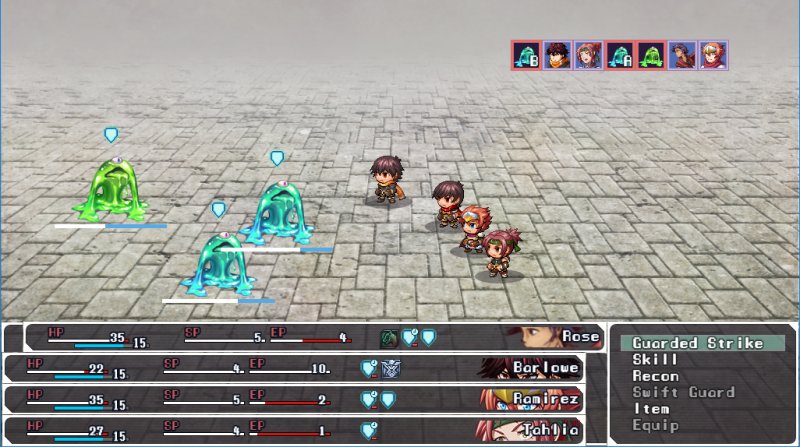
- Because barriers are so important to to the games combat balance the plugin, "I" feel does not relay enough information to the player to make well informed decisions on what to do. So I wanted to separate the numbers for HP and Barrier into separate gauges to help track there both their barrier along with current HP
To try to solve this problem I used SumRndmDdes Battle Status Customizer to rebuild the HUD from scratch.
http://sumrndm.site/battle-status-customizer/
While I was able to achieve a great deal with the tool, the problem that I am having is that I do not know how to create a SEPARATE gauge that tracks the absorption barrier.
NOTE: The Battle Status Customizer SumRndmDde does include a <Draw Absorption Barrier> notetag in the help file in the first file of the 2 part plugin. However this just does the same thing as the default HUD which is NOT what I'm looking for.
I attempted a couple of different things.
I noticed that the other fields in SuRndmDde Status references an actor variable. like actor.mhp actor.mmp etc.. and I found this actor in yanfly's script and tried using that to create a gauge of some kind. But to be honest it's getting a little outside of my realm and I'm not sure of what to do anymore
From what I've gleaned from using the plugins and trying to understand the code (not really programmer so it's hard for me decipher) is that I need two more things to make this type of gauge and apply it to my HUD
a TextManager.Id for the absorption barrier to enter in for the absorption barrier. and some type of variable to reference a max value for the absorption barrier like for the other gauges ex. actor.mhp for example.
This is the only thing that I need to complete my Battle HUD.
I've done this so far
What I want to achieve is this.
If there is a way to do this without an additional Plugin that would be the best solution.
If there is I just don't know how to get there.
Let me know if there is anything else I could provide. Any help would be greatly appreciated
Thanks
Downloads / Referenced Files
Log in, then follow the RPG Maker Developers Group to see these download links.
Log in to downloadReferenced Images / Attachments
Creator Claims / Removal
If you are the original creator and want this listing reassigned, edited, or removed, join BMMPlay and contact the moderators with proof that matches the original RPG Maker Web profile, linked GitHub, itch.io page, or another public creator identity.
Replies (0)
No replies yet.
Topic Summary
Loading summary...
