


[RMMV] Incompatibility between Yanfly Spawn & GalvTools
BMM_Archive · July 15, 2026

Original Source
- Original title: [RMMV] Incompatibility between Yanfly Spawn & GalvTools
- Original author: Riazey
- Original date: March 1, 2020
- Source thread: https://forums.rpgmakerweb.com/threads/rmmv-incompatibility-between-yanfly-spawn-galvtools.118730/
- Source forum path: Game Development Engines > RPG Maker Javascript Plugins > Javascript/Plugin Support
Summary
UPDATE 2: Oaky! After a second round of testing we have determined the cause is that when using Yanfly's Spawn/Morph/Copy plugins the notetags do not transfer correctly, or somehow make the notetag unreadable? This is replicateable by spawning or morphing in an event with the notetag (an existing and working tag without the crops plugin), but the hammer does not recognize it. q0q Aaaaaaaahhh- I really need some help to fix/workaround this! As a note, for some reason when spawning in an event with a parallel process on the first...
Archived First Post
Oaky! After a second round of testing we have determined the cause is that when using Yanfly's Spawn/Morph/Copy plugins the notetags do not transfer correctly, or somehow make the notetag unreadable?
This is replicateable by spawning or morphing in an event with the notetag <rock:1> (an existing and working tag without the crops plugin), but the hammer does not recognize it. q0q Aaaaaaaahhh- I really need some help to fix/workaround this!
As a note, for some reason when spawning in an event with a parallel process on the first page the parallel does not run? Do these events require a refresh of some kind*has no idea what she's talking about*
When using galvs spawn event the notetags reads fine, but that doesn't solve the issue with morph/copy, plus I would really like to keep these three together working in tandem if at all possible. The ability to call the last event ID spawned is amazing (plus if that event was despawned it grabs the event before that it's very useful).
Screenshots:
HERE is the tool being used on the same event not spawned in.
The tool common event is left unchanged.
View attachment 135790
View attachment 135791
View attachment 135792
Same rock event from the front page-
View attachment 135793
Plugs Mentioned in the error:
Galv's Simple Crops + Galv's Tools = Farming
 forums.rpgmakerweb.com
Event Spawner (YEP) - Yanfly.moe Wiki
 www.yanfly.moe
Last Post:
When I disable all yanfly plugins (utterly not ideal) and use the galvspawnevent instead it works.
This causes some huge issues for me, namely galvs spawn events cannot use player x,y-1 values I have set and has much less functionality, but the biggest issue is obvously not being able to use yanfly plugins at all!
To be more specific, the below (spawning in with the yanfly spawner) fires correctly and works on all regular events except this galv crop event. For those maybe still wonderiing, yes the region check condition is a plugin made by the wonderful ct_bolt!
Previous Post:
The game does not crash until you leave the area, let me know if you need more info!
Thanks so much for any help with this!! If there isn't a way around this I will seek a different route!
SCREENSHOTS:
The crop event:
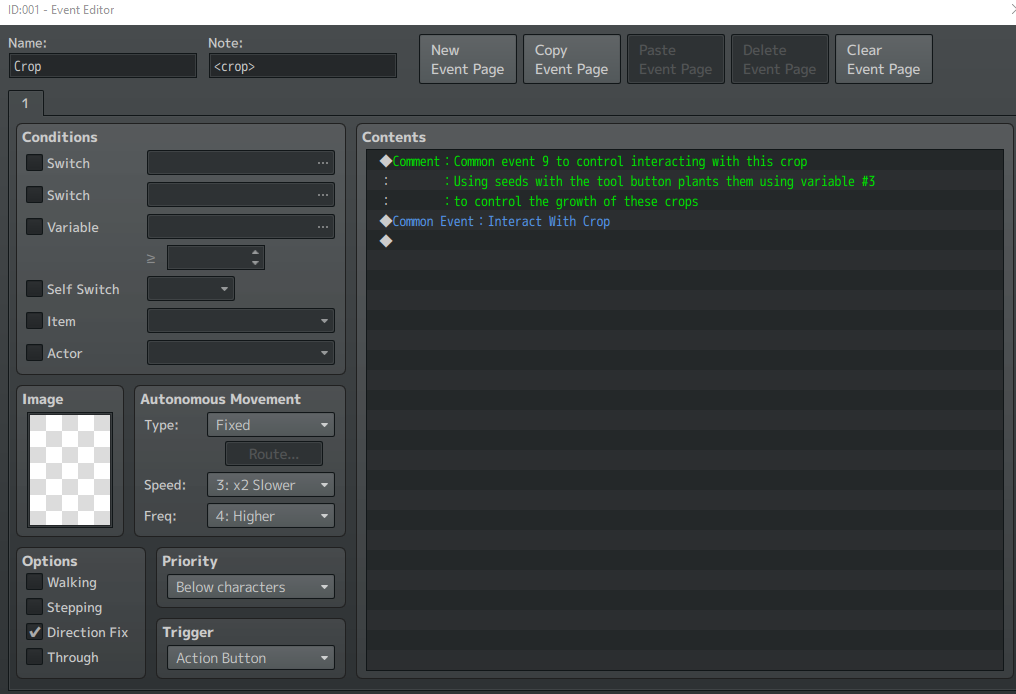
The Tool Common Event
Downloads / Referenced Files
Log in, then follow the RPG Maker Developers Group to see these download links.
Log in to downloadReferenced Images / Attachments
Creator Claims / Removal
If you are the original creator and want this listing reassigned, edited, or removed, join BMMPlay and contact the moderators with proof that matches the original RPG Maker Web profile, linked GitHub, itch.io page, or another public creator identity.
Replies (0)
No replies yet.
Topic Summary
Loading summary...

