public

Rpg Maker Developers Group

Simple enough for a child, powerful enough for a developer

2 Followers

Luna Engine MV - Window X, Y

BMM_Archive · July 15, 2026

Preserved forum archive. This topic stores the original first post and locally mirrored RPG Maker Web attachments when available. It is posted by the BMMPlay archive account, not by the original creator.

Original Source

  • Original title: Luna Engine MV - Window X, Y
  • Original author: Treynor
  • Original date: February 23, 2020
  • Source thread: https://forums.rpgmakerweb.com/threads/luna-engine-mv-window-x-y.118494/
  • Source forum path: Game Development Engines > RPG Maker Javascript Plugins > Javascript/Plugin Support

Summary

I'm not entirely sure if this is the right board to post on because the question I have is regarding the editing of the .yaml files. I'm now finally getting the hang of Luna Engine, but I've reached the limits of what video tutorials and documentation can teach me (unless there's a great tutorial I've missed.). My game is an adventure-puzzle game, not a combat RPG, so I'd like to have a minimalist UI that gives plenty of info with minimal design. However, since it's not a big UI, what...

Archived First Post

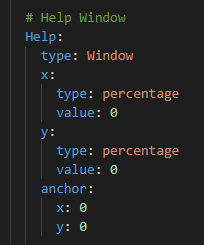
I'm not entirely sure if this is the right board to post on because the question I have is regarding the editing of the .yaml files. I'm now finally getting the hang of Luna Engine, but I've reached the limits of what video tutorials and documentation can teach me (unless there's a great tutorial I've missed.). My game is an adventure-puzzle game, not a combat RPG, so I'd like to have a minimalist UI that gives plenty of info with minimal design. However, since it's not a big UI, what I wanted to do is have it pop up under the player.

What I thought about doing was setting two RPGMV X, Y variables that read the players Screen X, Y then using that as the values in the .yaml file. Seems like it would work. Problem is that I don't really know how. I've made puzzles before that require an object to be an X, Y in order for something to happen, but this seems like a different beast.
What's the JS code I'd need to enter here for the .yaml?


Protected download

Downloads / Referenced Files

Log in to download

Log in, then follow the RPG Maker Developers Group to see these download links.

Log in to download

Referenced Images / Attachments

xy.png
xy.png
Creator Claims / Removal

If you are the original creator and want this listing reassigned, edited, or removed, join BMMPlay and contact the moderators with proof that matches the original RPG Maker Web profile, linked GitHub, itch.io page, or another public creator identity.

#039#rpg-maker-archive#js-support

Replies (0)

No replies yet.

0 replies 1 view

Log in to reply.

User Avatar