


QMovement collision map moves with player
BMM_Archive · July 15, 2026

Original Source
- Original title: QMovement collision map moves with player
- Original author: Bridgeman
- Original date: February 6, 2020
- Source thread: https://forums.rpgmakerweb.com/threads/qmovement-collision-map-moves-with-player.117991/
- Source forum path: Game Development Engines > RPG Maker Javascript Plugins > Javascript/Plugin Support
Summary
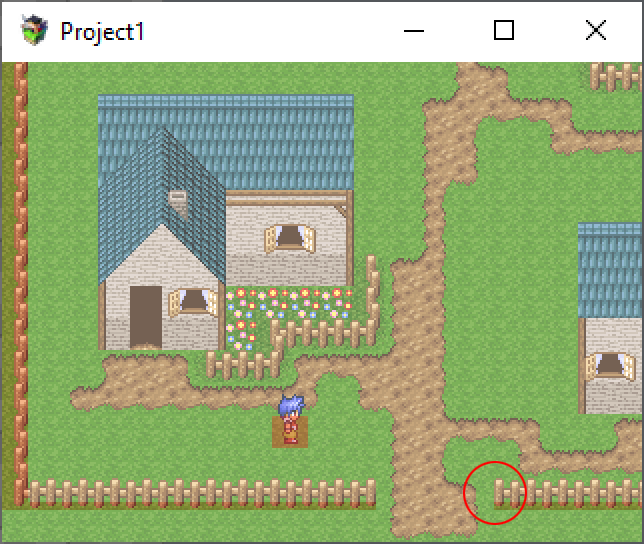
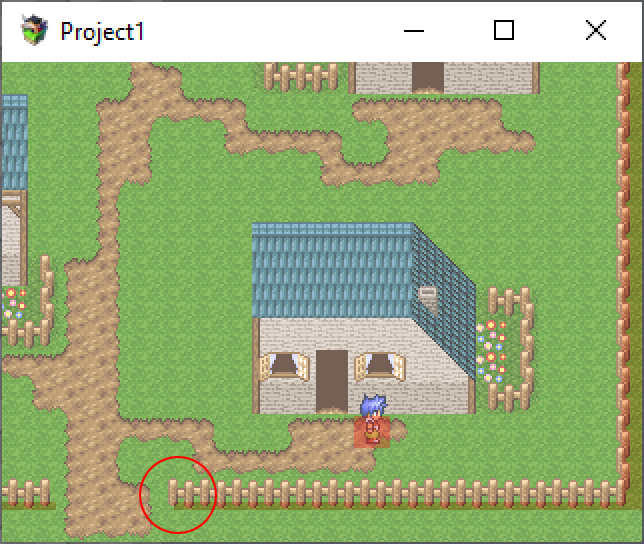
So... I'm using 16x16 tiles in my game... I'm using QMovement for pixel movement, and QCollisionmap for collisions. The width of my map is 10 tiles in MV, which translates to 480 pixels, which is the width of my map in Photoshop, as well as my collision map. However, the collision map should not move at all, it should be static. But it's not, and I can't figure out why it moves. If I move and the screen scrolls, the collision map shifts a few pixels. Good:
Archived First Post
The width of my map is 10 tiles in MV, which translates to 480 pixels, which is the width of my map in Photoshop, as well as my collision map.
However, the collision map should not move at all, it should be static. But it's not, and I can't figure out why it moves. If I move and the screen scrolls, the collision map shifts a few pixels.
Good:
Protected download
Bad:
Protected download
Does anyone know what could be causing this?
Downloads / Referenced Files
Log in, then follow the RPG Maker Developers Group to see these download links.
Log in to downloadReferenced Images / Attachments
Creator Claims / Removal
If you are the original creator and want this listing reassigned, edited, or removed, join BMMPlay and contact the moderators with proof that matches the original RPG Maker Web profile, linked GitHub, itch.io page, or another public creator identity.
Replies (0)
No replies yet.
Topic Summary
Loading summary...

