




public

Rpg Maker Developers Group

Simple enough for a child, powerful enough for a developer

2 Followers

Parallax Mapping with YEP Core Engine Resolution Change

BMM Archive · July 15, 2026

Preserved forum archive. This topic stores the original first post and locally mirrored RPG Maker Web attachments when available. It is posted by the BMMPlay archive account, not by the original creator.

Original Source

  • Original title: Parallax Mapping with YEP Core Engine Resolution Change
  • Original author: gibbotron09
  • Original date: November 16, 2015
  • Source thread: https://forums.rpgmakerweb.com/threads/parallax-mapping-with-yep-core-engine-resolution-change.50713/
  • Source forum path: Game Development Engines > Legacy Engine Support > RPG Maker MV Support

Summary

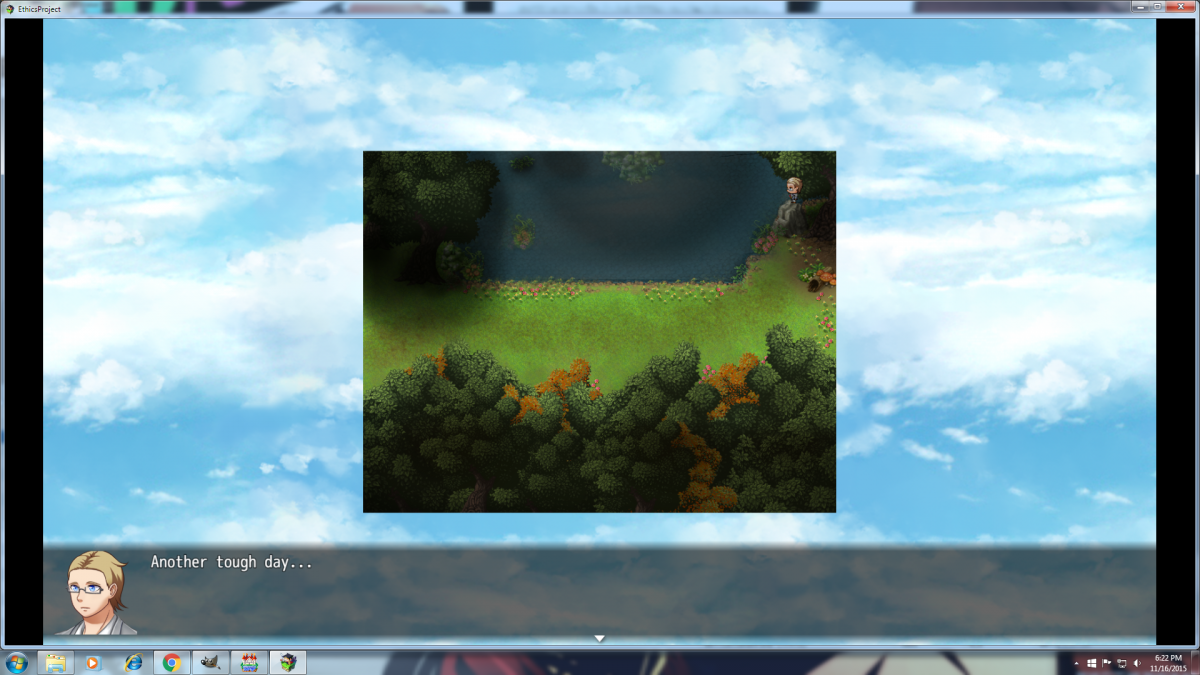
Hey guys, So I'm trying to create the effect of moving water in a parallax map I created using a sky parallax underneath a translucent section of water that I edited in Gimp. This works fine with the default resolution, but when I change the resolution using Yanfly's Core Engine Plugin, The sky parallax leaks into the black border surrounding the map. The black border was there because the map is smaller than the resolution, and that was ok, but the sky parallax surrounding the map is an issue. I...

Archived First Post

Hey guys,

So I'm trying to create the effect of moving water in a parallax map I created using a sky parallax underneath a translucent section of water that I edited in Gimp. This works fine with the default resolution, but when I change the resolution using Yanfly's Core Engine Plugin, The sky parallax leaks into the black border surrounding the map. The black border was there because the map is smaller than the resolution, and that was ok, but the sky parallax surrounding the map is an issue. I attached an image for reference as to what I mean. I'm hoping to be able to maintain the ability to change my resolution, while restricting the sky parallax to being behind the map so I have that water animation.

Protected download

Thanks for any help!

Downloads / Referenced Files

Log in to download

Log in, then follow the RPG Maker Developers Group to see these download links.

Log in to download

Referenced Images / Attachments

Example.png
Example.png
Creator Claims / Removal

If you are the original creator and want this listing reassigned, edited, or removed, join BMMPlay and contact the moderators with proof that matches the original RPG Maker Web profile, linked GitHub, itch.io page, or another public creator identity.

#039#rpg-maker-archive#mv-support

Replies (0)

No replies yet.

0 replies 1 view

Log in to reply.

User Avatar