

Preserved forum archive. This topic stores the original first post and locally mirrored RPG Maker Web attachments when available. It is posted by the BMMPlay archive account, not by the original creator.
Original Source
- Original title: Make animation start at player and end at opponent (Throwing a rock)
- Original author: BurningOrca
- Original date: March 15, 2020
- Source thread: https://forums.rpgmakerweb.com/threads/make-animation-start-at-player-and-end-at-opponent-throwing-a-rock.119128/
- Source forum path: Game Development Engines > Legacy Engine Support > RPG Maker MV Support
Summary
I want to create a skill where the user just throws a rock on to the opponent. For this I have set the Bare Hans animation to "Missile" { "lightbox_close": "Close",
Archived First Post
I want to create a skill where the user just throws a rock on to the opponent.
For this I have set the Bare Hans animation to "Missile"
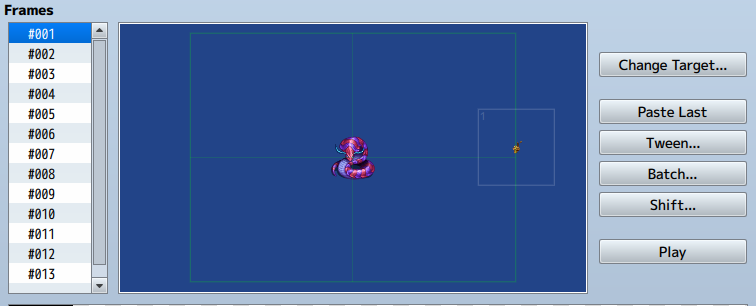
I've also created an animation, that currently has the following json format:
So far it looks really good. My only concern is that, as it is throwing a rock I want it to start at the user and end at opponent, but instead it starts at the center of the battle screen. This might come, because I chose a resolution of 1280 x 720.
At the default of 816 x 624 it starts nearer to user, but still at the place where I have set it up to start in the database.
Protected download
Is it possible to make a throwing a rock animation that starts at the user and ends at the enemy?
If not I have to live with it.
If this requires a plugin then please move it to the Plugin Request forum, except if it can be done using Yanfly Action Sequence Packs, then please move it to the plugin support forum or wherever it belongs to.
For this I have set the Bare Hans animation to "Missile"
I've also created an animation, that currently has the following json format:
{"id":121,"animation1Hue":0,"animation1Name":"Earth1","animation2Hue":345,"animation2Name":"","frames":[[[7,408,-23.5,100,0,0,255,0]],[[7,362.5,-43,100,0,0,255,0]],[[7,310,-62.5,100,0,0,255,0]],[[7,259.5,-72,100,0,0,255,0]],[[7,207,-76.5,100,0,0,255,0]],[[7,157,-78.5,100,0,0,255,0]],[[7,102,-68,100,0,0,255,0]],[[7,57.5,-53.5,100,0,0,255,0]],[[7,27,-23,100,0,0,255,0]],[[19,2,5,150,0,0,255,0]],[[19,2,5,150,0,0,255,0]],[[20,0,14,135,0,0,255,1]],[[20,0,14,135,0,0,255,1]]],"name":"Throw stone","position":1,"timings":[{"flashColor":[255,255,255,255],"flashDuration":5,"flashScope":0,"frame":9,"se":{"name":"Blow5","pan":0,"pitch":70,"volume":65}}]}
So far it looks really good. My only concern is that, as it is throwing a rock I want it to start at the user and end at opponent, but instead it starts at the center of the battle screen. This might come, because I chose a resolution of 1280 x 720.
At the default of 816 x 624 it starts nearer to user, but still at the place where I have set it up to start in the database.
Protected download
Is it possible to make a throwing a rock animation that starts at the user and ends at the enemy?
If not I have to live with it.
If this requires a plugin then please move it to the Plugin Request forum, except if it can be done using Yanfly Action Sequence Packs, then please move it to the plugin support forum or wherever it belongs to.
Downloads / Referenced Files
Log in to download
Log in, then follow the RPG Maker Developers Group to see these download links.
Log in to downloadReferenced Images / Attachments
Creator Claims / Removal
If you are the original creator and want this listing reassigned, edited, or removed, join BMMPlay and contact the moderators with proof that matches the original RPG Maker Web profile, linked GitHub, itch.io page, or another public creator identity.
Replies (0)
No replies yet.
0
replies
1
view
Topic Summary
Loading summary...


