public

Rpg Maker Developers Group

Simple enough for a child, powerful enough for a developer

2 Followers

SrDude's Battle Status Customizer: Actor window won't update.

BMM_Archive · July 15, 2026

Preserved forum archive. This topic stores the original first post and locally mirrored RPG Maker Web attachments when available. It is posted by the BMMPlay archive account, not by the original creator.

Original Source

  • Original title: SrDude's Battle Status Customizer: Actor window won't update.
  • Original author: RicoRob
  • Original date: November 4, 2019
  • Source thread: https://forums.rpgmakerweb.com/threads/srdudes-battle-status-customizer-actor-window-wont-update.114882/
  • Source forum path: Game Development Engines > RPG Maker Javascript Plugins > Javascript/Plugin Support

Summary

[The plugin link: SrDude's Battle Status Customizer.] If I remove one hero from the party in the middle of a battle, the Status window stop updating and stays on top of all the other windows. Screenshots: This is how it normally is (ignore the weird positioning), it should stay behind all windows:

Archived First Post

[The plugin link: SrDude's Battle Status Customizer.]

If I remove one hero from the party in the middle of a battle, the Status window stop updating and stays on top of all the other windows.

Screenshots:

This is how it normally is (ignore the weird positioning), it should stay behind all windows:

upload_2019-11-4_7-12-55.png


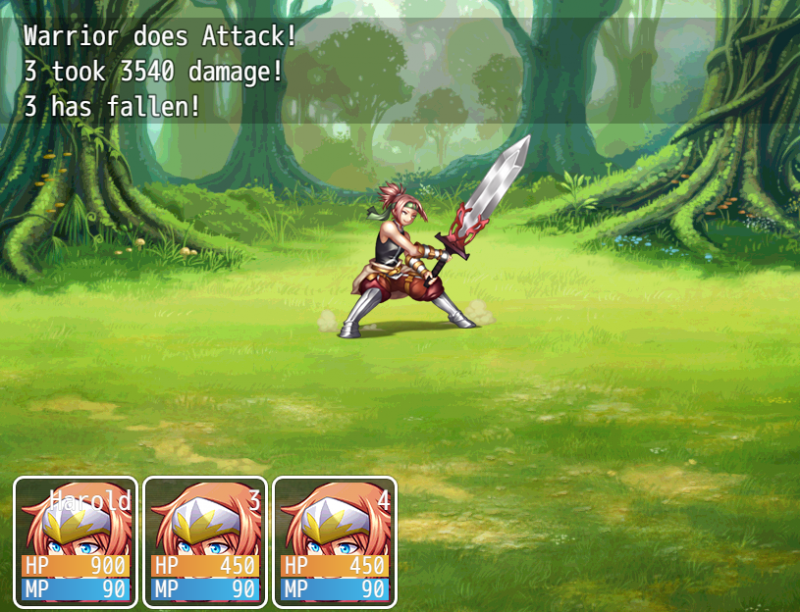
But if I remove one of the heros...:

Protected download

I removed the hero "2" and went on with the fight. The battle log states that hero "3" took damage and has fallen, yet the status window shows his HP as full. That doesn't change when the turn ends.

With that, a second problem appears:

upload_2019-11-4_7-3-32.png


Now the Status window stays on top of every other window that appear, including the Skills window and text messages.
This only happens if I remove one (or more) of the heros. The result is always the same no matter the number of party members.

Please, could someone help me fix this? My MV version is 1.5.1 (it's more compatible with the plugins I use). This test was made using only this plugin.

Downloads / Referenced Files

Log in to download

Log in, then follow the RPG Maker Developers Group to see these download links.

Log in to download

Referenced Images / Attachments

upload_2019-11-4_6-58-57.png
Creator Claims / Removal

If you are the original creator and want this listing reassigned, edited, or removed, join BMMPlay and contact the moderators with proof that matches the original RPG Maker Web profile, linked GitHub, itch.io page, or another public creator identity.

#039#rpg-maker-archive#js-support

Replies (0)

No replies yet.

0 replies 1 view

Log in to reply.

User Avatar