


RMMV: Disabling Text Anti-Aliasing Removes Opacity on "Greyed Out" Text
BMM_Archive · July 15, 2026

Preserved forum archive. This topic stores the original first post and locally mirrored RPG Maker Web attachments when available. It is posted by the BMMPlay archive account, not by the original creator.
Original Source
- Original title: RMMV: Disabling Text Anti-Aliasing Removes Opacity on "Greyed Out" Text
- Original author: SawyerFriend
- Original date: November 4, 2019
- Source thread: https://forums.rpgmakerweb.com/threads/rmmv-disabling-text-anti-aliasing-removes-opacity-on-greyed-out-text.114905/
- Source forum path: Game Development Engines > RPG Maker Javascript Plugins > Javascript/Plugin Support
Summary
I apologize, I tried my best to explain the problem in the thread title, but it's a little complicated so I'll have to explain everything here. By default, my game's text looks like this. It's ugly, hard to read, and clashes with the game's pixelated aesthetic. { "lightbox_close": "Close",
Archived First Post
I apologize, I tried my best to explain the problem in the thread title, but it's a little complicated so I'll have to explain everything here.
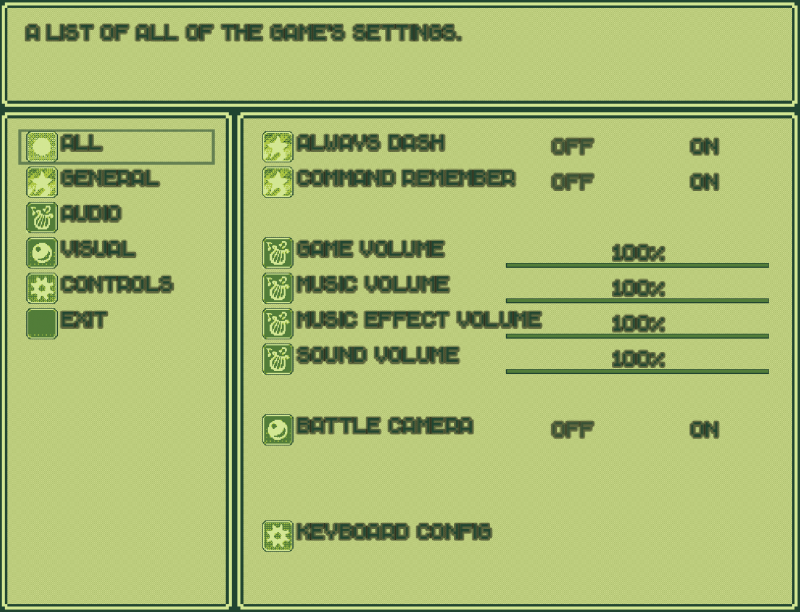
By default, my game's text looks like this. It's ugly, hard to read, and clashes with the game's pixelated aesthetic.
Protected download
So, I did some searching and found a plugin that would allow me to remove the outline on text. (The plugin itself was simply found on a forum outside any larger plugin database, here's the link.)
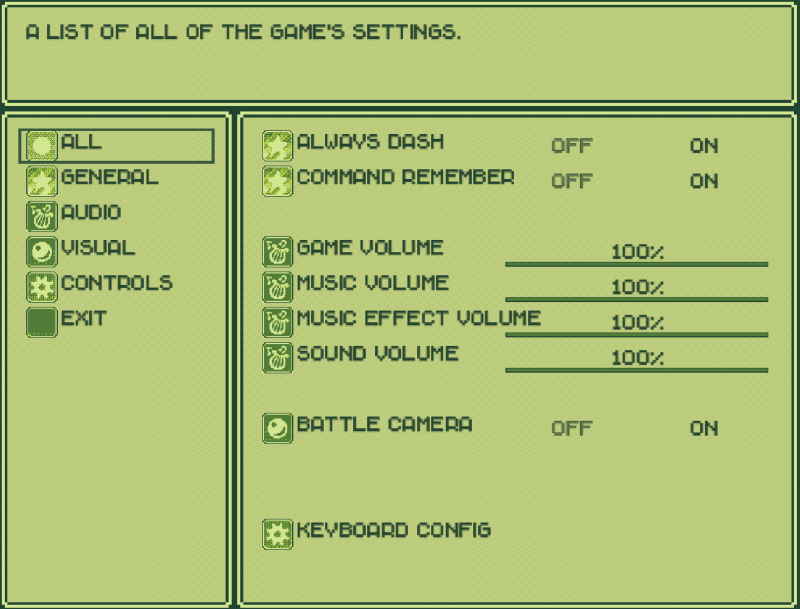
It looks substantially better without the outline, but as you can see, there is still an annoying anti alias blur. If I couldn't find a way to remove this, I'd probably be okay with sending out the game like this, but to be honest I still think it looks very ugly.
Protected download
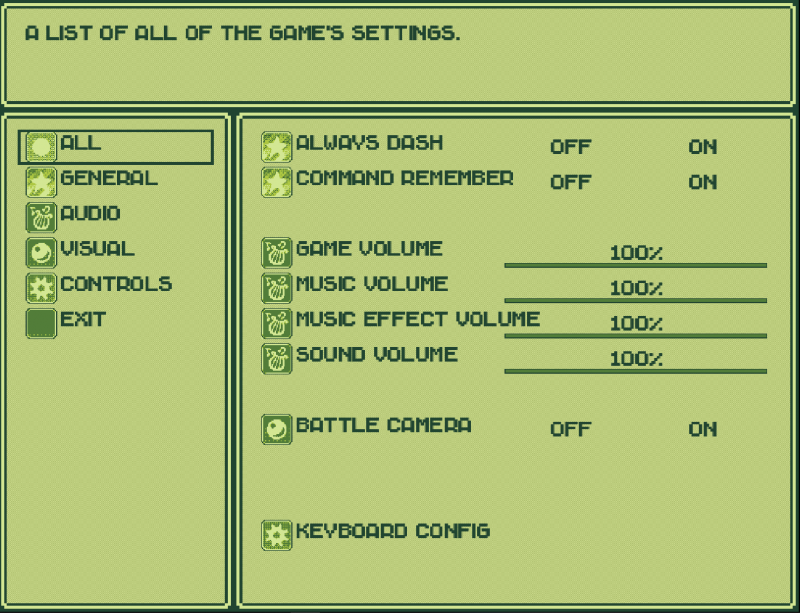
So, after continuing my search, I came across another thread with a plugin that would remove this anti aliasing. Without the font blur, the game looks fantastic, with a smige of aliasing that I'm willing to ignore. However, there remains one small problem:
Protected download
This plugin also removes the transparency on what I can only refer to as "greyed out" text. This kind of text is used for unavailable options such as the Continue option when there is no save data, or to show which option is currently toggled in the menu (i.e. always dash). Without the greyed out text, it goes without saying that many of the game's menus are borderline unusable.
So, I'm wondering if there is a way to edit the plugin so that this kind of text remains greyed out, or better yet, perhaps a plugin could be made that would allow me to use the window.png colours to decide what colour this "greyed text" should be changed to. Any chance somebody could help with this?
By default, my game's text looks like this. It's ugly, hard to read, and clashes with the game's pixelated aesthetic.
Protected download
So, I did some searching and found a plugin that would allow me to remove the outline on text. (The plugin itself was simply found on a forum outside any larger plugin database, here's the link.)
It looks substantially better without the outline, but as you can see, there is still an annoying anti alias blur. If I couldn't find a way to remove this, I'd probably be okay with sending out the game like this, but to be honest I still think it looks very ugly.
Protected download
So, after continuing my search, I came across another thread with a plugin that would remove this anti aliasing. Without the font blur, the game looks fantastic, with a smige of aliasing that I'm willing to ignore. However, there remains one small problem:
Protected download
This plugin also removes the transparency on what I can only refer to as "greyed out" text. This kind of text is used for unavailable options such as the Continue option when there is no save data, or to show which option is currently toggled in the menu (i.e. always dash). Without the greyed out text, it goes without saying that many of the game's menus are borderline unusable.
So, I'm wondering if there is a way to edit the plugin so that this kind of text remains greyed out, or better yet, perhaps a plugin could be made that would allow me to use the window.png colours to decide what colour this "greyed text" should be changed to. Any chance somebody could help with this?
Downloads / Referenced Files
Log in to download
Log in, then follow the RPG Maker Developers Group to see these download links.
Log in to downloadReferenced Images / Attachments
Creator Claims / Removal
If you are the original creator and want this listing reassigned, edited, or removed, join BMMPlay and contact the moderators with proof that matches the original RPG Maker Web profile, linked GitHub, itch.io page, or another public creator identity.
Replies (0)
No replies yet.
0
replies
6
views
Topic Summary
Loading summary...

