Howdy again, folks- New day, new challenge. I hope that you can help I have been using Galv's MV Message Styles plug-in- here are some excerpts from the plug-in help to give a better idea of how it works: The main purpose of this plugin is to allow your "Show Text" message boxes to have a different style to other windows in the game. The plugin settings have a variety of visual settings you can tweak, and in addition using a text code in Show Text messages will allow you...
Howdy again, folks-
New day, new challenge. I hope that you can help
I have been using
Galv's MV Message Styles plug-in- here are some excerpts from the plug-in help to give a better idea of how it works:
The main purpose of this plugin is to allow your "Show Text" message boxes to have a different style to other windows in the game. The plugin settings have a variety of visual settings you can tweak, and in addition using a text code in Show Text messages will allow you to turn that message into a floating message....
The following code MUST be put in the first line of a message to work.
\pop[x]...
EXAMPLES
\pop[23] // targets event 23
\pop[-3] // targets the 3rd follower in your follower lineup
\pop[a8] // targets actor 8, only if the actor is a follower on the map
\pop[200,200] // targets screen position at 200px X and 200px Y
In addition to the examples above,
\pop[0] will "target the event [that] the Show Text command is used [in]" (I will come back to this later).
The plug-in is pretty great, except that it doesn't work with
$gameMessage.add(), and can only be set through the Show Text command in the event editor.
This means that a script call like:
Code:
let test_message = `\pop[` + $gameVariables.value(14) + `]son, i'm surprised you run with them.`);
$gameMessage.add(test_message);
won't work with the plug-in.
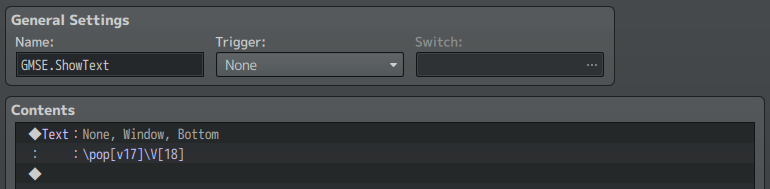
I wrote a clunky workaround that "extends" the plug-in a little bit. It consists of a Common Event:
And a JS plug-in (GALV_MessageStyles_Extended), that includes a few aliases of Galv's functions, as well as
ShowText_Intercept() and
$.ShowText():
Code:
    function ShowText_Intercept(text_to_parse) {

        let result = String.raw`${text_to_parse}`;

        if (~text_to_parse.toLowerCase().indexOf(String.raw`\pop[v`)) {

            let temp = [];

            temp[0] = text_to_parse.replace(/\\/g,`_`);

            temp[1] = temp[0].split(`_pop[v`);

            temp[2] = temp[1][1].substr(0, temp[1][1].indexOf(`]`));

            temp[3] = temp[1][0] + `_pop[` + $gameVariables.value(Number(temp[2])) + temp[1][1].substr(temp[1][1].indexOf(`]`));

            temp[4] = String.raw`${("_pop" + String.fromCharCode(92) + "[v" + temp[2] + String.fromCharCode(92) + "]").replace(/_/g,String.fromCharCode(92))}`;

            $.pop_reg_ex = temp[4];

            result = String.raw`${temp[3].replace(/_/g,String.fromCharCode(92))}`;

        }

        return result;

    };
ShowText_Intercept() "intercepts" (duh)
Galv.Mstyle.checkTarget() and allows me to use
\pop[vX] to inject a variable (
X) into the mix (hence
\pop[v17] in the common event).
Finally there's
$.ShowText(), which handles the aforementioned common event:
Code:
    $.ShowText = function(message, target_type = 0) {

        $gameVariables.setValue(18, message);

        $gameVariables.setValue(17, target_type);

        $gameTemp.reserveCommonEvent(2);

    };
This all works under normal circumstances.
I can do a script call like:
Code:
Galv.Mstyle_Extended.ShowText("you cursed it but rehearsed it.", -1);
or
Code:
Galv.Mstyle_Extended.ShowText("i drop unexpectedly like bird sh-t.", [($gamePlayer._x * 48) + 24, ($gamePlayer._y * 48) - 24]);
The problem I run into is when I try to use
$.ShowText() with dynamic events using another of Galv's plug-ins-
MV Event Spawner.
Because the new events spawned also have dynamically generated event IDs, I run into problems using
$.ShowText() in both of the following scenarios:
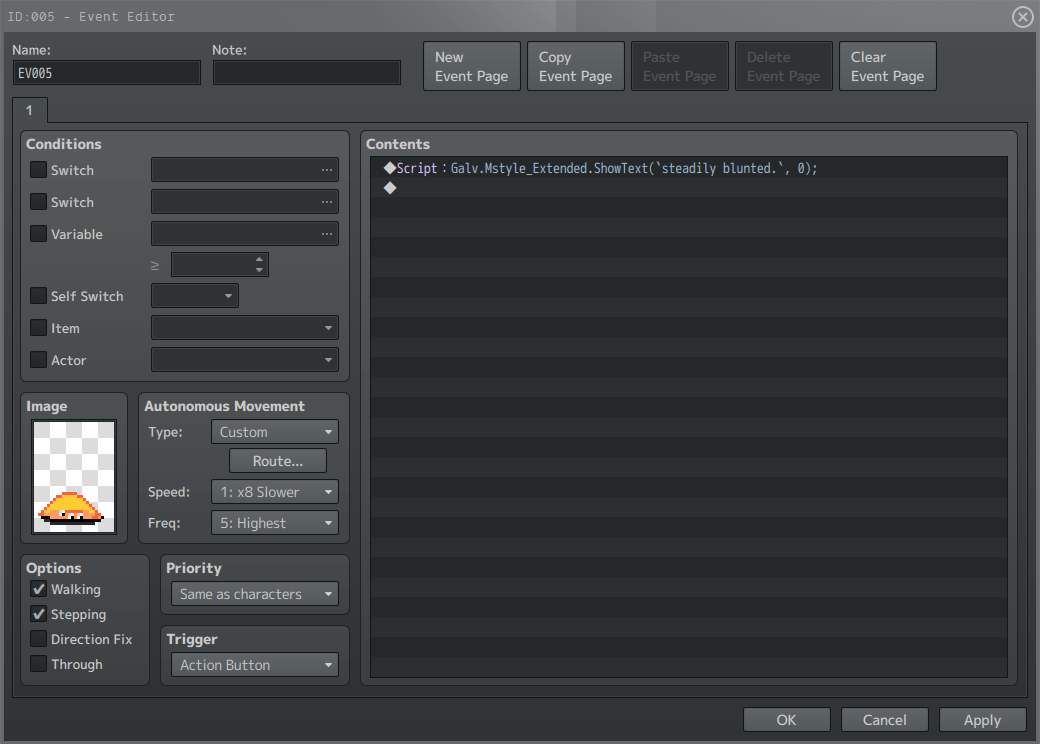
Code:
Galv.Mstyle_Extended.ShowText(`steadily blunted`, 0);
(which is equivalent to MessageStyle code
\pop[0])
and
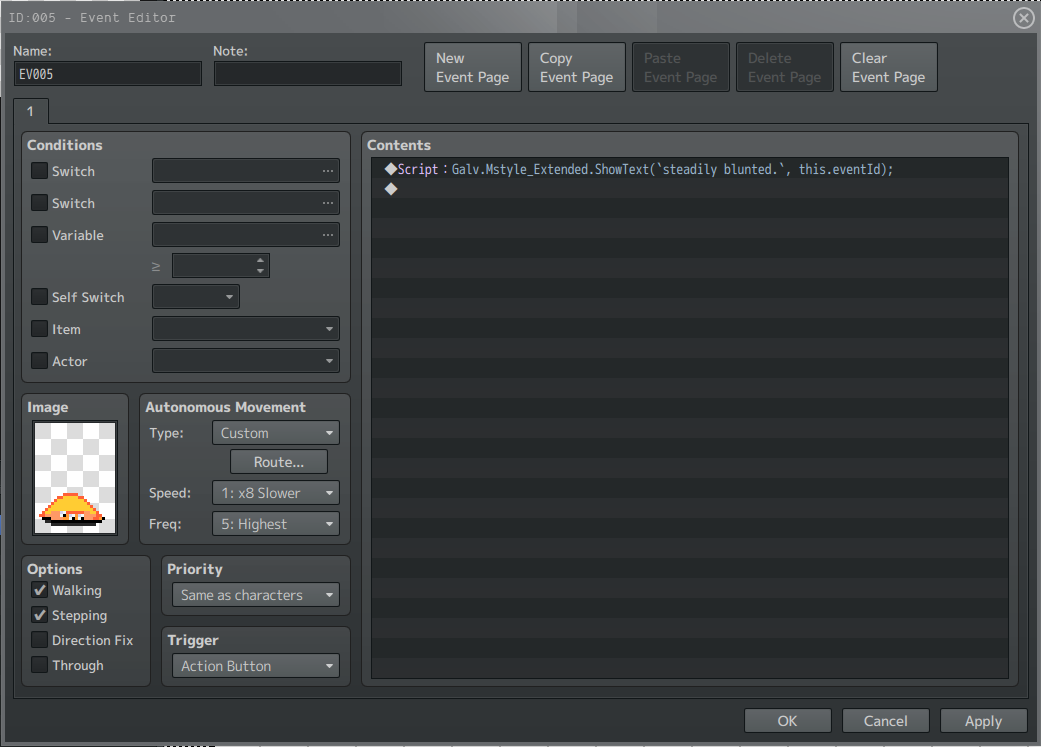
Code:
Galv.Mstyle_Extended.ShowText(`steadily blunted`, this.eventId);
(which is equivalent to MV Message Styles code
\pop[eventId])
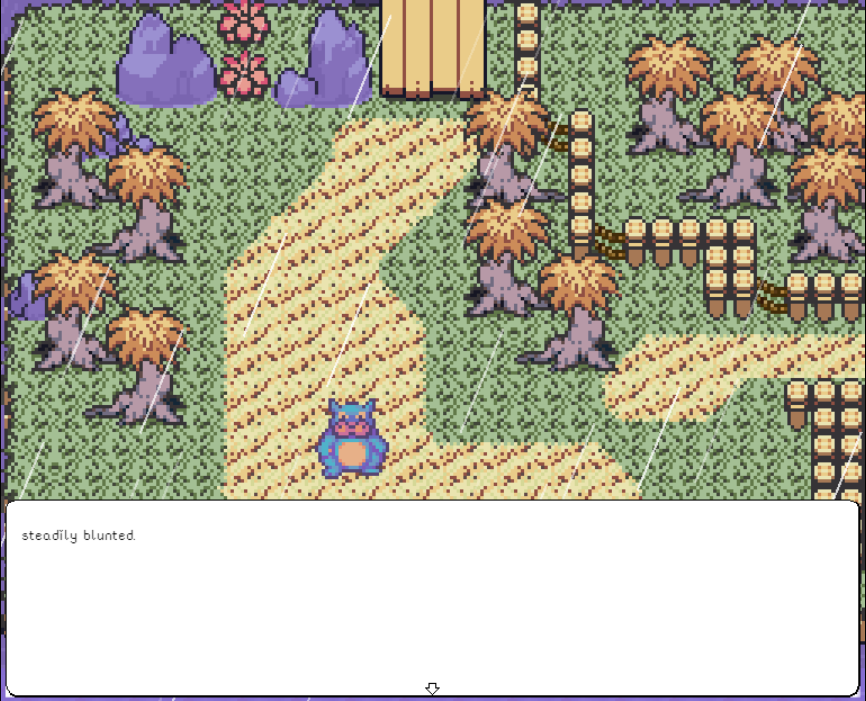
In both cases, MV Message Styles ends up referring to
Game_Interpreter rather than the event itself and so the Message Window appears at the bottom of the screen rather than floating by the event that called the script.
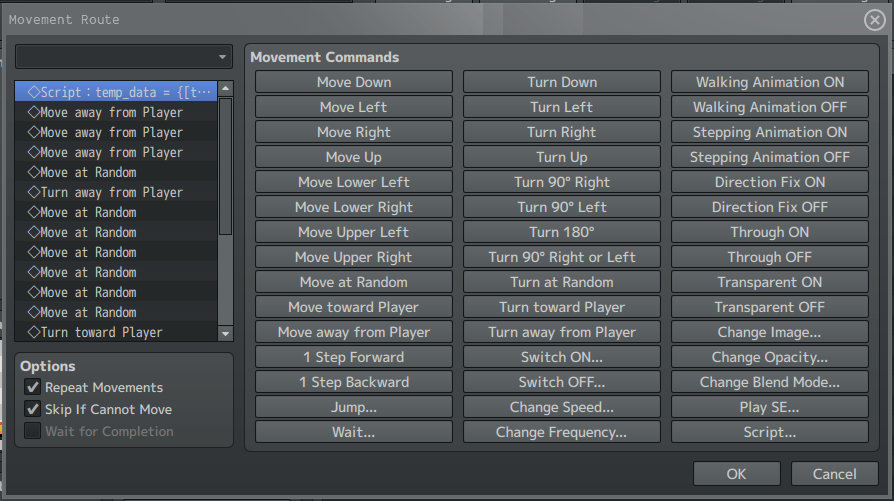
I can get the dynamically created event's ID and coordinates and store it in a variable if I put the following script call in its Autonomous Movement / Custom Movement Route commands list:
Code:
let temp_data = {[this._spawnEventId]: {}}; temp_data[this._spawnEventId] = {[this._mapId]: {[this._spawnEventId]: [(this._x * 48), (this._y * 48)]}}; $gameVariables.setValue(14, temp_data[this._spawnEventId]); delete temp_data[this._spawnEventId];
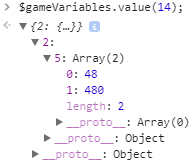
The script call creates and updates an object in which the spawned event's x and y coordinates (in this case- 48, 480) are stored as an array nested in a key from its event ID (5), nested in a key from its map ID (2), which is then stored in a variable (14):
But my problem now is, how do I access this information from the spawned event's Event Contents list so that I can then use it in
Galv.Mstyles_Extended.ShowText()?
I can't just do something like changing the Custom Movement Route script call to:
Code:
temp_data = [(this._x * 48), (this._y * 48)]; $gameVariables.setValue(14, temp_data); delete temp_data;
and then:
Code:
Galv.Mstyle_Extended.ShowText(`ain't no amateurs here, i damage and tear...`, $gameVariables.value(14));
because these commands are being called by spawned events that often have multiple instances on a map, so using a static variable would cause an overlap and then confusion in the execution of the function.
Does anybody know of a way that I would be able to solve this problem?
I am sorry for the lengthy explanation but I thought it might be helpful to present all parts to perhaps aid in coming up with a solution.
Thank you in advance for taking the time to help!
EDIT 08/09/2019 (5:21 PM [GMT +8])
Solved it myself.
Since these message boxes appear when the player is speaking to an event, it means that the player will be standing next to the event when the action occurs.
With this information, I wrote the following function and added it to my plug-in:
Code:
    $.detectEventID = function() {

        let result = 0;

        let px = $gamePlayer.x;
        let py = $gamePlayer.y;

        switch($gamePlayer.direction()) {

            case 2: // down
                result = $gameMap.eventIdXy(px, py + 1);
                break;

            case 4: // left
                result = $gameMap.eventIdXy(px - 1, py);
                break;

            case 6: // right
                result = $gameMap.eventIdXy(px + 1, py);
                break;

            case 8: // up
                result = $gameMap.eventIdXy(px, py - 1);
                break;

        }

        return result;

    };
Yeesh.




 ZSCMALLS 18.5-Inch Portable Monitor
Portable 1080p screen for laptop expansion, travel desks, and compact workstations.
View on Amazon
ZSCMALLS 18.5-Inch Portable Monitor
Portable 1080p screen for laptop expansion, travel desks, and compact workstations.
View on Amazon