Preserved forum archive. This topic stores the original first post and locally mirrored RPG Maker Web attachments when available. It is posted by the BMMPlay archive account, not by the original creator.
Source forum path: Game Development Engines > Legacy Engine Support > RPG Maker MV Support
Summary
I've built a parallax map and put it in the game as parallax background. It all looks fine and clear in the editor of MV but when I try it inside the game it is all blurry, the whole parallax. Checked the size, tried it with plugins disabled, saved it again with a different graphics program (maybe strange meta data), but it is always blurred in game. The parallaxes that come with MV are blurred in game too (even though not as noticable, due to the lack of sharp edges)....
Archived First Post
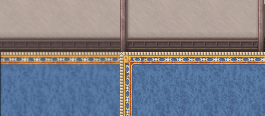
I've built a parallax map and put it in the game as parallax background. It all looks fine and clear in the editor of MV but when I try it inside the game it is all blurry, the whole parallax. Checked the size, tried it with plugins disabled, saved it again with a different graphics program (maybe strange meta data), but it is always blurred in game. The parallaxes that come with MV are blurred in game too (even though not as noticable, due to the lack of sharp edges). Funny enough, when I try it as a picture event, it is crystal clear. I've put the normal tiles over the parallax for comparison.
Is it just like that at the moment or is there a way to fix it?
Protected download
Downloads / Referenced Files
Log in to download
Log in, then follow the RPG Maker Developers Group to see these download links.
If you are the original creator and want this listing reassigned, edited, or removed, join BMMPlay and contact the moderators with proof that matches the original RPG Maker Web profile, linked GitHub, itch.io page, or another public creator identity.






 FIFINE Gaming USB Microphone Kit with Boom Arm
USB microphone setup for streams, party chat, podcasts, and creator clips.
View on Amazon
FIFINE Gaming USB Microphone Kit with Boom Arm
USB microphone setup for streams, party chat, podcasts, and creator clips.
View on Amazon