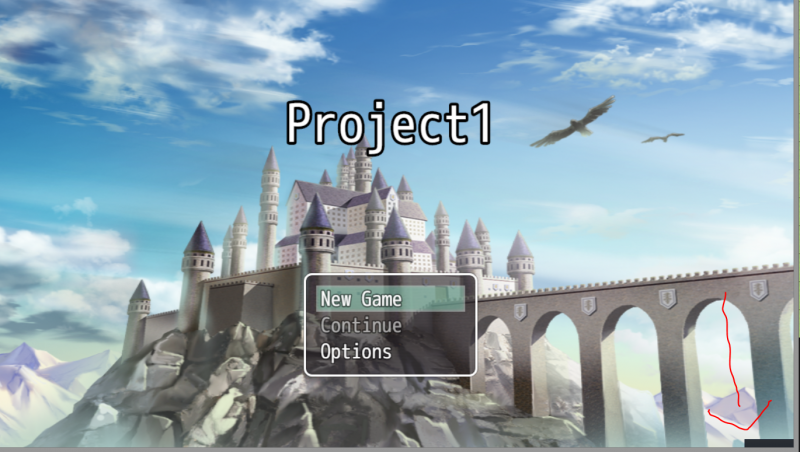
Hello people! I have a weird problem that could be a computer corruption problem but I don't know. I was working on my game project, it was a new project, I haven't made a project in months, I added all my plugins and made a debug map and found that a tiny black bar would appear in the lower right corner as soon as the game started, and then disappear in a few seconds. Spoiler {
Hello people! I have a weird problem that could be a computer corruption problem but I don't know.
I was working on my game project, it was a new project, I haven't made a project in months, I added all my plugins and made a debug map and found that a tiny black bar would appear in the lower right corner as soon as the game started, and then disappear in a few seconds.
It is the Core Engine because I redownloaded it from Yanfly's website created a new project and put it in. It was the only plugin in the project and it still appeared.
Has anyone had this problem before? It is not anything game breaking but it is an annoyance. Thanks.




 UGREEN Nexode 200W GaN USB-C Wall Charger
High-output four-port USB-C charger for laptops, tablets, phones, and travel kits.
View on Amazon
UGREEN Nexode 200W GaN USB-C Wall Charger
High-output four-port USB-C charger for laptops, tablets, phones, and travel kits.
View on Amazon