


Stacking multiple B-E tiles.
BMM_Archive · July 15, 2026

Original Source
- Original title: Stacking multiple B-E tiles.
- Original author: SawyerFriend
- Original date: August 2, 2019
- Source thread: https://forums.rpgmakerweb.com/threads/stacking-multiple-b-e-tiles.111719/
- Source forum path: Game Development Engines > Legacy Engine Support > RPG Maker MV Support
Summary
Hello, everyone! I know it's been a while, but to be honest I just feel a little nervous sometimes asking questions like this, and luckily the internet has been an enormous help in finding most of the answers I need. The current problem I have, however, is kinda simple yet I haven't been able to find a straight answer for it. So, the overworld of the first continent in my game is a large bustling city. I felt it would be most appropriate to make the overworld itself the city,...
Archived First Post
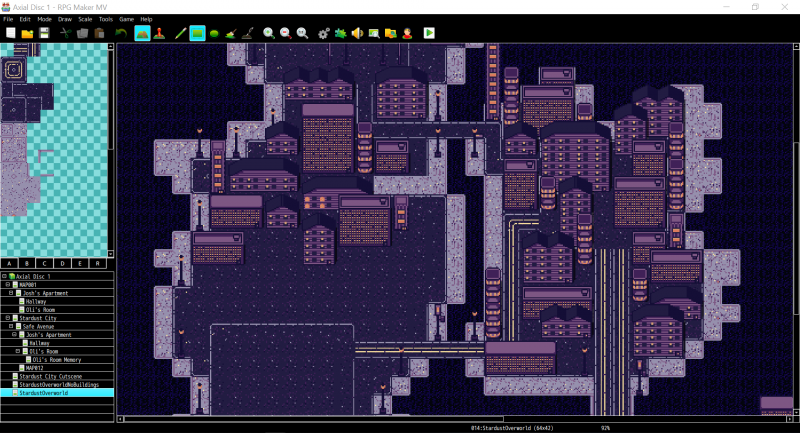
So, the overworld of the first continent in my game is a large bustling city. I felt it would be most appropriate to make the overworld itself the city, and have the "towns" of this area be streets and neighborhoods within. To evoke this city feel, I've been trying to place a lot of buildings close to each other to make it feel very tight and cramped, but as I'm sure you all know, stacking tiles can lead to some issues.
Right now, the water and concrete that make up the shape of the island are A tiles, while the streets and asphalt are B and the buildings C. The reason the streets take up a B tile instead of A is that when they're A tiles, placing them cuts into the concrete, making them look like they're cutting into it.
But unfortunately, this approach has caused some errors. Since the street is a B tile but is ever present across the entire (relevant) map, I can't place a building overlapping another building without the street tile vanishing. I can often hide this pretty well, but thanks to the general shape of each building tile. it's impossible to hide them all. I could simply refrain from ever overlapping buildings, but this doesn't sell the look quite right.
So, perhaps I'm looking at this from the wrong angle, but how can I make the buildings look cramped like this without cutting into the street? (Pictures attached to illustrate) Protected download
Downloads / Referenced Files
Log in, then follow the RPG Maker Developers Group to see these download links.
Log in to downloadReferenced Images / Attachments
Creator Claims / Removal
If you are the original creator and want this listing reassigned, edited, or removed, join BMMPlay and contact the moderators with proof that matches the original RPG Maker Web profile, linked GitHub, itch.io page, or another public creator identity.


Replies (0)
No replies yet.
Topic Summary
Loading summary...
