Preserved forum archive. This topic stores the original first post and locally mirrored RPG Maker Web attachments when available. It is posted by the BMMPlay archive account, not by the original creator.
Source forum path: Game Development Engines > Legacy Engine Support > RPG Maker MV Support
Summary
This is my first post, and I'm sure this is the wrong area for it, but I couldn't find a Maker Specific section for MV. Sorry preemptively. I'm not sure exactly how to word my problem, which is part of the trouble I'm having, but I'll try. Essentially I'm using the POP! Slasher Forest asset set, and am trying to get a campfire to run (like an animation with it shifting to 3-4 slightly different images to make the flames look like they're not a static image). However, when I...
Bmmplay may earn a commission from qualifying purchases made through these links.
Archived First Post
This is my first post, and I'm sure this is the wrong area for it, but I couldn't find a Maker Specific section for MV. Sorry preemptively.
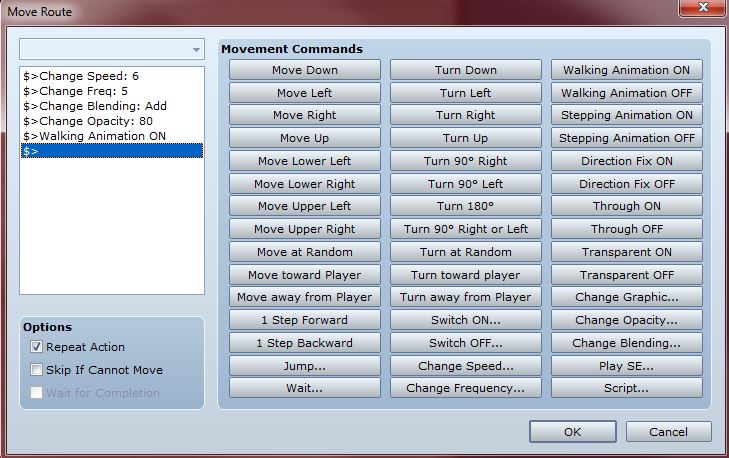
I'm not sure exactly how to word my problem, which is part of the trouble I'm having, but I'll try. Essentially I'm using the POP! Slasher Forest asset set, and am trying to get a campfire to run (like an animation with it shifting to 3-4 slightly different images to make the flames look like they're not a static image). However, when I try to do this, all that happens is the flame image continues to blink in and out, using only the same image. It isn't running. Normally I just set the event to "stepping" and "walking" with a maximum speed and frequency, but due to the image being black, I'm using this custom movement command with the opacity alteration.
Protected download
I can't figure out why it won't shift to the next image though. I tried the exact same thing with a default asset campfire, and it was working just fine. Is it something to do with the file having a "!$" at the beginning? I've tried it with just a "!", but the fire image is much larger than default asset images, and so the "$" is needed to show the whole image. I'm sure there's something I'm just overlooking, but I'm apparently blind to it.
This is the Character I'm trying to use. Could the problem be that the alternate images are beneath the initial one, rather than to the side like in the default assets?
Any suggestions?
<--snip--> Mod action, see post below.
Downloads / Referenced Files
Log in to download
Log in, then follow the RPG Maker Developers Group to see these download links.
If you are the original creator and want this listing reassigned, edited, or removed, join BMMPlay and contact the moderators with proof that matches the original RPG Maker Web profile, linked GitHub, itch.io page, or another public creator identity.




 PlayStation DualSense Wireless Controller - White
Extra DualSense controller for couch co-op, backup play, or PC and mobile sessions.
View on Amazon
PlayStation DualSense Wireless Controller - White
Extra DualSense controller for couch co-op, backup play, or PC and mobile sessions.
View on Amazon