[CGMZ] Crafting By: Casper Gaming Last Update: May 3, 2026 Latest Version: 1.12.2
[CGMZ] Crafting
By: Casper Gaming
Last Update: May 3, 2026
Latest Version: 1.12.2
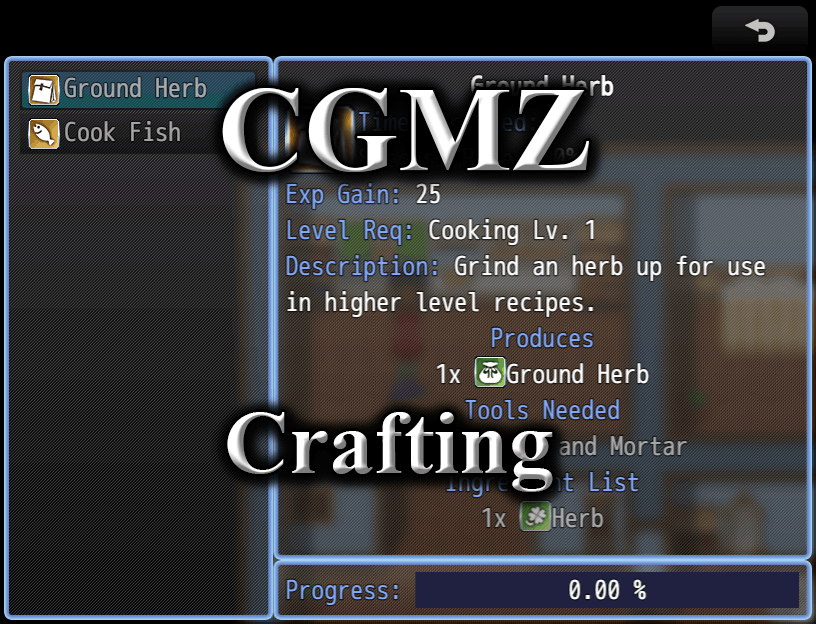
Adds a crafting system to your game that works well with [CGMZ] Professions. It can handle ingredients (consumed on craft), tool requirements (not consumed on craft), products (produced on craft success) and fail products (produced on craft fail). Recipes can be discovered by using an item or via plugin command.
- Crafting system with ingredients, tools, fail products, and success products
- Works well with [CGMZ] Professions and many other [CGMZ] plugins to add more functionality
- Learn recipes on level up, item use, or plugin command
- High quality crafts, normal crafts, craft failures as possible outcomes
- Allow the player to filter the craft window
The crafting scene
Crafting display window can scroll up/down
Call the crafting scene with only certain recipes, such as cooking recipes only
During the craft
v1.3.0+ crafting window display:
With instant crafting (no progress window) and a unique recipe (unique under products header):
The category window:
Import into plugin manager and enable the plugin. Some customization options available. Further instructions in plugin.
Online documentation can be found on my
website.
User documentation can be found on the
Casper Gaming Wiki.
Plugin (along with all my other plugins) can be found here:
https://www.caspergaming.com/plugins/cgmz/crafting/
Requires CGMZ Core plugin: https://www.caspergaming.com/plugins/cgmz/core/
Integrations
[CGMZ] Menu Command Window - To easily add Crafting as an option in the main menu.
[CGMZ] Professions - For a profession system that works well with this plugin.
[CGMZ] Toast Manager - For popup window when learning a recipe.
[CGMZ] Rumble - To rumble the controller on craft success or failure.
[CGMZ] Scene Backgrounds - To show a custom background image in the crafting scene, including animated scrolling images or weather.
[CGMZ] Currency System - To craft custom currencies or require custom currency ingredients set up via the currency system.
Also available on Itch.io:
Powerful crafting system for your game

casper-gaming.itch.io
https://www.caspergaming.com/terms-of-use/
Version 1.0.1
- Made it easier to select items/armors/weapons for crafting recipes
- Fixed crash if recipe had no toast SE but Toast Manager was imported
Version 1.0.2
- Added option to hide the percentage text on the progress window
- Made the recipe list refresh after every craft
Version 1.0.3
- Added option to show the current supply of ingredients in craft window
Version 1.0.4
- Rearranged the recipe parameter to show the name first
Version 1.1.0
- Added ability to use gold as ingredient, tool, fail product, or product
- Added ability to increase success change by equipment
- Added ability to increase success chance by profession level
- Added option to close crafting scene on profession level up
- Added option to use your own background image for the scene
- Added option to make the windows transparent
Version 1.2.0
- Descriptions and item names now compatible with text codes such as \c[x]
- Added ability to use custom icon image in place of big icon in display window
- Added option to show a confirmation window before crafting
- Added option to change label text color
- Added plugin command to set a recipe's description
- The display window now shows the current profession level
- Changed the Call Scene plugin command. You can now input multiple professions to include more than 1 type in the scene
- New recipes should be automatically recognized on saved game load
- Compatibility with CGMZ Professions profession level buffs
Version 1.2.1
- Fixed bug with click to craft for windows that don't scroll
Version 1.2.2
- Fixed bug when using cgmz professions but a recipe doesn't have a profession
- Fixed bug with back button on non-scrolling display window
Version 1.3.0
- Added ability to change what info is displayed in display window
- Added ability to change the order of information in display window
- Added ability to show fail products in display window
- You can now set recipe(s) to be learned when crafting another recipe
- More documentation added
- Documentation no longer horizontally scrolls
Version 1.4.0
- Added ability to increase a variable after a successful craft
- Added generic items, you can now designate multiple item/wep/armor as a "type" and crafting ingredient/tools will count any items of that type
Version 1.4.1
- Fixed crash if using CGMZ Professions and recipe profession did not exist
Version 1.5.0
- Added options to display tool, product, and fail product amounts
- Added ability to assign a quality to each recipe
- Added ability to assign a subcategory to each recipe
- Added option to fill space where touch UI buttons would be
- Added option to show the list window on right side of screen
- Added option to change windowskin of each window
- Added Spanish language support
Version 1.6.0
- Added option for instant crafting
- Added unique products
- Added option to craft from the list window
- Added unlearn on craft parameters, to forget recipes after crafting
- Added more control over sound effect parameters
- Added option to change the header line gradient colors
- Icon parameters now use icon selector in plugin manager
- This plugin now warns in the console when invalid JSON is detected
- Reduced unnecessary recipe save data, slight code optimizations
Version 1.7.0
- Added categories to crafting and various options for categories
- Added a view only option when calling the crafting scene
- Added a parameter to hide learn toasts for specific recipes
- Added an option to hide recipes if they cannot be crafted
- Added text to show when the player has no recipes in the scene
Version 1.7.1
- This plugin no longer crashes if you have a category window but no categories
Version 1.7.2
- Added option to change the x text after an amount required
- Fixed a bug with generic item requirements not showing amount needed
Version 1.8.0
- Added options to craft more than one item at a time
- Added option to automatically discover recipes with proper items
- Added new High Quality Product and various options for high quality crafts
- Added options for window padding, opacity, tone for all windows
- Crafting now waits for craft to finish before giving back player control
- Scene Background Image now supports being from any folder
Version 1.8.1
- Added option to disable autodiscovery per recipe
- Added option to change the width of the multicraft window
Version 1.8.2
- Fixed bug where multicraft could attempt to craft fractions of an item
- Fixed bug with multicraft window making space for touch UI when disabled
Version 1.9.0
- Added filters, you can now filter the recipe list by quality/subcategory
- Added rumble integration, you can now rumble gamepad on craft success/fail
- Added Display Name parameter for recipes
- Added option to display time remaining on progress bar
- Added option to change decimals shown on progress bar percentage
- Added text param for percent text after progress percentage
- Added text params for filter options
Version 1.9.1
- Added option to hide recipes if level requirement not met
- Removed option to always show recipes
- Fixed crash when touch UI disabled
Version 1.10.0
- Added option to craft different things at the same time
- Added plugin command to check if a crafting station is currently crafting
- Added toast window option for craft complete
- Added [CGMZ] Currency System integration
- Added [CGMZ] Scene Backgrounds integration
- Bug fix for display window scroll being slightly off with custom padding
- Bug fix for list window overflowing for long recipe names
- Removed Craft From List parameter as it is now default
- Display Window now recognizes font size changes
- Sound Effect and Toast parameters changed
- [CGMZ] Toast Manager order no longer important
- [CGMZ] Rumble integration parameters changed
Version 1.10.1
- Fix bug with instant crafting stopping working until scene re-enter
Version 1.10.2
- Fix bug with crafting sound effect not playing
Version 1.11.0
- Recipe picture now supports all image folders
- Recipe description changed to multiline string type
- Learn On Craft parameter converted to struct type
- Unlearn On Craft parameter converted to struct type
- Added [CGMZ] Window Settings integration
- Added [CGMZ] Window Backgrounds integration
- Fix bug with auto learn not learning recipes in some cases
Version 1.11.1
- [CGMZ] Toast Manager integration now uses toast preset id
Version 1.12.0
- Added option to return to crafting station to collect items
- Add Discover Batch plugin command
- Add Is Recipe Discovered plugin command
- Success Rate can now be negative
Version 1.12.1
- Fix bug with getting stuck when wait for craft finish enabled
Version 1.12.2
- Added support for automatic space after label
- Fix bug with crash on profession level up if set to pop scene on level






 Antlion Audio ModMic USB Attachable Microphone
Attachable USB microphone that turns favorite headphones into a stream or chat headset.
View on Amazon
Antlion Audio ModMic USB Attachable Microphone
Attachable USB microphone that turns favorite headphones into a stream or chat headset.
View on Amazon