
Editor not handling single character sheets with $ in their filename properly

Replies (0)
No replies yet.
Topic Summary
Loading summary...
No products in the cart.


Simple enough for a child, powerful enough for a developer
BMM_Archive · July 15, 2026
I'm trying to set an actor's map sprite but its not showing the white rectangle like its supposed to. I'm trying to select the $BigMonster1 sheet (Demon) but it won't let me select a single sprite & just automatically selects 1 of the top sprites instead. I tried to expand the sheet to normal size & remove the $ from the name, but it won't let me set a particular sprite in that way either. Anyone know what causes this & how to fix it? { "lightbox_close": "Close",
Log in, then follow the RPG Maker Developers Group to see these download links.
Log in to download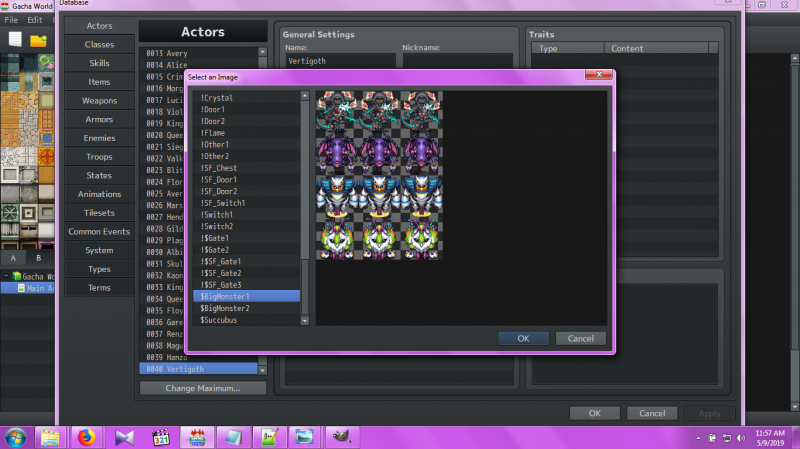
If you are the original creator and want this listing reassigned, edited, or removed, join BMMPlay and contact the moderators with proof that matches the original RPG Maker Web profile, linked GitHub, itch.io page, or another public creator identity.
No replies yet.
Loading summary...
Bmmplay creator tools
Log in or create an account to use this creator tool.
Join the conversation
Your reaction is ready. Log in and you will return to this page to add it.
Are you sure you want to close this music player?
Community safety

