public

Rpg Maker Developers Group

Simple enough for a child, powerful enough for a developer

2 Followers

Is there any way to disable the turn toward player feature when interacting with an NPC?

BMM Archive · July 15, 2026

Preserved forum archive. This topic stores the original first post and locally mirrored RPG Maker Web attachments when available. It is posted by the BMMPlay archive account, not by the original creator.

Original Source

  • Original title: Is there any way to disable the turn toward player feature when interacting with an NPC?
  • Original author: Akbar_Essa
  • Original date: May 8, 2019
  • Source thread: https://forums.rpgmakerweb.com/threads/is-there-any-way-to-disable-the-turn-toward-player-feature-when-interacting-with-an-npc.108784/
  • Source forum path: Game Development Engines > Legacy Engine Support > RPG Maker MV Support

Summary

In my game, before you can talk to characters. I'm implementing choices that can make you do a variety of things to the NPC. Such as being able to battle, talk, steal, inspect what they are doing, etc... It's not a big problem but whenever you interact with the NPC they always turn towards the player. I turned on direction fix and then tried turning it off with movement route but it's just not working for some reason. It gets even worse when I try to create a short stealth...

Archived First Post

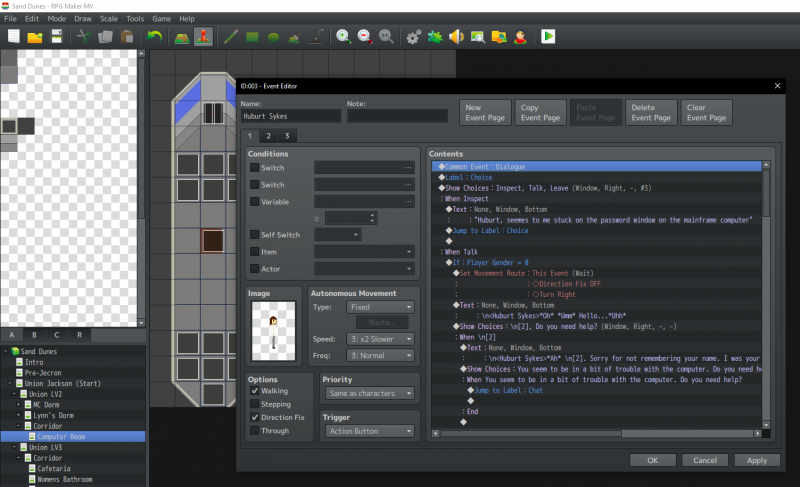
In my game, before you can talk to characters. I'm implementing choices that can make you do a variety of things to the NPC. Such as being able to battle, talk, steal, inspect what they are doing, etc... It's not a big problem but whenever you interact with the NPC they always turn towards the player.

I turned on direction fix and then tried turning it off with movement route but it's just not working for some reason.

It gets even worse when I try to create a short stealth scene. In one area the player has to pickpocket an NPC using the choices but when that's done the NPC just stares at the player and it overall just looks really silly. Is there any way to fix this? I'll try explaining in more detail if you want me to. I'm not too sure if the screenshot will help but it will probably give you an idea on if I'm doing anything wrong. Protected download

Downloads / Referenced Files

Log in to download

Log in, then follow the RPG Maker Developers Group to see these download links.

Log in to download

Referenced Images / Attachments

Desktop Screenshot 2019.05.08 - 06.15.47.78.png
Creator Claims / Removal

If you are the original creator and want this listing reassigned, edited, or removed, join BMMPlay and contact the moderators with proof that matches the original RPG Maker Web profile, linked GitHub, itch.io page, or another public creator identity.

#039#rpg-maker-archive#mv-support

Replies (0)

No replies yet.

0 replies 1 view

Log in to reply.

User Avatar