public

Rpg Maker Developers Group

Simple enough for a child, powerful enough for a developer

2 Followers

Battlebacks displaying upside down in LMBS

BMM Archive · July 15, 2026

Preserved forum archive. This topic stores the original first post and locally mirrored RPG Maker Web attachments when available. It is posted by the BMMPlay archive account, not by the original creator.

Original Source

  • Original title: Battlebacks displaying upside down in LMBS
  • Original author: L.J. Ogre
  • Original date: December 2, 2018
  • Source thread: https://forums.rpgmakerweb.com/threads/battlebacks-displaying-upside-down-in-lmbs.102852/
  • Source forum path: Game Development Engines > RPG Maker Javascript Plugins > Javascript/Plugin Support

Summary

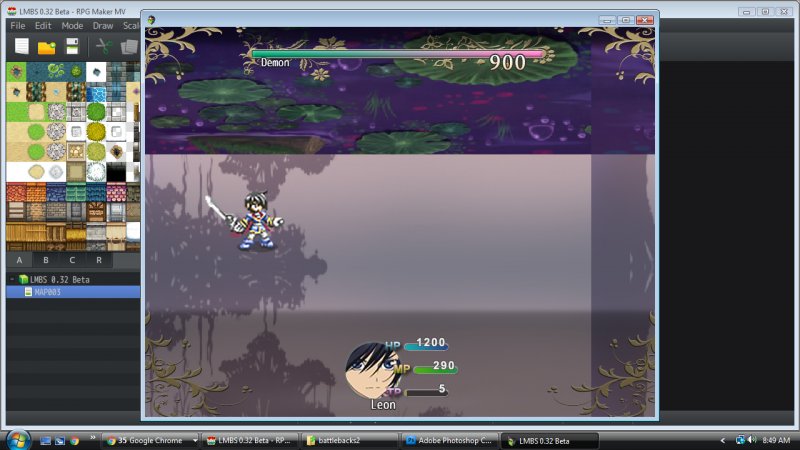
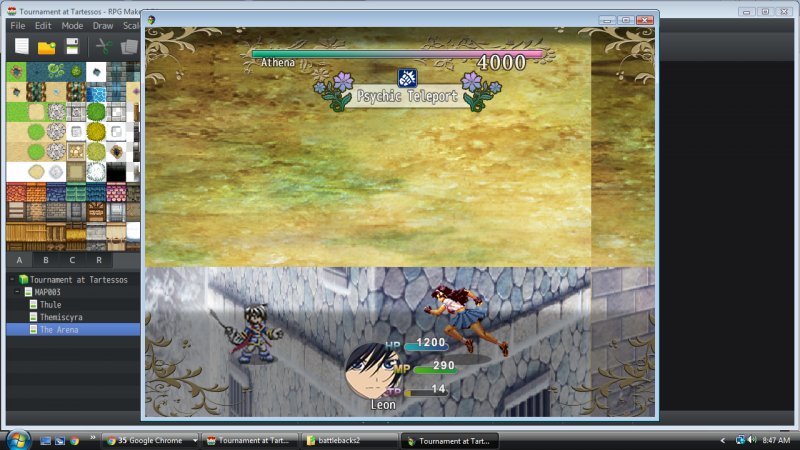
I downloaded MOG Hunter's LMBS (https://atelierrgss.wordpress.com/rmv-lmbs-linear-motion-battle-system/) and have been playing around with it. But I noticed that even in the demo, the battlebacks are displayed upside down. The problem is actually in the Battleback EX plugin. If I turn that off, the problem stops, but the only backgrounds displayed are the lower image, which is ok, I guess. I can live with that if I have to. But I'd like to fix this problem if I can. I don't see any settings or parameters in the plugin that would change...

Archived First Post

I downloaded MOG Hunter's LMBS (https://atelierrgss.wordpress.com/rmv-lmbs-linear-motion-battle-system/) and have been playing around with it. But I noticed that even in the demo, the battlebacks are displayed upside down. The problem is actually in the Battleback EX plugin. If I turn that off, the problem stops, but the only backgrounds displayed are the lower image, which is ok, I guess. I can live with that if I have to. But I'd like to fix this problem if I can.

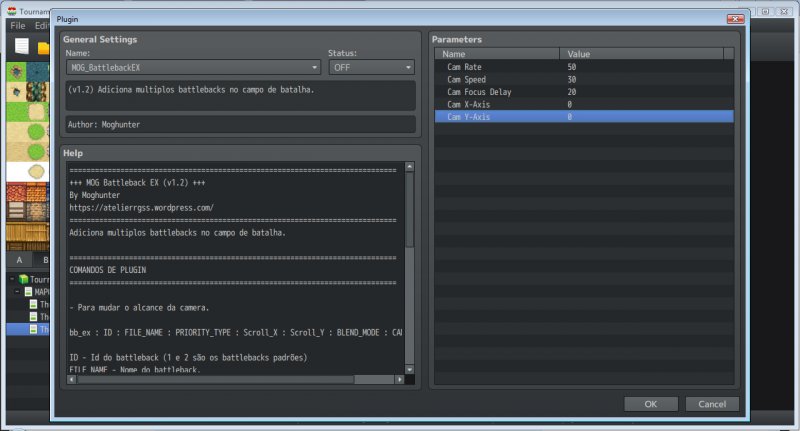
I don't see any settings or parameters in the plugin that would change the orientation. I've fiddled with the X and Y settings but that doesn't seem to change anything. I've also messed with the camera settings.

I've also used the battleback settings in the map parameters, but that gets the same results as putting them in the Event page - upside down.

I've also checked the assets to make sure they were oriented properly in the file folder. They are.

So there is something about that plugin that is causing the battlebacks to display upside down. But I can't figure it out.


Protected download Protected download Protected download


Downloads / Referenced Files

Log in to download

Log in, then follow the RPG Maker Developers Group to see these download links.

Log in to download

Referenced Images / Attachments

Upsidedown1.jpg
Upsidedown1.jpg
Upsidedown2.jpg
Upsidedown2.jpg
Upsidedown3.jpg
Upsidedown3.jpg
Creator Claims / Removal

If you are the original creator and want this listing reassigned, edited, or removed, join BMMPlay and contact the moderators with proof that matches the original RPG Maker Web profile, linked GitHub, itch.io page, or another public creator identity.

#039#rpg-maker-archive#js-support

Replies (0)

No replies yet.

0 replies 1 view

Log in to reply.

User Avatar