I asked about a typewriter-effect plugin earlier (https://forums.rpgmakerweb.com/index.php?threads/typewriter-text-effect.102482/) but managed to muddle through and draft one of my own which I'm getting pretty happy with. I have two issues right now, I'll list both but I'm most interested in solving the centering of the text vertically: - Text Centering; improving the horizontal center and making the vertical center make any sense what so ever - Events reacting appropriately, IE not moving
I asked about a typewriter-effect plugin earlier (
https://forums.rpgmakerweb.com/index.php?threads/typewriter-text-effect.102482/) but managed to muddle through and draft one of my own which I'm getting pretty happy with.
I have two issues right now, I'll list both but I'm most interested in solving the centering of the text vertically:
- Text Centering; improving the horizontal center and making the vertical center make any sense what so ever
- Events reacting appropriately, IE not moving
Some background:
I copied the Window_Message code and base the "Window_Typewriter" on that.
I modify the parts as appropriate to accomplish what I needed to do, and bring in a few other elements to adjust as appropriate.
The plugin is called, right now, via a script call in an event.
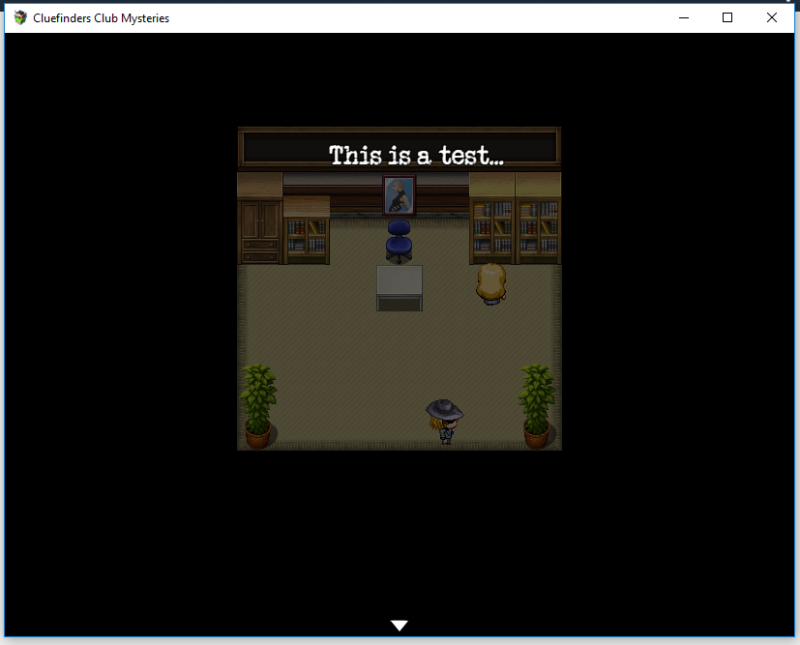
I have three scripts that can be called from there, one which displays as a normal message, one which displays at the bottom of the screen without a frame, and the GOAL is the third will display full screen, with the text vertically and horizontally centered. So far it displays full screen, displays horizontally centered for the most part (I think its a little off, too far to the right at the moment), but I CANNOT get the vertical to work appropriately.
Attached is one of the most simple: box height divided by two. The line of text is CLEARLY not near the center of the screen, but more like center of the top half?
Protected download
Notes:
- The parameters have no effect right now. They're placeholders for the moment.
- The font "SecretTypewriter" is in my game; comment that line out and use the GameFont
- If this code does prove useful to someone, please just toss a note in the credits for me, "Typewriter Effect, Nate Petersen (daMoose52)"
- If this code does prove useful to someone, please just toss a note in the credits for me, "Typewriter Effect, Nate Petersen (daMoose52)"




 Pulsar X2 Crazylight Wireless Gaming Mouse
Ultra-light wireless gaming mouse for quick aim, claw grip, and fingertip control.
View on Amazon
Pulsar X2 Crazylight Wireless Gaming Mouse
Ultra-light wireless gaming mouse for quick aim, claw grip, and fingertip control.
View on Amazon