Ultra Mode 7 v2.2.0 Blizzard Introduction Ultra Mode 7 simulates the Mode 7 rendering mode from the SNES by using 3D rendering (hence the "Ultra"). Sprites are scaled appropriately and use additional code to determine whether they are visible, because of cut-off distance. The view of a Mode 7 map is defined by the following parameters:
Ultra Mode 7 v2.2.0
Blizzard
Introduction
Ultra Mode 7 simulates the Mode 7 rendering mode from the SNES by using 3D rendering (hence the "Ultra"). Sprites are scaled appropriately and use additional code to determine whether they are visible, because of cut-off distance. The view of a Mode 7 map is defined by the following parameters:
- camera distance
- camera Y position
- field of view
- pitch rotation angle
- yaw rotation angle
- maximum Z coordinate
This work is licensed under BSD License 2.0:
Copyright (c) Boris "Blizzard" Mikić
All rights reserved.
Redistribution and use in source and binary forms, with or without
modification, are permitted provided that the following conditions are met:
1. Redistributions of source code must retain the above copyright notice,
this list of conditions and the following disclaimer.
2. Redistributions in binary form must reproduce the above copyright notice,
this list of conditions and the following disclaimer in the documentation
and/or other materials provided with the distribution.
3. Neither the name of the copyright holder nor the names of its contributors
may be used to endorse or promote products derived from this software
without specific prior written permission.
THIS SOFTWARE IS PROVIDED BY THE COPYRIGHT HOLDERS AND CONTRIBUTORS "AS IS" AND
ANY EXPRESS OR IMPLIED WARRANTIES, INCLUDING, BUT NOT LIMITED TO, THE IMPLIED
WARRANTIES OF MERCHANTABILITY AND FITNESS FOR A PARTICULAR PURPOSE ARE DISCLAIMED.
IN NO EVENT SHALL THE COPYRIGHT HOLDER OR CONTRIBUTORS BE LIABLE FOR ANY DIRECT,
INDIRECT, INCIDENTAL, SPECIAL, EXEMPLARY, OR CONSEQUENTIAL DAMAGES (INCLUDING, BUT
NOT LIMITED TO, PROCUREMENT OF SUBSTITUTE GOODS OR SERVICES; LOSS OF USE, DATA, OR
PROFITS; OR BUSINESS INTERRUPTION) HOWEVER CAUSED AND ON ANY THEORY OF LIABILITY,
WHETHER IN CONTRACT, STRICT LIABILITY, OR TORT (INCLUDING NEGLIGENCE OR OTHERWISE)
ARISING IN ANY WAY OUT OF THE USE OF THIS SOFTWARE, EVEN IF ADVISED OF THE
POSSIBILITY OF SUCH DAMAGE.
You may use this script for both non-commercial and commercial products without limitations as long as you fulfill the conditions presented by the above license. The "complete" way to give credit is to include the license somewhere in your product (e.g. in the credits screen), but a "simple" way is also acceptable. The "simple" way to give credit is as follows:
Ultra Mode 7 licensed under BSD License 2.0, Copyright (c) Boris "Blizzard" Mikić
Alternatively, if your font doesn't support diacritic characters, you may use this variant:
Ultra Mode 7 licensed under BSD License 2.0, Copyright (c) Boris "Blizzard" Mikic
In general other similar variants are allowed as long as it is clear who the creator is (e.g. "Ultra Mode 7 created by Blizzard" is acceptable). But if possible, prefer to use one of the two variants listed above.
If you fail to give credit and/or claim that this work was created by you, this may result in legal action and/or payment of damages even though this work is free of charge to use normally.
Features
- render map in 3D
- control rendering with various parameters and even change them on the fly
- supports white fading of horizon
- supports auto-scaling for sprites depending on distance from camera
- high performance
- easy to use
v2.2.0
- fixed compatibility with MZ Core 1.7.0 and later
- fixed handling of LEGACY_SCALING option
v2.1.2
- added LOOP_MAPS_EXTEND_TILES_SMART option
- fixed configuration issue when upgrading plugin
- fixed crash with looping maps and FOV=90
- fixed a bug in looping maps rendering optimization
v2.1.1
- fixed issues with fade color setter
- fixed issues with fade begin setter
- fixed issues with fade end setter
v2.1.0
- refactored some code to improve general compatibility
v2.0.9
- fixed bug with invisible looped maps
v2.0.8
- fixed some new issues with Yanfly's Grid-Free Doodads
v2.0.7
- changed NEAR_CLIP_Z to DEFAULT_NEAR_CLIP_Z
- changed FAR_CLIP_Z to DEFAULT_FAR_CLIP_Z
- added map parameters for Near Clip Z and Far Clip Z
- updated custom Terrax Plugins - Lighting system compatibility code
v2.0.6
- fixed issues with MZ v1.5.0 core scripts
v2.0.5
- added CHARACTERS_SHIFT_Y option
v2.0.4
- fixed some more issues with compatbility for several other plugins
v2.0.3
- fixed a minor issues with compatbility for several other plugins
v2.0.2
- fixed roll-rotation issue with ZephAM_YEPDoodadExt
- fixed performance issues on larger maps in RPG Maker MZ
- fixed issue with looping maps in RPG Maker MZ
- fixed minor offset issue with map display in RPG Maker MZ
- enabled CHARACTERS_USE_FADE_Z again by default (RPG Maker MZ has no performance issues)
v2.0.1
- fixed a minor rendering issue
- improved unified shader code structure
v2.0.0
- implemented compatibility with RPG Maker MZ
v1.7.6
- fixed a minor issues with compatbility for Galv Map Projectiles
v1.7.5
- added compatbility for Galv Map Projectiles
v1.7.4
- added compatbility for SAN_AnalogMove when PLAYER_ADJUST_MOVE_DIRECTION is turned on
- added roll angle support
v1.7.3
- fixed loading issues with OcRam_Lights
v1.7.2
- fixed issues with Yanfly's Grid-Free Doodads in deployed builds
- fixed issues with terrain tag lights in OcRam_Lights
- added safeguards to prevent faulty compatibility code to affect other compatibility code
- limited NEAR_CLIP_Z to a minimum of 1 due to issues with rendering for values of 0 or less
- disabled CHARACTERS_USE_FADE_Z by default due to performance issues
v1.7.1
- fixed some issues in compatibility code for OcRam_Lights
v1.7.0
- added compatibility code for OcRam_Lights
- improved compatibility code for KhasUltraLighting
v1.6.5
- updated some instructions
v1.6.4
- fixed a const assignment errors
v1.6.3
- refactored positioning in looped maps
- fixed sprite positioning in looped maps for Yanfly's Grid-Free Doodads
- added CHARACTERS_USE_FADE_Z option
- removed some left-over debug code
v1.6.2
- attempted fix in Yanfly's Grid-Free Doodads for sprite positioning in looped maps
v1.6.1
- improved code that handles sprite positioning in looped maps
v1.6.0
- implemented improved scaling of sprites on map which doesn't get messed up by near and far clipping planes
- changed some of the default parameters to accommodate the fixed scaling issues
- added LEGACY_SCALING parameter for backwards compatibility
v1.5.4
- fixed bug with screen-to-map calculations when using orthogonal projection
v1.5.3
- improved compatibility code for KhasUltraLighting
v1.5.2
v1.5.1
- added color fade begin to map parameters
- added color fade end to map parameters
v1.5.0
- added map parameters for map borders
v1.4.6
- added compatibility for newer pixi-tilemap versions
v1.4.5
- added compatibility with Quasi Simple Shadows
v1.4.4
- added compatibility with Thomas Edison MV
- fixed issue with fixed-coordinate parallax not working
v1.4.3
- changed NEAR_CLIP_Z from constant to plugin parameter
v1.4.2
- added new parameter FADE_Z_COLOR
- added option to setup custom fade colors for specific maps
- added option to change fade color at any time
v1.4.1
- added compatibility with Yanfly's Grid-Free Doodads
- added compatibility with MOG's Character Motion
v1.4.0
- added new license
- added usage and crediting instructions
v1.3.8
- added script call to enable/disable pixelated rendering during runtime
- reduced WEBGL_MAX_VERTICES to reduce possibility of glitched rendering
v1.3.7
- added experimental compatibility for BattleLighting plugin
v1.3.6
- added experimental compatibility for BattleLighting plugin
v1.3.5
- corrected some minor positioning and scaling calculation errors
- improved compatibility code for KhasUltraLighting
v1.3.4
- added compatibility code for KhasUltraLighting
- added compatibility instructions for Terrax Plugins - Lighting system
v1.3.3
- fixed issue with event visibility on map borders when using looping maps
v1.3.2
- added coordinate rounding for X and Y coordinates
- improved code that handles sprite visibility when outside of the view frustum
- removed some leftover debug prints
v1.3.1
- fixed a crash with event testing
v1.3.0
- implemented map looping functionality
- added workaround for PIXI bug where a lag spike would occur about every 10 seconds
- fixed issue where sprite direction didn't display properly at certain yaw angles
- fixed issue where movement controls didn't adjust to yaw angle
- added CHARACTERS_ADJUST_SPRITE_DIRECTION option
- fixed coordinate offset when using yaw angle
v1.2.4
- fixed accidental removal of animateCameraDistance function
v1.2.3
- added parallax distance parameter in maps for parallax movement with yaw and pitch
- renamed "Camera" functions to "CameraDistance"
- fixed bug with parallax scrolling on non-Mode 7 maps
- fixed bug with shaking the screen
- removed FOV limit and implemented orthogonal projection with FOV of 0°
v1.2.2
- fixed a syntax error that was caused by code cleanup
v1.2.1
v1.2.0
- fixed FPS drop problem while moving
v1.1.0
- added animation function for parameters
- renamed RENDER_PIXELATED option to TILEMAP_PIXELATED
- added CHARACTERS_PIXELATED option
- fixed issue with floating characters
- fixed issue with normal maps not working anymore
- added some code to prevent compatibility issues with some map scripts
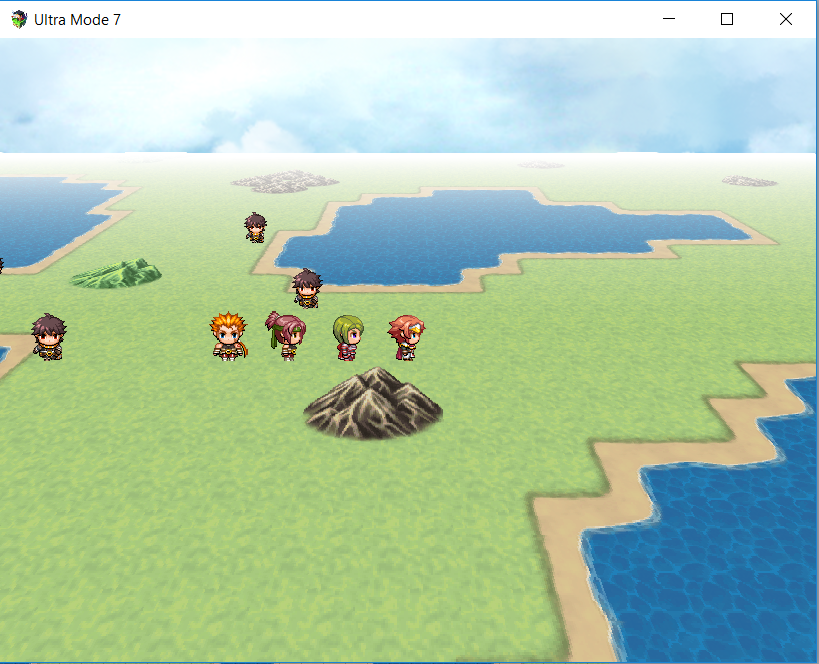
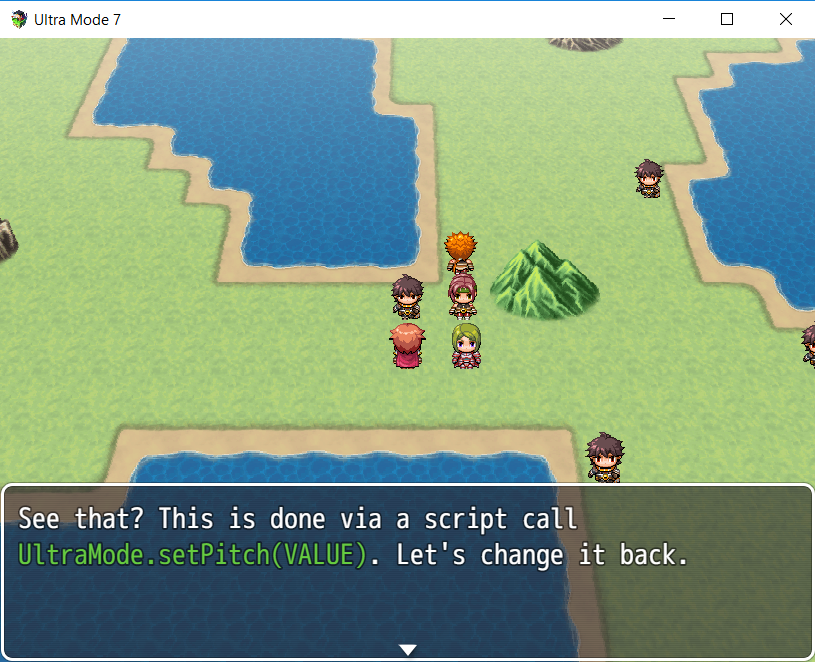
Screenshots
https://i.gyazo.com/9c7d3250509a967665e978ea608f46af
How to Use
All instructions are inside the script in the first comment.
Demo
Ultra Mode 7 Demo for RPG Maker MZ
Ultra Mode 7 Demo for RPG Maker MV
Plugin
Plugin Download
FAQ
Q: Why does the script not work with canvas?
A: The script was written with the 3D capabilities that WebGL offers. Any implementation ported to work with canvas would be too slow anyway.
Q: Can I change map parameters on the fly?
A: Yes, there are instructions in the script how the script calls are used. There are also examples in the demo.
Q: I updated the plugin to a newer version and it crashes now!
A: After replacing the actual file, you should open up the plugin settings and confirm/close them again. Sometimes new features and options are added and this ensures that the newer version of the plugin doesn't crash by adding the new options to your project's system settings.
Credit and Thanks
Author's Notes
Compatibility:
- Requires WebGL. Does not work with canvas and due to how canvas works, it can never support canvas.
- If you update from an earlier version, after replacing the actual file, you should open up the plugin settings and confirm/close them again. Sometimes new features and options are added and this ensures that the newer version of the plugin doesn't crash by adding the new options to your project's system settings.
- Because the tilemap is rendered entirely flat, tile priority isn't used.
- Scaling has been optimized for usage of an FOV of 60°. Using different values will cause some weird scales being used for characters.
- Due to yaw rotation requiring turning of characters, 8-directional characters sprites might have only limited support.
Make sure to read the instructions and study the demo before asking questions.
You might find this utility script useful that let's you manipulate the anchor point for the sprites:
https://forums.rpgmakerweb.com/index.php?threads/character-anchors.105599/
If I'm not active here at some point, you can contact me at my forum about the script:
http://forum.chaos-project.com/index.php/topic,15899.0This work is licensed under BSD License 2.0: Copyright (c) Boris "Blizzard" Mikić All rights reserved. Redistribution and use in source and binary forms, with or without






 UGREEN Nexode 200W GaN USB-C Wall Charger
High-output four-port USB-C charger for laptops, tablets, phones, and travel kits.
View on Amazon
UGREEN Nexode 200W GaN USB-C Wall Charger
High-output four-port USB-C charger for laptops, tablets, phones, and travel kits.
View on Amazon