


YEP Item Core & Moogle X Equipment Learning - Window Issue
BMM_Archive · July 15, 2026

Original Source
- Original title: YEP Item Core & Moogle X Equipment Learning - Window Issue
- Original author: Ouroboros90
- Original date: August 25, 2018
- Source thread: https://forums.rpgmakerweb.com/threads/yep-item-core-moogle-x-equipment-learning-window-issue.99332/
- Source forum path: Game Development Engines > RPG Maker Javascript Plugins > Javascript/Plugin Support
Summary
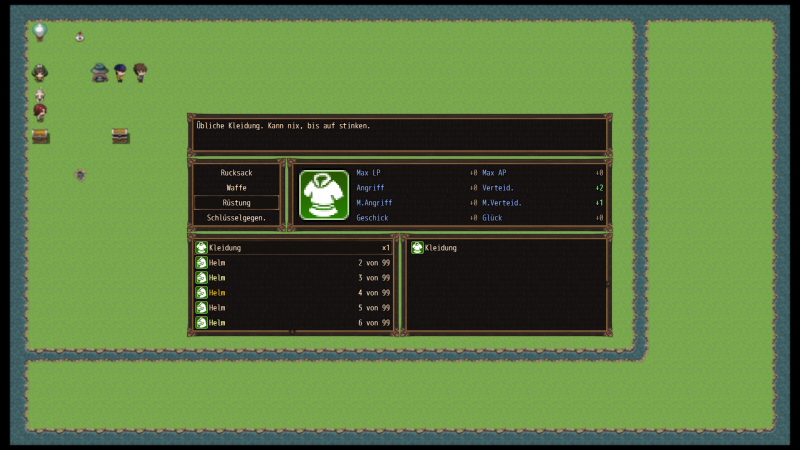
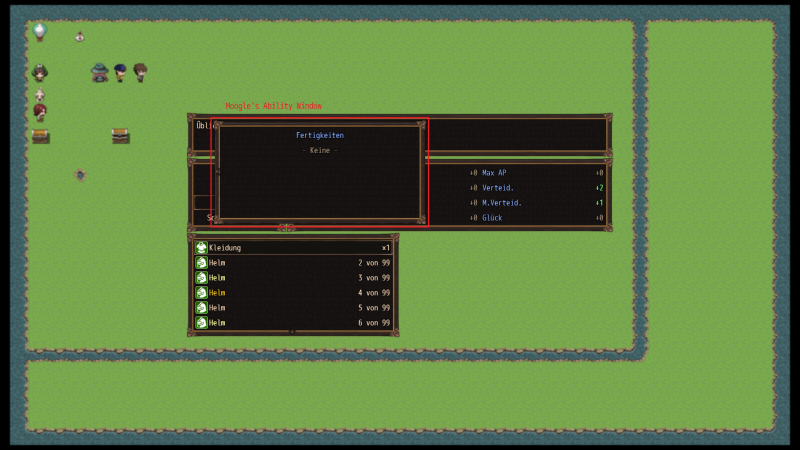
Hello everyone, I am having an issue, using YEP Item Core and Moogle X Equipment Leanring Plugins, in combination with dsScreenLayoutSize Plugin, which resizes the width/height of the menus. By default, without the resize Plugin, both YEP and Moogle work fine. With the screen size set to 1920px by YEP Engine Core, and the menu size set to 1440px by dsScreenLayoutSize, the Item Ability Window of Moogle X Plugin start to overlap, when pressing right arrow key for switching the view:
Archived First Post
I am having an issue, using YEP Item Core and Moogle X Equipment Leanring Plugins, in combination with dsScreenLayoutSize Plugin, which resizes the width/height of the menus.
By default, without the resize Plugin, both YEP and Moogle work fine.
With the screen size set to 1920px by YEP Engine Core, and the menu size set to 1440px by dsScreenLayoutSize, the Item Ability Window of Moogle X Plugin start to overlap, when pressing right arrow key for switching the view:
I've tried to solve the issue by:
- Change the width of screen size and menu size by Plugin Params
- Change Plugin loading order by list position index
- Alter the window width/height of the Ability Window by +- 1/2/10/100px at the js-file @ line 1484
- Alter the context where the child is add to at the js-file @ line 1492 (but I guess that was nonsense)
Please ensure the attached js-files.
Any help would be appreciated
Downloads / Referenced Files
Log in, then follow the RPG Maker Developers Group to see these download links.
Log in to downloadReferenced Images / Attachments
Creator Claims / Removal
If you are the original creator and want this listing reassigned, edited, or removed, join BMMPlay and contact the moderators with proof that matches the original RPG Maker Web profile, linked GitHub, itch.io page, or another public creator identity.


Replies (0)
No replies yet.
Topic Summary
Loading summary...
