Preserved forum archive. This topic stores the original first post and locally mirrored RPG Maker Web attachments when available. It is posted by the BMMPlay archive account, not by the original creator.
Original Source
Original title: RPG Maker MV 1.6.1 Key Functions Not Working.
Source forum path: Game Development Engines > Legacy Engine Support > RPG Maker MV Support
Summary
Hi, apologies if i have posted this not in the correct place. Recently updated my project to 1.6.1 stable.. updated all my plugin's..mostly Yanfly's and all worked perfectly! until my laptop had an update, now the F1, F2, F8, etc functions dont work, so i cant bring up console neither can i check my FPS. Surprisingly F10 works for Yanfly Doodad's and Space Bar for Orange MapShot. So F2 was FPS it now lowers my brightness F8 increases my volume instead, functions that i was only able to use before...
Archived First Post
Hi, apologies if i have posted this not in the correct place.
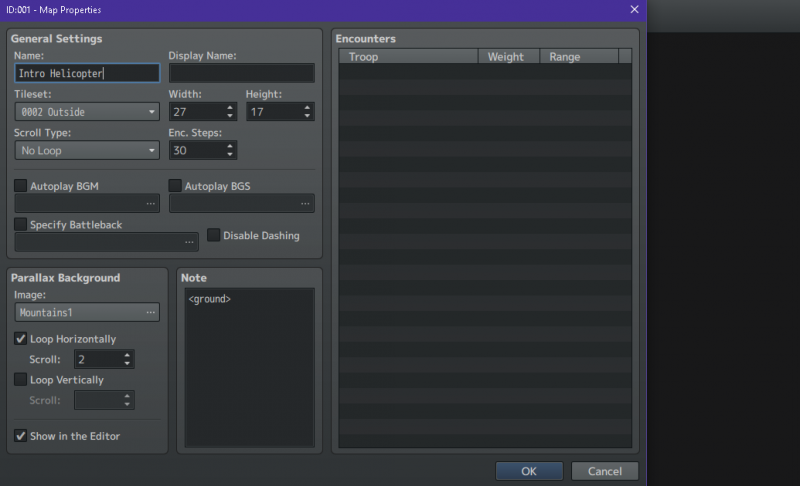
Recently updated my project to 1.6.1 stable.. updated all my plugin's..mostly Yanfly's and all worked perfectly! until my laptop had an update, now the F1, F2, F8, etc functions dont work, so i cant bring up console neither can i check my FPS. Surprisingly F10 works for Yanfly Doodad's and Space Bar for Orange MapShot. So F2 was FPS it now lowers my brightness F8 increases my volume instead, functions that i was only able to use before by holding Fn and then F2 etc. I have used MV for a while, my core js is 1.6.1 so my project is updated correctly and did work before this windows update. I run windows 10. So im pretty sure the update has changed bindings or somthing? and hope someone can help me swap them back? i can get console to start up when i playtest via turning it on in yanfly core. If anyone needs screenshots/information ill edit this and add them. One last thing while im here...im having trouble getting the Parallax background to scroll horizontally! it just wont scroll/move. if i add vertical to it then it scrolls! XD am i missing something? thankyou to anyone that reply's.
Protected download
Downloads / Referenced Files
Log in to download
Log in, then follow the RPG Maker Developers Group to see these download links.
If you are the original creator and want this listing reassigned, edited, or removed, join BMMPlay and contact the moderators with proof that matches the original RPG Maker Web profile, linked GitHub, itch.io page, or another public creator identity.




 ZSCMALLS 18.5-Inch Portable Monitor
Portable 1080p screen for laptop expansion, travel desks, and compact workstations.
View on Amazon
ZSCMALLS 18.5-Inch Portable Monitor
Portable 1080p screen for laptop expansion, travel desks, and compact workstations.
View on Amazon

