Preserved forum archive. This topic stores the original first post and locally mirrored RPG Maker Web attachments when available. It is posted by the BMMPlay archive account, not by the original creator.
Original Source
Original title: Displaying JP For Each Class? (Yanfly's JP System/Classes/Subclasses)
Source forum path: Game Development Engines > Legacy Engine Support > RPG Maker MV Support
Summary
I am using 4 Yanfly Plugins together: Class Change Core, Subclass, Skill Learn and Job Points. When I open up the main menu screen, I am able to see the JP of the primary class next to the character. In my game I use the primary class for what species they are (like Human/Canite/Kryll), then I have subclass which is basically their profession/training of choice. When I am trying to learn skills for a subclass, everything works, but the problem is that the the number of JP for the subclass...
Archived First Post
I am using 4 Yanfly Plugins together: Class Change Core, Subclass, Skill Learn and Job Points. When I open up the main menu screen, I am able to see the JP of the primary class next to the character. In my game I use the primary class for what species they are (like Human/Canite/Kryll), then I have subclass which is basically their profession/training of choice.
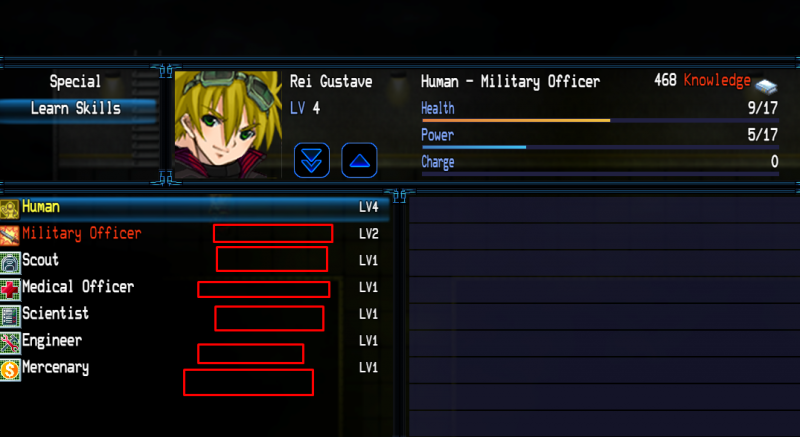
When I am trying to learn skills for a subclass, everything works, but the problem is that the the number of JP for the subclass is different than the number of JP for the primary class, and so when you go to learn a skill it looks like you have enough points, but you don't. The amount you need doesn't line up with the number at the top (that's ok), but I need to know if there's a way to display how much JP each class has in the menu. Screenshot of what I'm talking about.
Protected download
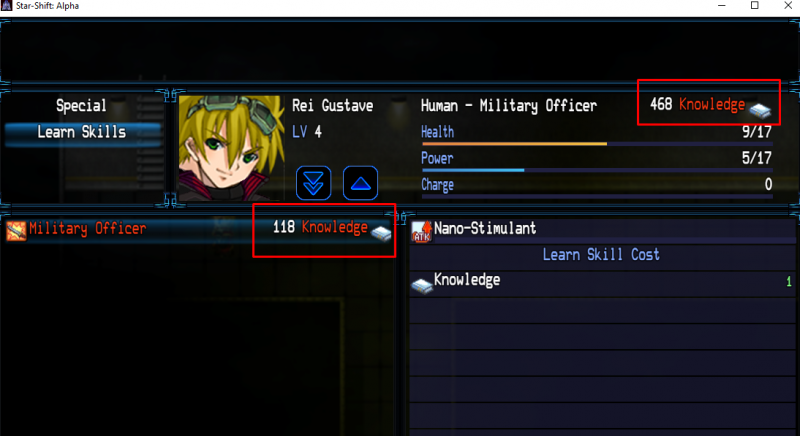
As for the specific JP numbers for each class, I can see them, but only when I have enough points to learn a skill, and it shows me the number at confirmation of learning the skill, which looks like this. I can't see the number when I'm just looking at the classes in the skill learn menu.
Protected download
Just wondering if there's an easy way to display the JP next to each class so the player knows how much JP is earned in each class for when they're picking out skills.
Downloads / Referenced Files
Log in to download
Log in, then follow the RPG Maker Developers Group to see these download links.
If you are the original creator and want this listing reassigned, edited, or removed, join BMMPlay and contact the moderators with proof that matches the original RPG Maker Web profile, linked GitHub, itch.io page, or another public creator identity.




 PDP AIRLITE Wired Stereo Gaming Headset for PlayStation
Lightweight wired headset option for party chat, multiplayer, and everyday gaming.
View on Amazon
PDP AIRLITE Wired Stereo Gaming Headset for PlayStation
Lightweight wired headset option for party chat, multiplayer, and everyday gaming.
View on Amazon

