

 Chromecast with Google TV HD
Compact streaming device for movies, live TV apps, and personalized entertainment.
View on Amazon
Chromecast with Google TV HD
Compact streaming device for movies, live TV apps, and personalized entertainment.
View on Amazon
Bmmplay may earn a commission from qualifying purchases made through these links.
No products in the cart.


Simple enough for a child, powerful enough for a developer
BMM_Archive · July 15, 2026
Hey friends, I can't figure this out - in the plugin parameters I have the window set to be transparent at a 0, but no matter what the plugin wants to make a window to fit the icons (I have the offset so they cycle vertically but they typically line up horizontally). Does anyone have any ideas how I can have it so that the CTB Window is completely transparent? Plugin: https://victorenginescripts.wordpress.com/rpg-maker-mv/conditional-turn-battle/ {
Chromecast with Google TV HD
Compact streaming device for movies, live TV apps, and personalized entertainment.
View on Amazon
Bmmplay may earn a commission from qualifying purchases made through these links.
Log in, then follow the RPG Maker Developers Group to see these download links.
Log in to download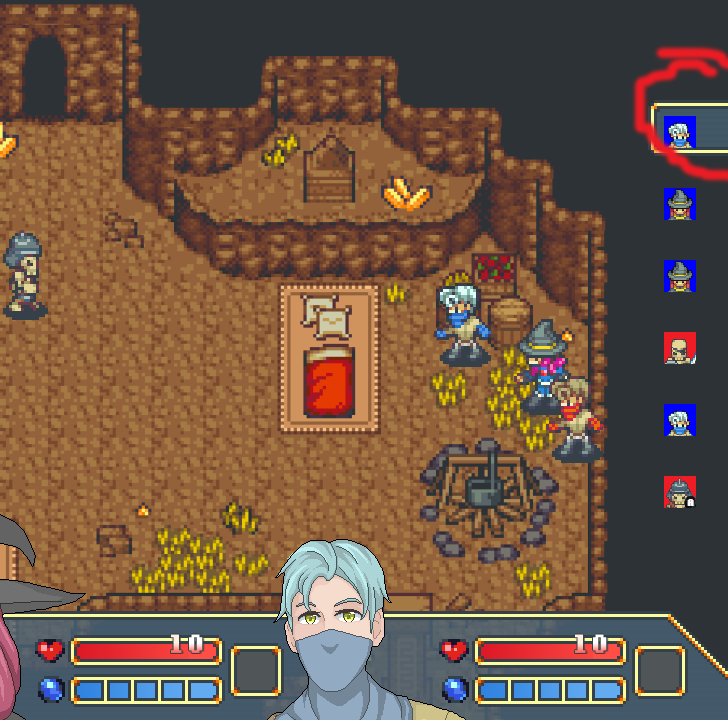
If you are the original creator and want this listing reassigned, edited, or removed, join BMMPlay and contact the moderators with proof that matches the original RPG Maker Web profile, linked GitHub, itch.io page, or another public creator identity.
No replies yet.
Loading summary...
Bmmplay creator tools
Log in or create an account to use this creator tool.
Join the conversation
Your reaction is ready. Log in and you will return to this page to add it.
Are you sure you want to close this music player?
 Amazon Fire TV 50-Inch 4-Series 4K UHD Smart TV
4K smart TV with Fire TV built in for streaming, games, and living room viewing.
View on Amazon
Amazon Fire TV 50-Inch 4-Series 4K UHD Smart TV
4K smart TV with Fire TV built in for streaming, games, and living room viewing.
View on Amazon
Bmmplay may earn a commission from qualifying purchases made through these links.
Community safety