


Change region on event touch.
BMM_Archive · July 15, 2026

Preserved forum archive. This topic stores the original first post and locally mirrored RPG Maker Web attachments when available. It is posted by the BMMPlay archive account, not by the original creator.
Original Source
- Original title: Change region on event touch.
- Original author: Skook
- Original date: December 3, 2018
- Source thread: https://forums.rpgmakerweb.com/threads/change-region-on-event-touch.102879/
- Source forum path: Game Development Engines > Legacy Engine Support > RPG Maker MV Support
Summary
Hello everyone! I got another small pickle. Look at this screenshot. { "lightbox_close": "Close",


Archived First Post
Hello everyone!
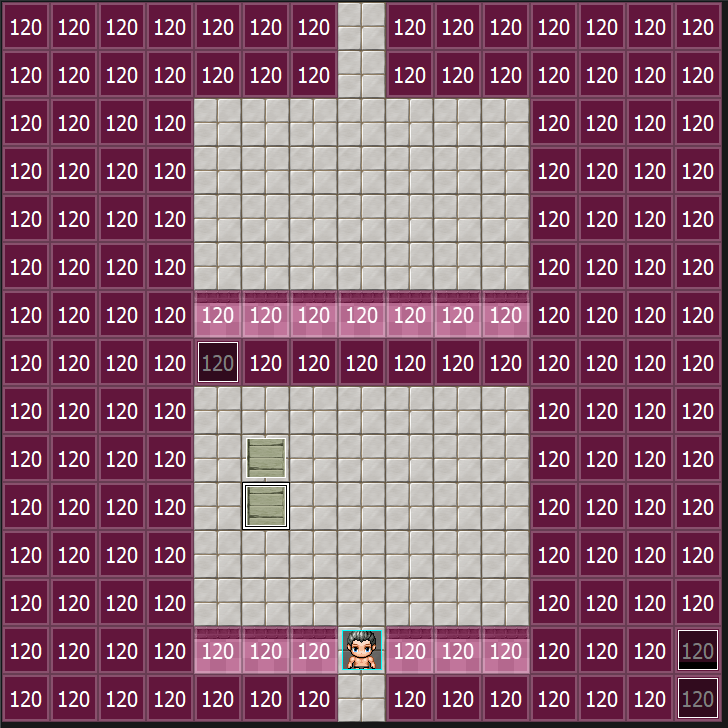
I got another small pickle. Look at this screenshot.
Protected download
Region 120 are set as pitfalls. Whenever the player touches those, they fall and it's gameover.
You see the two bridge events on the bottom platform? I'm using the Pick Up and Throw plugin to be able to pick them up and throw them over the black void.
I want those bridge events to change the region ID from 120 to 0 so the player can go through the black void safely and reach the top.
The idea I've been cooking is to get the event ID of one of the bridges, and compare it to the region ID of where the player drops it. Unfortunately I can't seem to find anything that facilitates it.
I got another small pickle. Look at this screenshot.
Protected download
Region 120 are set as pitfalls. Whenever the player touches those, they fall and it's gameover.
You see the two bridge events on the bottom platform? I'm using the Pick Up and Throw plugin to be able to pick them up and throw them over the black void.
I want those bridge events to change the region ID from 120 to 0 so the player can go through the black void safely and reach the top.
The idea I've been cooking is to get the event ID of one of the bridges, and compare it to the region ID of where the player drops it. Unfortunately I can't seem to find anything that facilitates it.
Downloads / Referenced Files
Log in to download
Log in, then follow the RPG Maker Developers Group to see these download links.
Log in to downloadReferenced Images / Attachments
Creator Claims / Removal
If you are the original creator and want this listing reassigned, edited, or removed, join BMMPlay and contact the moderators with proof that matches the original RPG Maker Web profile, linked GitHub, itch.io page, or another public creator identity.
Replies (0)
No replies yet.
0
replies
10
views
Topic Summary
Loading summary...
