


Help learning Q movement and Q Collision Map
BMM_Archive · July 15, 2026

Preserved forum archive. This topic stores the original first post and locally mirrored RPG Maker Web attachments when available. It is posted by the BMMPlay archive account, not by the original creator.
Original Source
- Original title: Help learning Q movement and Q Collision Map
- Original author: Jamtec01
- Original date: November 6, 2017
- Source thread: https://forums.rpgmakerweb.com/threads/help-learning-q-movement-and-q-collision-map.86745/
- Source forum path: Game Development Engines > RPG Maker Javascript Plugins > Javascript/Plugin Support
Summary
Hey guys, I'm trying to learn how to use the Q movement plugin and QM + collision map plugin but I can't get them to work. Here are my plugins. { "lightbox_close": "Close",
Archived First Post
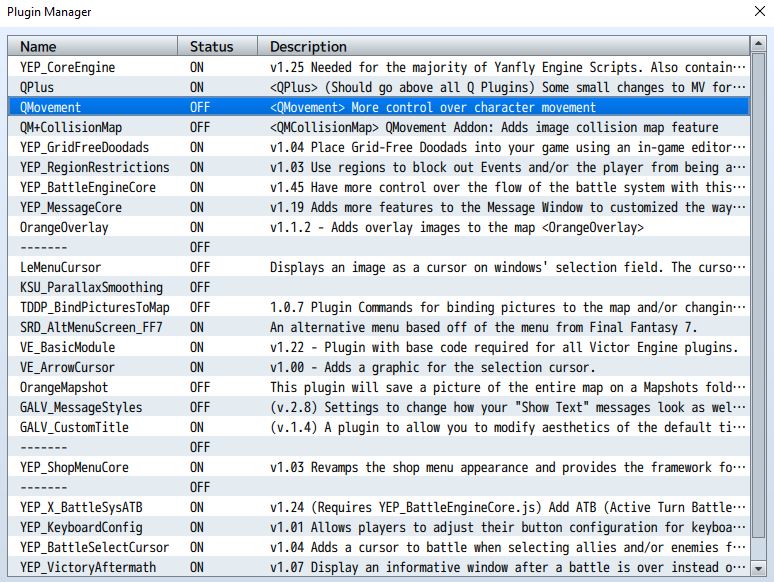
Hey guys, I'm trying to learn how to use the Q movement plugin and QM + collision map plugin but I can't get them to work.
Here are my plugins.
Protected download
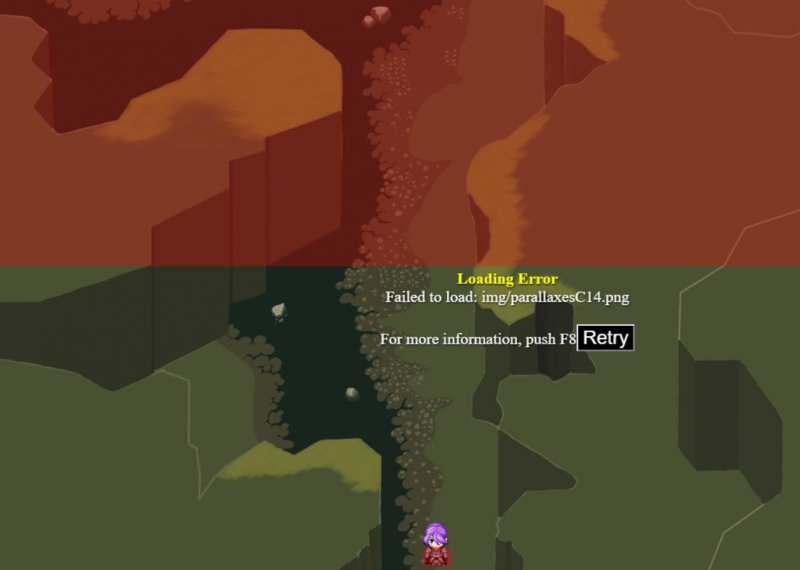
If I turn on the Q movement plugin then my character sprite becomes stuck and a large red collision box appears on the map. If I turn off the Q movement plugin then everything goes back to normal and I can control the character sprite and walk the map with no problems. If I turn on the Q collision map plugin then I get an error message. The next photo shows both issues.
Protected download
I named the collision map C14 and located it inside the parallax folder.
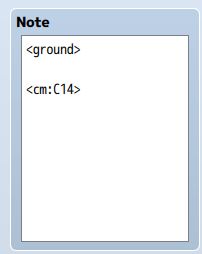
Here is my notes I used for this map.
Protected download
Let me know if I'm way off or anywhere I can go to see or read a tutorial. I read the Quasi thread but the Full documentation link leads to nothing. Thanks everyone for your help.
Here are my plugins.
Protected download
If I turn on the Q movement plugin then my character sprite becomes stuck and a large red collision box appears on the map. If I turn off the Q movement plugin then everything goes back to normal and I can control the character sprite and walk the map with no problems. If I turn on the Q collision map plugin then I get an error message. The next photo shows both issues.
Protected download
I named the collision map C14 and located it inside the parallax folder.
Here is my notes I used for this map.
Protected download
Let me know if I'm way off or anywhere I can go to see or read a tutorial. I read the Quasi thread but the Full documentation link leads to nothing. Thanks everyone for your help.
Downloads / Referenced Files
Log in to download
Log in, then follow the RPG Maker Developers Group to see these download links.
Log in to downloadReferenced Images / Attachments
Creator Claims / Removal
If you are the original creator and want this listing reassigned, edited, or removed, join BMMPlay and contact the moderators with proof that matches the original RPG Maker Web profile, linked GitHub, itch.io page, or another public creator identity.
Replies (0)
No replies yet.
0
replies
9
views
Topic Summary
Loading summary...

