


Region Issues
BMM_Archive · July 15, 2026

Preserved forum archive. This topic stores the original first post and locally mirrored RPG Maker Web attachments when available. It is posted by the BMMPlay archive account, not by the original creator.
Original Source
- Original title: Region Issues
- Original author: Eqonesian
- Original date: October 24, 2017
- Source thread: https://forums.rpgmakerweb.com/threads/region-issues.86191/
- Source forum path: Game Development Engines > RPG Maker Javascript Plugins > Javascript/Plugin Support
Summary
I'm using the YanFly Grid Free Doodad plugin. I've placed region markers around various parts of the map to block walking access to the player, so once I open the doodad editor in-game, I can toggle on the region display and see where I wanted to place trees, bushes, etc. { "lightbox_close": "Close",


Archived First Post
I'm using the YanFly Grid Free Doodad plugin.
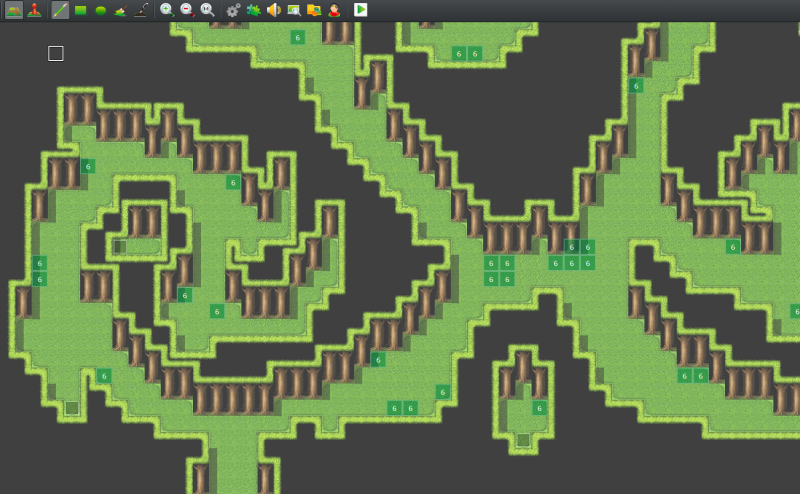
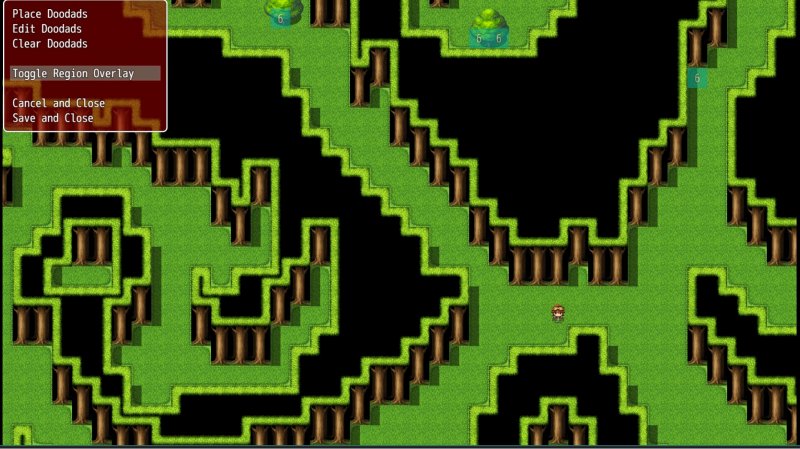
I've placed region markers around various parts of the map to block walking access to the player, so once I open the doodad editor in-game, I can toggle on the region display and see where I wanted to place trees, bushes, etc.
Protected download
But when I open up the game, the bottom section of the map doesn't show the region markers I've placed, even though they're clearly there in the game editor.
Protected download
I've placed region markers around various parts of the map to block walking access to the player, so once I open the doodad editor in-game, I can toggle on the region display and see where I wanted to place trees, bushes, etc.
Protected download
But when I open up the game, the bottom section of the map doesn't show the region markers I've placed, even though they're clearly there in the game editor.
Protected download
Downloads / Referenced Files
Log in to download
Log in, then follow the RPG Maker Developers Group to see these download links.
Log in to downloadReferenced Images / Attachments
Creator Claims / Removal
If you are the original creator and want this listing reassigned, edited, or removed, join BMMPlay and contact the moderators with proof that matches the original RPG Maker Web profile, linked GitHub, itch.io page, or another public creator identity.
Replies (0)
No replies yet.
0
replies
10
views
Topic Summary
Loading summary...
