



public

Rpg Maker Developers Group

Simple enough for a child, powerful enough for a developer

2 Followers

Different commands for the same skill

BMM Archive · July 15, 2026

Preserved forum archive. This topic stores the original first post and locally mirrored RPG Maker Web attachments when available. It is posted by the BMMPlay archive account, not by the original creator.

Original Source

  • Original title: Different commands for the same skill
  • Original author: SojuXO
  • Original date: October 17, 2017
  • Source thread: https://forums.rpgmakerweb.com/threads/different-commands-for-the-same-skill.85900/
  • Source forum path: Game Development Engines > RPG Maker Javascript Plugins > Javascript/Plugin Support

Summary

Hello, the issue I'm having I think its pretty simple but I can't figure it out. I'm using the Plugins yep_battleengencore and actseqpack 123. While using the basic attack skill, I wanted my sv battlers to move closer to their target to look like they are actually hitting the target. The script I'm using works except I have a ranged class and it looks weird when a Ranged class runs up to an enemy and shoots them HAHA. I wanted to know if there is a way to move only...

Archived First Post

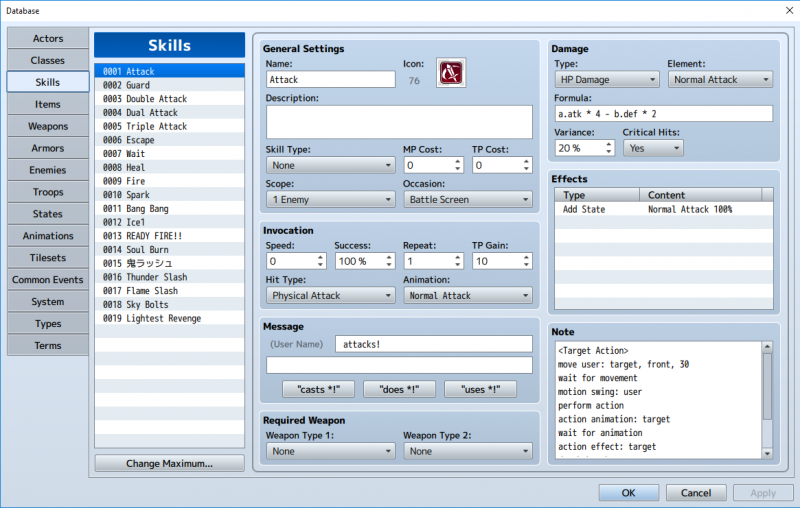
Hello, the issue I'm having I think its pretty simple but I can't figure it out. I'm using the Plugins yep_battleengencore and actseqpack 123. While using the basic attack skill, I wanted my sv battlers to move closer to their target to look like they are actually hitting the target. The script I'm using works except I have a ranged class and it looks weird when a Ranged class runs up to an enemy and shoots them HAHA. I wanted to know if there is a way to move only the actors that are mele type, so if I attack with the basic attack skill, the ranged classes will just fire from the distance they are at. Here is the script I'm using.

<Target Action>
move user: target, front, 30
wait for movement
motion swing: user
perform action
action animation: target
wait for animation
action effect: target
death break
perform finish
</Target Action>

Protected download

Downloads / Referenced Files

Log in to download

Log in, then follow the RPG Maker Developers Group to see these download links.

Log in to download

Referenced Images / Attachments

Database.png
Database.png
Creator Claims / Removal

If you are the original creator and want this listing reassigned, edited, or removed, join BMMPlay and contact the moderators with proof that matches the original RPG Maker Web profile, linked GitHub, itch.io page, or another public creator identity.

#039#rpg-maker-archive#js-support

Replies (0)

No replies yet.

0 replies 1 view

Log in to reply.

User Avatar