


more efficient way to map with shift-click/elevation?
BMM_Archive · July 15, 2026

Original Source
- Original title: more efficient way to map with shift-click/elevation?
- Original author: jonthefox
- Original date: September 22, 2018
- Source thread: https://forums.rpgmakerweb.com/threads/more-efficient-way-to-map-with-shift-click-elevation.100368/
- Source forum path: Game Development Engines > Legacy Engine Support > RPG Maker MV Support
Summary
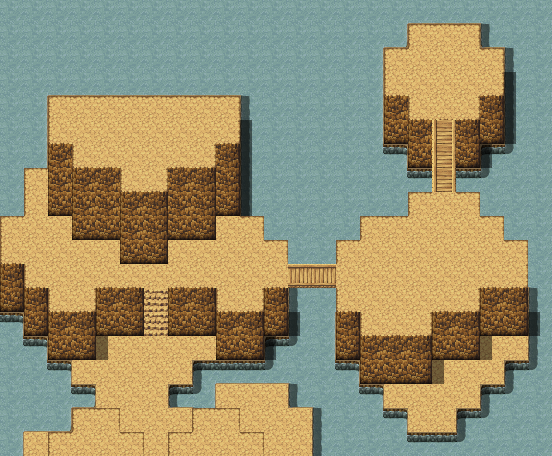
hi, i'm struggling so bad to make maps that have multiple levels of elevation, like in the following screenshot. it takes so much painstaking shift-clicking, and then if i want to reshape the cliffs, it messes up and i have to keep re-doing it. it's driving me nuts! hoping that some mapping gurus out there can help me figure out a more efficient system for these kinds of maps. would it be better to copy these tiles to a D layer tilesheet so that the autotiling doesn't come into effect?...
Archived First Post
Protected download
Downloads / Referenced Files
Log in, then follow the RPG Maker Developers Group to see these download links.
Log in to downloadReferenced Images / Attachments
Creator Claims / Removal
If you are the original creator and want this listing reassigned, edited, or removed, join BMMPlay and contact the moderators with proof that matches the original RPG Maker Web profile, linked GitHub, itch.io page, or another public creator identity.


Replies (0)
No replies yet.
Topic Summary
Loading summary...
