


Problem with a script call
BMM_Archive · July 15, 2026

Original Source
- Original title: Problem with a script call
- Original author: BluPanda_97
- Original date: August 19, 2018
- Source thread: https://forums.rpgmakerweb.com/threads/problem-with-a-script-call.99105/
- Source forum path: Game Development Engines > Legacy Engine Support > RPG Maker MV Support
Summary
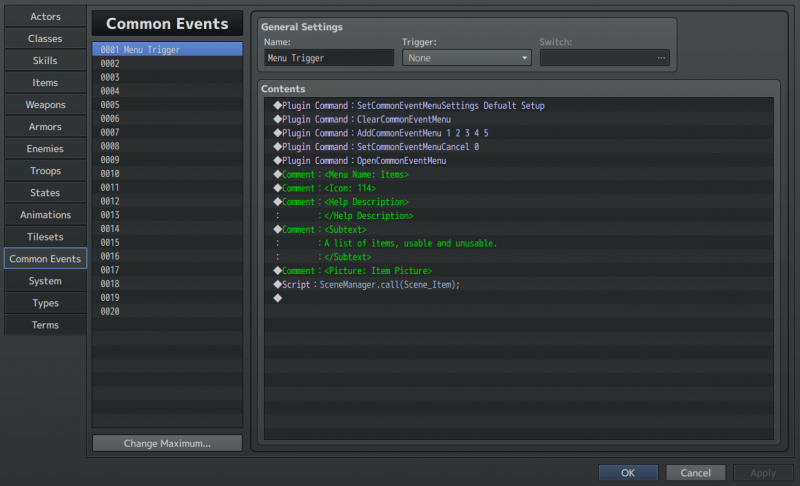
Hello. So, basically I was trying to make a custom menu using Yanflys common event menu, and I tried to make an items section using the SceneManager.push(Scene_Item); script call. When I open the menu, things look okay, but then I tried to click on the items button and nothing seemed to happen. Below is a picture of the common event. Does anyone know what is going on? Thanks in advance. { "lightbox_close": "Close",
Archived First Post
So, basically I was trying to make a custom menu using Yanflys common event menu, and I tried to make an items section using the SceneManager.push(Scene_Item); script call. When I open the menu, things look okay, but then I tried to click on the items button and nothing seemed to happen. Below is a picture of the common event. Does anyone know what is going on? Thanks in advance. Protected download
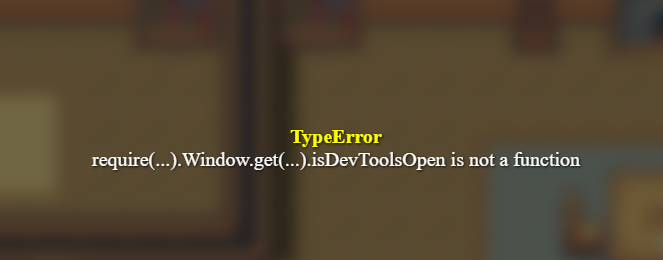
Also, when I try to exit the menu I get the following error:
Protected download Protected download Protected download
Downloads / Referenced Files
Log in, then follow the RPG Maker Developers Group to see these download links.
Log in to downloadReferenced Images / Attachments
Creator Claims / Removal
If you are the original creator and want this listing reassigned, edited, or removed, join BMMPlay and contact the moderators with proof that matches the original RPG Maker Web profile, linked GitHub, itch.io page, or another public creator identity.
Replies (0)
No replies yet.
Topic Summary
Loading summary...

