


[SOLVED] Conflicting Plugins: Word Wrap & PictureCallCommon
BMM_Archive · July 15, 2026

Preserved forum archive. This topic stores the original first post and locally mirrored RPG Maker Web attachments when available. It is posted by the BMMPlay archive account, not by the original creator.
Original Source
- Original title: [SOLVED] Conflicting Plugins: Word Wrap & PictureCallCommon
- Original author: Sarena
- Original date: June 1, 2017
- Source thread: https://forums.rpgmakerweb.com/threads/solved-conflicting-plugins-word-wrap-picturecallcommon.79409/
- Source forum path: Game Development Engines > RPG Maker Javascript Plugins > Javascript/Plugin Support
Summary
I am having an issue specifically with Yanfly's Message Core and triacontane's PictureCallCommon plugins working together. When both plugins are being used, Word Wrap does not work. What the Issue looks like: Spoiler: Screenshot {
Archived First Post
I am having an issue specifically with Yanfly's Message Core and triacontane's PictureCallCommon plugins working together. When both plugins are being used, Word Wrap does not work.
What the Issue looks like:
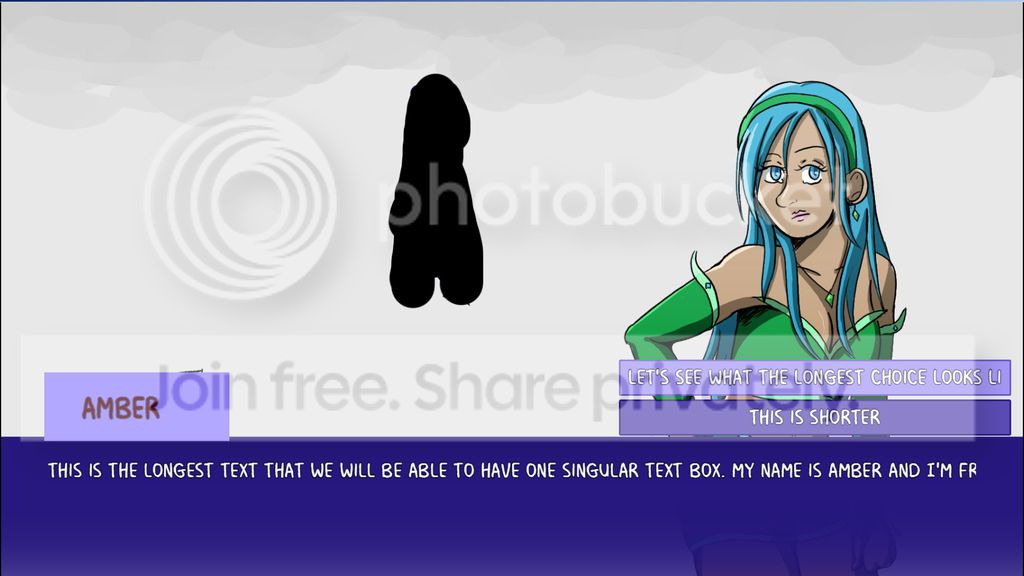
How to Recreate the Issue in the Demo Project:
What I have Tested:
Download Demo Project here!
Both of these plugins are essential to my game, so any help figuring out how to resolve this issue would be greatly appreciated! This includes plugin suggestions that do work together, but reproduce the same effect as these existing plugins.
Thank you!
What the Issue looks like:
How to Recreate the Issue in the Demo Project:
- Test Play the game.
- Click on the shadowed figure with the mouse.
- Notice that the text does not wrap to the next line.
What I have Tested:
- Turning off all plugins aside from PictureCallCommon and YEP_Message Core. This is how I discovered that these two plugins were conflicting with each other.
- Using Yanfly's Word Wrap plugin instead of Message Core. This did not help the case at all.
- Creating an event on the map itself that auto-plays and is not triggered by clicking on a picture. This works, so that is how I discovered that the problem comes directly from clicking on the images and having text triggered through a common event.
Download Demo Project here!
Both of these plugins are essential to my game, so any help figuring out how to resolve this issue would be greatly appreciated! This includes plugin suggestions that do work together, but reproduce the same effect as these existing plugins.
Thank you!
Downloads / Referenced Files
Log in to download
Log in, then follow the RPG Maker Developers Group to see these download links.
Log in to downloadReferenced Images / Attachments
Creator Claims / Removal
If you are the original creator and want this listing reassigned, edited, or removed, join BMMPlay and contact the moderators with proof that matches the original RPG Maker Web profile, linked GitHub, itch.io page, or another public creator identity.
Replies (0)
No replies yet.
0
replies
9
views
Topic Summary
Loading summary...

